Top 10 Universal Travel Adapters With USB-C
Ten distinct options, from a phone-sized 20W kit to a 100W laptop setup, with the electrical limitations kept in view.
AI-generated editorial illustration. It does not depict a safety-tested sample or certify a particular adapter.
Universal travel adapters with USB-C can simplify a charging kit, but the word universal hides several separate questions. Does the adapter plug into the wall at your destination? Does its front socket accept your appliance plug? Does it maintain any earth connection the appliance needs? And can the USB-C port supply the required power after another device is connected?
This comparison separates those questions rather than ranking adapters by country count or the largest wattage printed on the box. It includes ten distinct designs from eight brands, selected for different roles: a phone-only kit, several USB devices, a higher-power laptop, or a mains connection that needs particular attention. The recommendations are research-led judgements based on published specifications, not hands-on electrical testing or independently verified safety certification.
The list is a shortlist for the correct regional product, not permission to use any version anywhere. UK buyers should confirm the actual seller, model markings, local compliance and destination suitability before purchase. An attractive design or a known brand does not remove those checks. [1]
Verbatim UTA-05
Two USB-C ports, 65W total, and an explicit no-grounding limitation.
SKROSS PRO Light
Investigate its supported earthed configurations, rather than assuming all outlets are grounded.
MOMAX UA10
100W single-port capability; two USB-C devices share 65W + 35W.
Anker A9215
20W total USB; useful for modest charging, not a UK three-pin appliance socket.
Compare the ten universal travel adapters with USB-C
The shortlist is organised by a job, not a star score
A good adapter for a phone and a watch is not necessarily a good adapter for a working laptop. Similarly, a model with excellent-looking USB specifications may be unsuitable for an appliance requiring earth. The positions below reflect useful travel roles and the clarity of the available specifications, rather than measured charging efficiency or a laboratory safety ranking.
| Exact model | USB-C / total headline | Distinctive role | Important limit |
|---|---|---|---|
| Verbatim UTA-05 32120 | 65W total; 2C + 2A | Balanced USB-led kit | No grounding. [2] |
| SKROSS PRO Light AC45PD – World | 45W C alone; 24W shared A+C | Investigate supported earthed mains use | Shared USB is not 45W + 20W. [3] |
| EPICKA TA-105 Max | 75W total; 3C + 2A | Three useful USB-C allocations | Do not read 75W as each port. [4] |
| MOMAX UA10 | 100W total; 2C + 2A | Higher-power laptop candidate | 65W + 35W dual C; regional version check. [5] |
| TESSAN WTA07 | C3 up to 65W; 3C + 2A | Dedicated higher-power C3 | Official page sold out at review. [6] |
| Anker Nano A9215 | 20W total; 2C + 2A | Compact phone-focused setup | No UK three-pin AC input. [7] |
| Ceptics UP-70KU | Primary C up to 70W; 3C + 2A | One primary laptop connection | Fuse/current wording needs clarification. [8] |
| SKROSS MUV AC65PD with cable | 65W C alone; 45W C + 12W A shared | Simple two-port routine | Unearthed equipment only. [9] |
| Go Travel 640.101 | 15W C; 12W A individually | Mains-led multi-country use | Not Switzerland; earth depends on configuration. [10] |
| EPICKA Pulse Duo 45W | C2 45W; C1 20W; 45W total | Extra US/Japan-style AC outlet | Extra socket is not extra load capacity. [11] |
On a narrow screen, swipe the table sideways. Published specifications and rules were checked for this editorial review; personal packing examples are illustrative.
Read the limitations before the buying button
All quoted outputs are manufacturer ceilings for the stated mode. They are not simultaneous promises for every port, and actual device demand can be lower. Prices are omitted because regional stock, delivery and import costs are too variable for a clean like-for-like comparison. Availability restrictions and specification conflicts are noted where they affect the recommendation.
Manufacturer buttons open the identified product page. Exact UK product listings are linked where the model was identifiable. Remaining Amazon buttons are explicitly labelled model searches; those results may include different versions. This keeps the intended model visible without presenting an unverified substitute as a direct purchase.
Verbatim UTA-05 GaN III 65W: a balanced USB-led option
Two USB-C ports are useful, but 65W is the total
The UTA-05, product 32120, combines two USB-C ports, two USB-A ports and a mains socket. Verbatim gives a 65W total DC output, with either USB-C port capable of up to 65W when used in its appropriate single-port mode. It also explicitly states that the adapter provides no grounding. [2]
That makes it a sensible first comparison for a traveller whose main need is USB charging rather than an earthed mains appliance. A compatible light laptop, phone and small accessories can fit the concept well, provided the shared modes meet the actual charging routine. The useful selling point is the port combination, not an assumption that every device receives its maximum at once.
Keep the ungrounded socket limitation visible
Do not plug in equipment that requires an earth connection simply because its plug fits the front socket. For such a device, choose a correctly documented alternative. The limitation does not make the USB ports irrelevant; it means the mains-through function must be treated separately from the charging function.
For a person already carrying a suitable laptop charger, compare the total size of that charger plus a simple destination adapter against the Verbatim. An integrated unit is worthwhile when it genuinely removes duplicated equipment, not when it adds a second elaborate charger to the same pouch.
SKROSS PRO Light USB AC45PD – World: investigate the earth path
A mains-led choice with USB alongside it
The PRO Light AC45PD – World is the option to investigate when a supported earthed mains configuration matters more than having numerous USB ports. The manufacturer specifies a replaceable 7A fuse, USB-C up to 45W alone and a separate USB-A connection. Confirm the complete input-to-output configuration for your appliance and destination. [3]
This is not a statement that any wall outlet becomes safely earthed once the adapter is inserted. The appliance, adapter setting and outlet all need to be suitable. It is nevertheless a more relevant comparison than selecting an explicitly unearthed block solely because that block has a larger advertised USB number.
The second USB device changes the calculation
Using USB-A and USB-C together reduces the published combined USB mode to 24W shared. A traveller expecting 45W for a laptop and another full-power port for a phone would therefore be planning around the wrong mode. [3]
Choose it for a documented connection and a modest, planned USB workload. Someone needing sustained higher-power laptop charging and several devices at once may be better served by their suitable existing charger through a correctly specified adapter. The PRO Light's value is the complete supported arrangement, not a promise to replace every charger in the bag.
EPICKA TA-105 Max 75W: spread power across three USB-C devices
Its strongest case is the shared-output layout
The TA-105 Max has three USB-C and two USB-A ports alongside the mains socket. EPICKA lists a 75W total USB budget, including a two-USB-C allocation of 45W + 30W and a three-USB-C allocation of 35W + 20W + 20W. These are meaningfully different arrangements from a single high-power port plus several slow extras. [4]
For two phones and a compatible lightweight computer, that division may be more useful than a nominally higher-powered adapter with fewer useful shared modes. Write down which device goes into each port before deciding. The same arrangement may be less attractive for a laptop that needs considerably more power while being used.
Do not turn the model name into a per-port claim
Here, 75W describes the total USB budget. The current page's single-port voltage/current table does not establish a clean 75W-per-USB-C promise, so this guide does not make one. Confirm the exact unit's output label for a charging requirement that depends on the maximum single-port profile. [4]
The extra ports also come with additional bulk and a regional purchasing check. This is a stronger candidate for someone who will use its distribution options than for a phone-only traveller. Keep the selection focused on the actual devices rather than filling ports merely because they are present.
MOMAX 1-World 100W UA10: more headroom for a demanding laptop
Two USB-C ports share a documented 65W + 35W
The UA10 is the higher-power option here, with two USB-C and two USB-A ports. MOMAX lists up to 100W from a suitable single USB-C connection and 65W + 35W when both USB-C ports are used. Its total USB budget is 100W, not 100W for every connection. [5]
That can be useful when a laptop benefits from more than the 45-65W ceilings of smaller designs. However, the second device can move the laptop into a lower allocation. A work setup that needs the highest available mode continuously may be better with the laptop alone on the adapter and other devices charged separately.
The regional version is part of the product decision
The manufacturer source used here is MOMAX's Hong Kong store, which notes region-specific treatment of the UK pin. This guide does not recommend modifying a pin, removing a seal or improvising around a regional restriction. The linked UK marketplace listing identifies UA10, but obtain the correct approved version and clear manufacturer instructions for the market where it will be bought and used. [5][15]
Choose the UA10 only when its charging capability solves a real need and the regional purchase is clear. A heavy-duty laptop does not automatically become compatible because the charger says 100W; confirm the computer's supported USB-C input and the cable before relying on it for work.
TESSAN GaN 65W WTA07: identify the high-power port
C3 has a different role from the other USB-C ports
TESSAN's WTA07 has three USB-C and two USB-A ports, but the USB-C connections are not equivalent. The manufacturer identifies C3 as the port capable of up to 65W in single-port use; the other four USB connections are described with lower individual ceilings. [6]
That distinction is valuable for a traveller who wants a designated laptop connection and several accessory leads. Marking the appropriate cable can prevent an apparently mysterious slow-charge problem when you plug the laptop into a lower-power port. Do not infer the combined allocation by adding all the individual maxima together.
Availability is a real limitation, not a footnote to ignore
The official WTA07 page showed sold out when reviewed. The UK marketplace listing linked below identifies TS-WTA07, but that does not guarantee current seller stock. Other TESSAN 65W listings can carry different model codes and should not be silently treated as the same device. [6][13]
It earns its place for the distinct high-power-port arrangement, not for an unverified bargain. For an imminent departure, choose an available, correctly identified model with a clear specification rather than rushing into a similar-looking listing whose port labels or regional details do not match.
Anker Nano Travel Adapter A9215: compact charging with a crucial socket limit
A 20W USB budget can be enough for a small kit
The A9215 has two USB-C ports and two USB-A ports, with a 20W total USB ceiling. C1 provides the higher single-port USB-C mode, while C2 has a lower maximum. It is a compact phone-and-accessories concept rather than a laptop-first power solution. [7]
For a leisure trip with one phone, earphones and a watch, charging in stages can be perfectly practical. The lower ceiling may matter little during a long hotel stay, while the compact form may matter every time you pack. Conversely, several depleted devices before a short departure window can expose the limited shared budget.
UK wall pins do not mean a UK appliance socket
Anker's two-pin AC arrangement does not accept a British three-pin appliance plug. A UK traveller could still consider the integrated USB function in a suitable destination configuration, but should not expect the front socket to take an ordinary UK laptop charger. The input and output sides of an adapter are separate compatibility checks; the linked UK listing also identifies the A9215 and its two-pin design. [7][14]
This is why the A9215 is not the universal overall recommendation for British travellers despite its compact size. It suits a clearly USB-led routine. Where a UK mains plug must be connected, choose a model explicitly supporting that input and any required earth connection.
Ceptics UP-70KU: a 70W main port with smaller accessory connections
The primary USB-C port carries the laptop role
Ceptics identifies one 70W USB-C connection, two additional USB-C connections and two USB-A ports on the UP-70KU. The published primary profile includes 20V at 3.5A, while the supplementary connections are intended for lower-power devices. [8]
The arrangement can suit someone who wants to leave a laptop lead in one identified port while keeping phone and accessory cables organised. However, the available power when several ports operate together still needs to match the actual plan. A 70W primary-port specification should not be repeated as a guarantee during every combination of connected devices.
Resolve conflicting current information before mains use
The reviewed page refers to an 8A replaceable fuse in one description and a 10A figure elsewhere in its comparison material. This guide does not choose the larger number or provide a mains-appliance load recommendation based on that conflict. Check the marking and instructions for the exact unit with the manufacturer. [8]
That unresolved detail makes the UP-70KU a conditional option, particularly for a UK buyer considering an imported version. It may have the right USB layout, but useful features do not excuse ambiguous electrical information. A clearer local alternative can be the better purchase when the departure date leaves little time for clarification.
SKROSS MUV USB AC65PD with cable: a simpler two-port arrangement
Fewer ports can make the charging plan clearer
The MUV AC65PD with USB-C cable provides one USB-C port rated up to 65W alone and one USB-A port. SKROSS publishes simultaneous allocations of up to 45W for USB-C and 12W for USB-A. It is specifically an adapter for unearthed equipment, distinct from the PRO Light's supported earthed configurations. [9]
For one compatible laptop and a modest accessory, two well-understood connections can be more useful than five ports whose shared modes are unclear. The supplied cable also removes one purchasing decision, although its exact specification should still be checked against the computer's requirements.
Do not buy the USB-only charger by mistake
SKROSS uses similar AC65PD wording on other products, including a World USB Charger without a mains plug input. Match the full MUV adapter name and the version with cable, rather than assuming a search result with the same wattage is the reviewed product. [9]
The MUV is worth considering when USB-C is the main job and your mains-use requirements are compatible with its unearthed design. It is not the substitute for the PRO Light when an appliance needs earth. Its smaller number of ports should be viewed as a deliberate fit for a simple routine, not an automatic disadvantage.
Go Travel Worldwide Adaptor 640.101: mains flexibility, modest USB-C
This is not a high-powered laptop USB charger
Go Travel's 640.101 provides USB-C up to 15W and USB-A up to 12W. The useful distinction is its mains-adapter design, with sliding configurations and a separate European component, rather than high USB charging performance. The maker lists configuration-specific electrical and earth limitations. [10]
It can suit someone who already has a suitable dedicated laptop charger and wants a modest integrated phone connection. A reader looking to replace that laptop charger with the USB-C port should look elsewhere. Connector shape does not change the relatively low output ceiling.
Check exclusions before counting countries
Go Travel expressly says this model is not for Switzerland, notes that its Italian use is limited to Schuko sockets, and identifies other destination qualifications. It also describes plug combinations where there is no earth connection. Those details matter more than the headline country count. [10]
The detachable component needs a consistent storage place so it does not get left in a room or disappear inside luggage. Choose the 640 for its actual supported route and mains role. For a USB-only trip with no need for that versatility, a smaller integrated charger may be the cleaner solution.
EPICKA Pulse Duo 45W: two outlet roles with a lower USB ceiling
The extra socket has a specific plug format
The Pulse Duo adds a US/Japan-style outlet alongside the universal outlet, rather than providing two interchangeable UK sockets. It also has two USB-C and two USB-A ports. The manufacturer's C1 ceiling is 20W, C2 is 45W, and the total USB output remains 45W. [11]
This gives it a different role from the TA-105 Max: a traveller with an appropriate two-pin charger and modest USB devices may value the second outlet more than a higher USB budget. A UK traveller carrying only British three-pin appliances gains less from that extra connection.
Avoid planning a second mains socket as extra electrical capacity
Additional outlets do not multiply the adapter's permitted total load. Nor does an extra AC connection remove the need to check voltage and earth requirements for every attached appliance. Keep the complete arrangement within the exact unit's instructions rather than interpreting outlet count as a power allowance. [1][11]
The Pulse Duo is best treated as a mixed-connection specialist. For several power-hungry USB-C devices, the TA-105 Max or another appropriately specified higher-output unit is the more relevant comparison. For a phone alone, the Duo's extra outlet may simply be unused bulk.
Understand single-port power before adding a second lead
A worked laptop-and-phone example
Imagine a laptop that can use a 100W USB-C supply and a phone able to use a suitable lower-power profile. On the MOMAX UA10, connecting the laptop alone can allow the relevant 100W mode. Using both USB-C ports changes the published split to 65W + 35W. That is the configuration to assess for simultaneous use, not two copies of the single-port headline. [5]
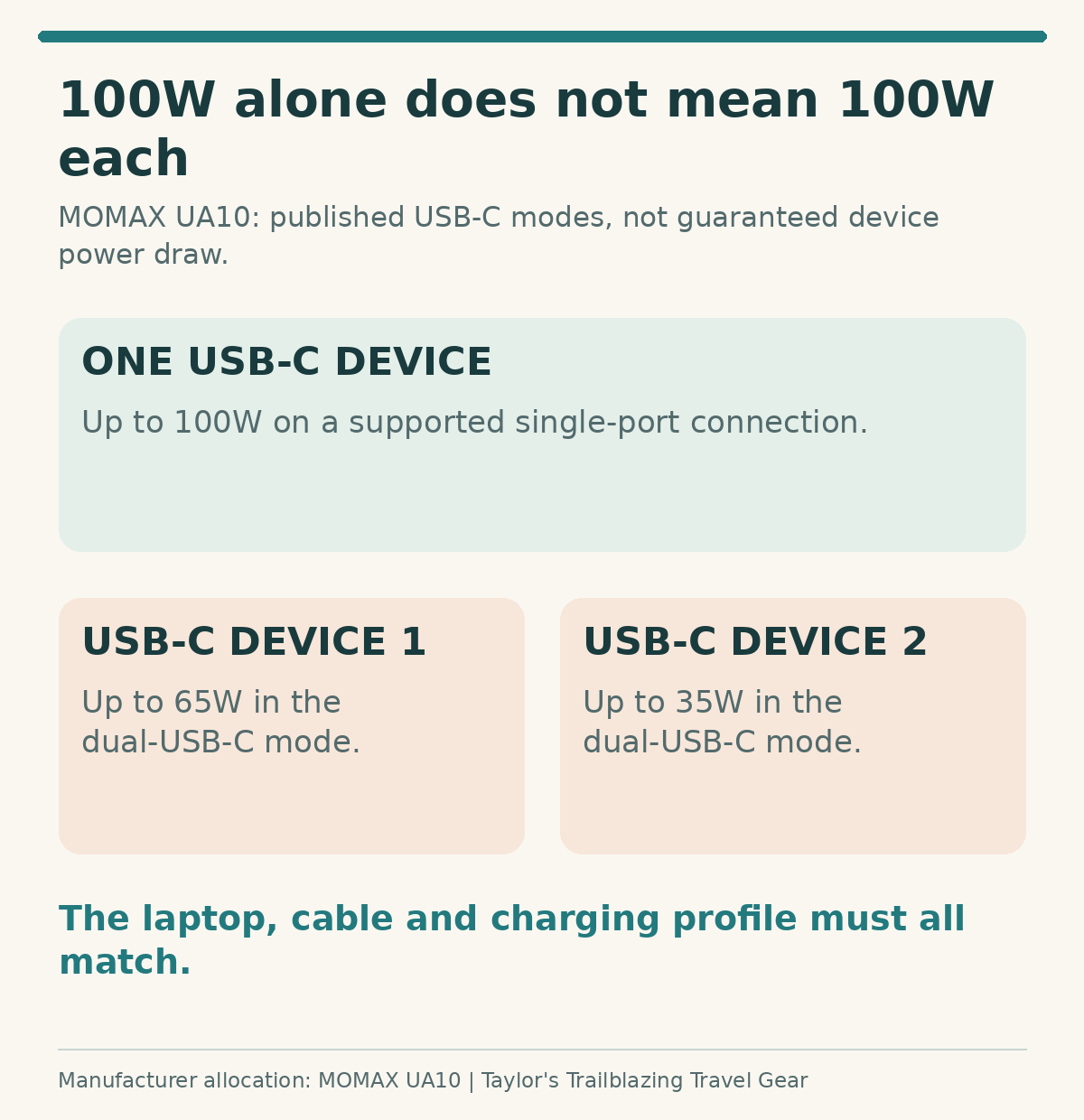
The laptop may still work satisfactorily on the lower allocation, or it may charge more slowly under load. The correct answer depends on its supported input and workload. Check the computer manufacturer's guidance rather than treating any visible charging icon as proof that the travel setup meets the full requirement.
Match the routine, not the sum of device chargers
Some devices can charge while you are getting ready; others need power while being used. Write down those time windows. A phone and watch may not need their fastest possible charging mode all evening, which can make a modest adapter sufficient. A work laptop with a deadline is a different case.
Do not build a critical travel setup around repeatedly moving cables between unclear port combinations. A simpler charger with a documented allocation can be better than a larger total figure. The aim is a predictable routine, not a charging arrangement that requires troubleshooting every night.
Keep voltage, earth and USB charging separate
The mains socket passes through the local supply
A plug adapter changes the physical connection; it does not convert the voltage or frequency reaching a mains appliance. Read the appliance or charger's input marking and compare it with the destination supply. Equipment that is suitable for one country is not automatically suitable for another merely because the plug can be inserted. [1][12]
A protective earth is not a decorative extra
Some adapters are intended only for unearthed or double-insulated equipment. Electrical Safety First identifies double insulation by the square-within-a-square symbol. Do not remove an earth pin, stack improvised adapters or rely on a universal-looking socket to provide a connection it does not support. [1]
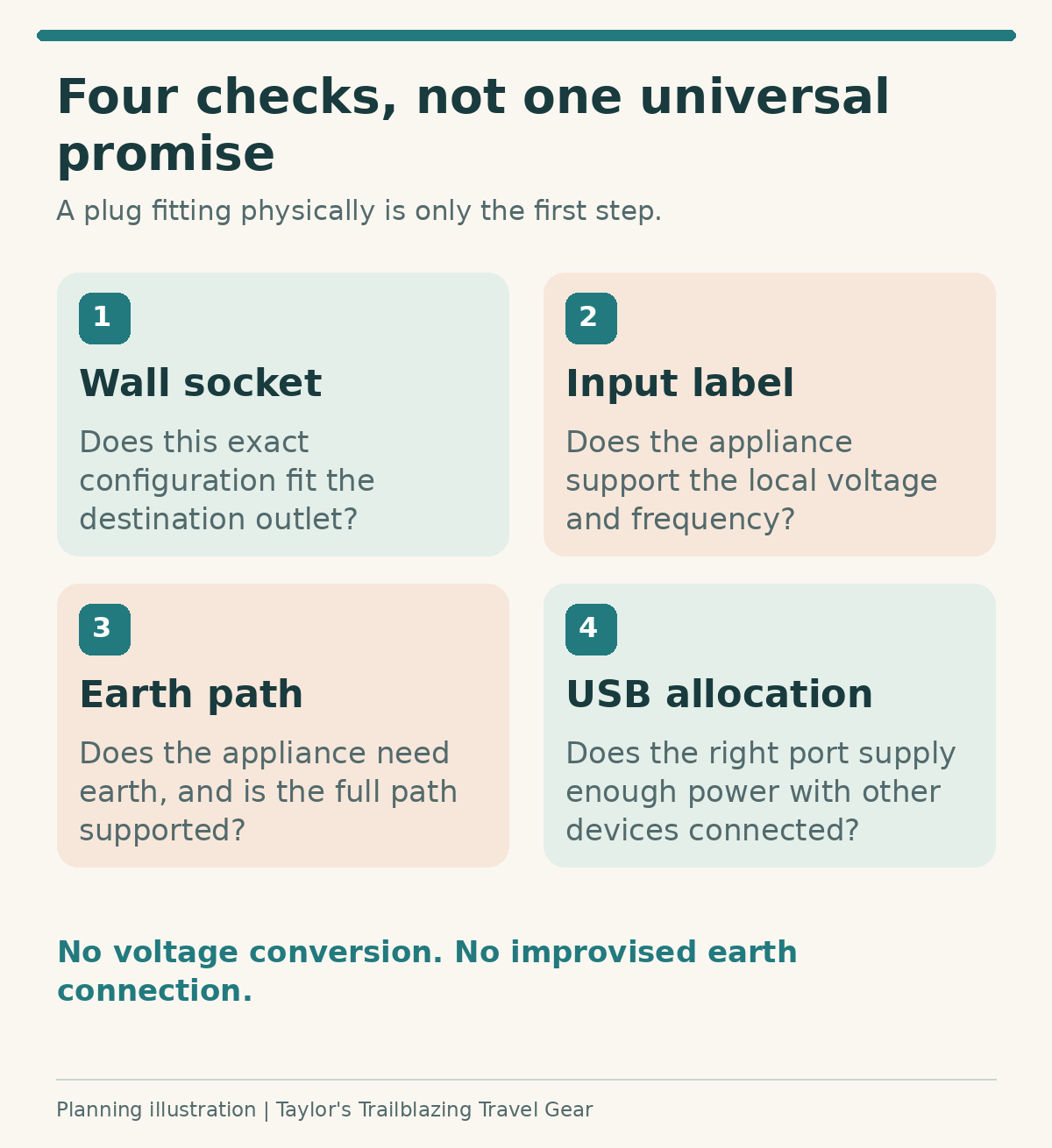
When the information is unclear, pause and ask the manufacturer about the exact equipment and destination. For a heat-producing or specialist appliance, the consequences of an incorrect assumption are more serious than the inconvenience of leaving it at home. This comparison does not approve any medical, high-load or unusual equipment arrangement.
Country coverage starts with the actual itinerary
Check a connection, not a marketing map
Write each destination beside the required outlet type and supply information from an authoritative source. Then check the adapter's supported configuration and exclusions. Country-level summaries may include several outlet types, and an older building can present a different practical connection from the one you expected. [12]
Do not assume that an adapter accepting a plug from a country can also plug into that country's wall. Input compatibility and destination output are separate lists. The Anker example makes the distinction particularly clear: having a UK wall configuration does not provide a British three-pin appliance socket. [7]
A dedicated adapter can still be the better purchase
For one destination and a charger you already trust, a correctly specified dedicated adapter can be smaller and clearer than a universal block. Universal equipment earns its complexity when the actual route uses several supported configurations. Buying one simply because it covers more countries may not improve this particular trip.
Choose the cables and hotel layout at the same time
Put a known working lead beside each device
Confirm the power capability and connectors of the cables you plan to use. A cable that fits is not automatically appropriate for a higher-power laptop mode. Keep the working travel cable with its charger rather than borrowing an unidentified household lead just before departure.
Check the physical arrangement too. A short lead may pull a heavy adapter towards the edge of a bedside table, while a long lead can create a trip hazard. Choose a setup that sits securely in a suitable outlet and keeps the devices within reach without tension on the connection.
Do not turn the carrying pouch into a charging enclosure
Protect pins and cables in transit, then unpack the charging arrangement for use according to its ventilation instructions. Keep it away from bedding, water and piled clothing. If a socket is loose or damaged, ask the accommodation for a suitable alternative rather than wedging the adapter into place. [1]
For two travellers, consider whether one large block will actually reach both bedside areas. Two modest suitable setups can be more convenient than a nominally efficient shared unit. That decision is about room use and resilience, not just the number of ports on the shopping page.
Buying checks that matter more than a discount
Identify the complete model and regional version
Check the model code, supplied plug configuration, current markings and seller before ordering. Similar names can conceal different USB outputs or the absence of a mains socket. Keep a copy of the listing and instructions, then compare them with the unit delivered.
For a UK product with a UK plug or socket section, Electrical Safety First points to BS 8546 and recommends a reputable retailer. Manufacturer certification statements are not independent tests performed for this guide. An unfamiliar seller using a recognised product name should not be treated as equivalent to a verified supply chain. [1]
Resolve uncertainty before departure
A sold-out official page, inconsistent current rating or a region-specific pin restriction is a reason to investigate, not a reason to choose the most convenient interpretation. This guide preserves those limitations for the TESSAN, Ceptics and MOMAX examples rather than filling the gaps with a confident guess. [6][8][5]
Build in enough time to inspect and use the correct unit with compatible devices before the trip. Do not perform improvised mains tests. The practical preparation is identification, reading the instructions and confirming the documented arrangement, not attempting to certify electrical safety at home.
Pros, cons and common mistakes
Pros
One organised unit can reduce charger clutter; several supported plug configurations can suit a multi-country route; published shared modes can make a multi-device plan predictable.
Cons
Universal does not mean every socket or appliance; many designs provide no earth; shared power can be much lower than the headline; one adapter can become a single point of failure.
The tempting assumptions to avoid
Do not add the maximum output of every USB port and call the result simultaneous power. Do not treat an AC wattage quoted at one voltage as a guarantee at another. Above all, do not equate physical plug fit with voltage compatibility or an earth path. These are different checks with different evidence. [1]
Avoid replacing a failed fuse with an arbitrary higher-rated one or continuing to use visibly damaged equipment. Follow the manufacturer's exact instructions and obtain help where the cause is uncertain. More ports, attractive reviews and a travel-friendly name are not reasons to bypass a restriction.
Frequently asked questions
Does universal mean it works in every country?
No. It means the design supports several plug configurations, not every outlet, appliance plug or local requirement. Check the complete destination list and exclusions for the exact model. The Go Travel 640, for example, expressly excludes Switzerland and has qualifications for other destinations. Country counts are marketing summaries rather than a compatibility certificate for your itinerary. [10][12]
Can I plug a British three-pin charger into all ten?
No. Anker's A9215 uses a two-pin AC arrangement and is not a UK three-pin input socket. Other designs also vary by regional version and supported input plug. Check the front socket separately from the wall pins. A product having a UK wall configuration does not prove that it accepts a UK appliance plug. [7]
Will a 100W adapter force too much power into my phone?
A compatible USB Power Delivery connection negotiates a supported output; the headline wattage is a capability, not an instruction to send that amount indiscriminately. The device, cable and charger must still support the intended mode. Read the product and device instructions rather than choosing solely by wattage or assuming every USB-C connection supports the same protocol.
Why does my laptop charge more slowly when I connect a phone?
Many adapters redistribute a fixed total USB budget. The MOMAX UA10 lists 65W + 35W for its two USB-C ports together, rather than 100W on both. The SKROSS PRO Light falls from 45W on USB-C alone to 24W shared across USB-C and USB-A. Your laptop may therefore receive a different charging profile once the second device is connected. [5][3]
Can these adapters run my UK hairdryer abroad?
Not as a blanket recommendation. The hairdryer must support the destination voltage and frequency, the required earth connection and the adapter's permitted load and use. A plug adapter does not convert voltage. Where the correct arrangement is unclear, leave the appliance at home or obtain model-specific advice and suitable equipment rather than trying it experimentally. [1][12]
Is an adapter with a third pin necessarily earthed?
No. A physical pin or a socket accepting a three-pin plug does not by itself demonstrate a protective-earth path through every configuration. Verbatim explicitly identifies the UTA-05 as having no grounding. Use an appliance requiring earth only with a suitably documented earthed arrangement and a suitable outlet; never remove or defeat an earth connection. [1][2]
Do I need one adapter for every device?
Usually not when several USB devices can share compatible ports and a realistic charging schedule. However, one integrated adapter is a single point of failure, and two people may need outlets on opposite sides of a room. Compare a modest backup or separate charger with the inconvenience it prevents, rather than filling every port on a large block by default.
Is a USB-C cable that fits physically enough for laptop charging?
Not necessarily. Check the cable's power rating and the charging profiles needed by the laptop. Higher-current modes need a cable designed for that use. A charging cable may also have different data capabilities from another identical-looking lead. Keep the exact working cable with the travel charger, and do not infer its rating from thickness or connector shape.
Are the Amazon search buttons direct product listings?
No. They are explicitly labelled searches for the specified model. Results can include other versions, substitutes or unavailable items. The manufacturer buttons identify the product reviewed, while an exact current UK product listing was not verified for every model. Check the model code, regional version and seller before ordering; do not substitute a similar name without comparing the specification.
Should I replace an adapter that still works?
Replace damage, an uncertain specification or a missing capability, not a functioning setup simply because a new model offers more ports. Inspect your existing unit, check its supported destinations and confirm that its ratings suit the equipment. Stop using it if it is damaged, subject to a recall or unsupported by clear safety information. [1]
Final recommendation: choose the clearest complete setup
For a USB-led trip, compare the Verbatim UTA-05's balanced layout with the MOMAX UA10's higher laptop ceiling, keeping the regional and earth limitations visible. For a supported mains arrangement requiring earth, begin with the SKROSS PRO Light rather than an unearthed universal socket. A small phone kit may need no more than a modest adapter whose inputs actually match your equipment.
The best purchase is the model whose destination connection, device input, earth requirement and shared USB output you can explain clearly. Leave unresolved electrical claims unresolved until the maker supplies an answer. A known, suitable charger with a simple destination adapter remains a perfectly good outcome when it does the job with less uncertainty.
Sources and fact-checking notes
Product specifications, airline and airport rules were researched from the references below. Manufacturer figures are not independent performance tests, and personal packing schedules are planning examples. Check current instructions, the exact regional model and your booking before purchase or departure.
- Electrical Safety First: travel adaptor safety. Voltage, earth, load and UK BS 8546 guidance. No unit-level certification was performed for this article. Reviewed 15 October 2026.
- Verbatim: UTA-05, product 32120. 65W total, two USB-C ports, two USB-A ports and explicitly no grounding. Reviewed 15 October 2026.
- SKROSS: PRO Light USB AC45PD – World. 45W USB-C alone, 24W shared USB, 7A fuse and supported plug configurations. Reviewed 15 October 2026.
- EPICKA: TA-105 Max 75W. 75W total USB budget and the published two- and three-USB-C allocations. Reviewed 15 October 2026.
- MOMAX: 1-World Universal 4-Port Travel GaN Charger 100W, UA10. Two USB-C and two USB-A ports, 100W total and 65W + 35W dual USB-C; Hong Kong store and regional version caveat. Reviewed 15 October 2026.
- TESSAN: WTA07 GaN 65W. C3 is the 65W port; manufacturer page showed sold out at review. Reviewed 15 October 2026.
- Anker UK: Nano Travel Adapter A9215. 20W total USB, two-pin AC arrangement and regional mains rating distinctions. Reviewed 15 October 2026.
- Ceptics: UP-70KU. 70W primary USB-C, other USB ports and inconsistent fuse/current fields requiring unit-level clarification. Reviewed 15 October 2026.
- SKROSS: MUV USB AC65PD with USB-C cable. 65W USB-C alone; published simultaneous USB-C 45W and USB-A 12W; unearthed equipment only. Reviewed 15 October 2026.
- Go Travel: Worldwide Adaptor + USB-A and USB-C, 640.101. 15W USB-C, 12W USB-A, country exclusions and configuration-specific earthing. Reviewed 15 October 2026.
- EPICKA: Pulse Duo 45W. C1 20W, C2 45W, 45W total and the additional US/Japan-style outlet. Reviewed 15 October 2026.
- Electrical Safety First: using electrical equipment overseas. Destination-specific socket, mains-supply and equipment compatibility checks. Reviewed 15 October 2026.
- TESSAN UK marketplace listing: TS-WTA07. Model field identifies TS-WTA07; listing identity does not guarantee current seller stock. Reviewed 15 October 2026.
- Anker UK marketplace listing: A9215. Model number and two-pin AC arrangement confirmed in the product description. Reviewed 15 October 2026.
- MOMAX UK marketplace listing: UA10. The identified 100W two-USB-C/two-USB-A model; check the delivered regional version. Reviewed 15 October 2026.
Illustrations in this article were created for Taylor’s Trailblazing Travel Gear. Third-party photographs, where used, are credited beside the image or in the source list.