Best Bluetooth Airplane Audio Adapters
Use your own wireless headphones with a seatback screen, while avoiding the wrong socket, mode or codec promise.
Bluetooth airplane audio adapters solve a very specific travel problem: the aircraft screen has a headphone socket, but the headphones you prefer are wireless. A suitable transmitter can bridge that gap. However, a small black box labelled Bluetooth is not automatically the right device, and a newer Bluetooth number does not guarantee perfectly synchronised sound.
The useful buying questions are more practical. Does the adapter send audio in the correct direction? Will it fit the seat’s socket? Can it connect one headphone pair or two? Can you understand its pairing controls without a phone screen? Those details make the difference between an easy film and a frustrating session of flashing lights. The adapter generally pairs with the headphones, not with the phone you used to buy it. [4]
This guide compares five researched options and includes a seat-ready setup and troubleshooting routine. It does not claim hands-on flight testing, measured latency or universal compatibility. An inexpensive wired backup remains sensible, because no buying guide can establish the exact socket and wireless behaviour of every seat you might be allocated.
Some buying links in this guide may earn Taylor’s Trailblazing Travel Gear a commission at no extra cost to you. As an Amazon Associate I earn from qualifying purchases.
AirFly Pro 2
Separate pairing controls and a useful transmitter/receiver switch.
AirFly SE
A simpler starting point when sharing and receive mode are unnecessary.
Avantree Relay
Detailed setup guidance and firmware support help repeat travellers.
Wired earphones
No adapter guarantees every aircraft socket and headphone combination.
01Bluetooth airplane audio adapters: the useful shortlist
What these recommendations compare
The shortlist focuses on adapters with a 3.5 mm audio connection and a flight-relevant reason to consider them. The criteria are pairing clarity, one- or two-headphone use, control layout, published runtime, model identification and the quality of available support. No invented sound-quality score is used.
Four options have directly matched brand product or support information. SafeFly Pro is more cautiously included as a listing-led alternative because its exact technical manual was not independently matched. That distinction matters: a screen is attractive, but it should not earn a stronger recommendation than the evidence supports.
| Adapter / UK listing | Best reason to consider it | Advertised runtime | Model or buying caution | Check offers |
|---|---|---|---|---|
| Twelve South AirFly Pro 2[1] | Two listeners / receive mode | Over 25 hours claimed | Buy Pro 2, not the earlier Pro; contents vary by bundle. | Check UK offer |
| Twelve South AirFly SE[2] | Single listener | Up to 20 hours claimed | One headphone pair; no receive-mode substitute. | Check UK offer |
| Avantree Relay[3] | Support and controls | Up to 25 hours, current spec | Earlier listings may state 20 hours; check revision. | Check UK offer |
| UGREEN 65706[5] | Simple two-pair buttons | Up to 19 hours claimed | EU maker page was sold out; check UK seller stock. | Check UK offer |
| 1Mii SafeFly Pro[8] | Screen-led selection | 25 hours in UK listing | Listing-led option: confirm exact model manual and return terms. | Check UK offer |
Why the model name needs to be exact
AirFly SE, AirFly Pro and AirFly Pro 2 are not interchangeable names. Likewise, an older Relay listing can show a different battery figure from the current specification. Compare the selected item, not whichever feature appears elsewhere on a large mixed-product page. [1][2][3]
UK offer links are provided for model comparison. Stock, seller support, contents and delivery dates should be checked before purchase. This article does not reproduce marketplace prices because consistent checkout offers were not verified across every option.
02Five adapters and the reasons to consider them
AirFly Pro 2: a useful two-listener starting point
AirFly Pro 2 supports two headphone connections and includes transmitter and receiver functions. Twelve South documents separate pairing controls, volume and mute controls, a battery indicator and over 25 hours of advertised playtime. These are published features, not a runtime or pairing-speed result from this guide. [1]
For a couple sharing one seatback screen, separate controls can make the setup easier to understand. One connection can be established before the other is added, rather than both people trying to pair at once. However, two connected headphones still receive the same source; the adapter does not create two independent films.
The receive function is a separate convenience for a compatible analogue audio input outside the aircraft use case. It does not mean receive mode is appropriate when sending sound from a seatback screen to earbuds. Learn the switch position before boarding so that a useful extra feature does not become the reason nothing plays.
I would compare Pro 2 first when sharing and clear controls are genuine requirements. For a solo traveller who only wants to watch a film, the simpler SE may be enough. Check whether the selected bundle includes the international socket adapter or case you need rather than assuming every Pro 2 offer has identical contents.
AirFly SE: simpler for one listener
Twelve South’s SE is designed for a single headphone pair and advertises up to twenty hours of battery life. The UK product information also describes volume controls and a mute function. It is the more straightforward comparison when you do not need dual listening or the Pro’s receiver role. [2]
That simplicity can be a real advantage. A traveller who wants one reliable sequence may prefer fewer modes and fewer saved devices to manage. Nevertheless, simple does not mean automatic: the headphones must still enter pairing mode, and nearby devices may try to reconnect to them first.
I would shortlist SE for solo journeys with an ordinary audio output and headphones that have passed a home test. Check its included accessories against the type of socket expected on your aircraft. A single integrated plug does not establish compatibility with every dual-prong installation.
Do not pay extra for a two-listener feature you will never use, but consider whether your habits are changing. Someone who regularly travels with a partner may prefer to buy the appropriate dual device once rather than discover the limitation during a shared journey. The key is to buy for an actual use case, not a hypothetical collection of future gadgets.
Avantree Relay: strong support documentation
The current Relay specification advertises two-headphone support, volume controls, up to 25 hours of playtime and firmware upgrades. Avantree publishes a detailed interactive guide explaining connection indicators, pairing, charging and resets. Older twenty-hour descriptions should not be treated as proof that every seller is supplying the same revision. [3][4]
The support material is a meaningful part of the recommendation. A small adapter with no display needs clear explanations of what its lights mean. Being able to distinguish connected, reconnecting and waiting states can save more time than a feature that looks impressive only on the box.
Relay also lists aptX-family support, but the benefit depends on the headphones using a compatible codec. That is not a universal low-delay promise for every pair of earbuds. Avantree’s guide explicitly acknowledges Bluetooth delay and advises against treating the device as a real-time instrument-monitoring solution. [3][4]
I would compare it closely for repeat travellers who are willing to save the manual and check firmware before departure. The useful objective is a predictable routine with known headphones. Do not interpret firmware support as a guarantee that every future headphone or entertainment system will be compatible.
UGREEN 65706: clearly separated pairing buttons
UGREEN’s model 65706 is a Bluetooth 5.4 transmitter with separate pairing controls for two devices. The manufacturer describes a 300 mAh battery, nineteen hours of use and approximately two hours to charge. Those figures concern this model, not every UGREEN Bluetooth adapter. [5]
The distinct controls are attractive for a two-person setup because they reduce ambiguity about which headphone connection is being added. Nonetheless, you still need to put each headphone into the correct pairing state. A button labelled for a second device cannot make headphones discoverable if they are already connected elsewhere.
This is worth comparing as a straightforward dual-listener option, but read the bundle contents and seller terms. The EU manufacturer page was marked sold out when checked on 10 October 2026; that is not a statement that every UK retailer is out of stock. Check the linked UK offer independently before relying on it for an imminent flight. [5]
Avoid transferring claims from a similar UGREEN transmitter/receiver, USB dongle or different model number. The brand sells multiple kinds of connection equipment. A correct logo on the product is not enough to establish the direction of audio, included seat adapter or available controls.
1Mii SafeFly Pro: consider the screen, verify the details
The selected UK SafeFly Pro listing describes a screen, dual linking, a 3.5 mm connection, transmitter/receiver functions and a twenty-five-hour battery claim. Those are listing claims for the linked item. A matching technical manual was not independently established, so this guide does not assign unverified codec, charging or firmware capabilities to it.
A screen may appeal if you dislike interpreting small flashing indicators. Being able to see useful connection information could make a multi-headphone setup easier to manage, but confirm what the screen actually displays. Product photographs alone do not prove that every status you would like to see is available.
I would keep this as a conditional alternative rather than the default recommendation. Ask for the manual for the exact model, confirm the selected seller’s return terms and run a thorough compatibility check while a return remains possible. Do not confuse SafeFly Pro with a SafeFly Dual, Mini or another device in the range.
The manufacturer’s website is a starting point for support, not evidence that every marketplace specification has been verified. Choose a better-documented option when certainty matters more than the appeal of the display. [8]
03Check the socket and the direction of audio
You need a transmitter for the seatback screen
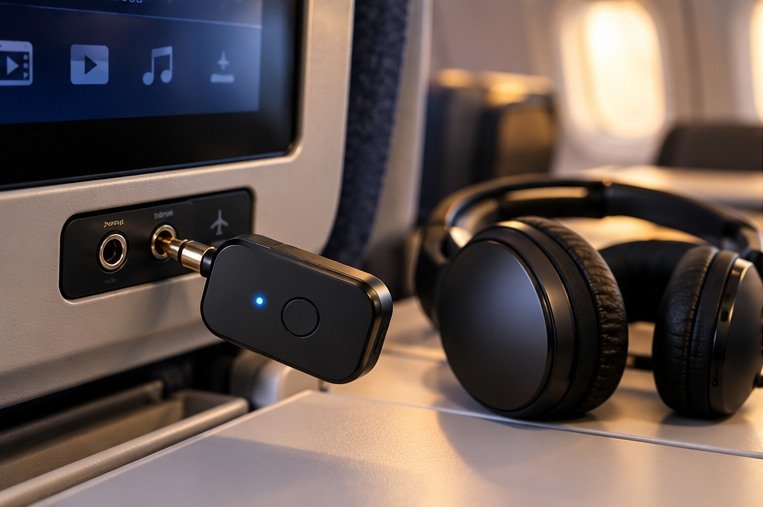
The usual connection is analogue audio out from the seat, into the adapter, then Bluetooth audio out to your headphones. A receiver performs the opposite radio role: it receives Bluetooth and passes audio to a wired destination. Devices with both modes need the correct one selected. Avantree’s Relay guide illustrates the transmitter path directly. [4]
This is why a cheap Bluetooth receiver intended for a car’s auxiliary input may be the wrong purchase for an aircraft screen. It can have the right-looking socket and still do the wrong job. Read the words ‘transmitter’ and ‘audio output’ rather than relying on a photograph of a 3.5 mm plug.
A charging socket is not necessarily an audio output
A seat’s USB port may be provided for power rather than audio. Plugging a transmitter’s charging lead into it does not necessarily supply the film soundtrack. Likewise, a USB Bluetooth dongle designed for a computer is not automatically usable without the computer’s operating system and drivers.
Check the entertainment system’s headphone connection. If no suitable analogue output exists, the particular 3.5 mm adapters in this guide may not solve the problem. A screen with supported built-in Bluetooth could make the extra adapter unnecessary, but verify that feature on the actual aircraft and seat system rather than assuming it from the airline name.
Dual-prong seats need the appropriate accessory
Some systems use a dual-prong arrangement. An appropriate airline audio adapter may be needed between the seat and transmitter. Check the spacing and design instead of forcing one plug into a socket that does not accept it. Bundle descriptions should explicitly identify the accessory rather than merely showing it in a generic image.
Test gently and stop if the fit is wrong. A loose plug can also cause one-sided sound or crackling, so physical connection should be checked before blaming Bluetooth. The transmitter should not hang where your arm, tray or seat movement repeatedly pulls on it.

04Understand audio delay without getting lost in jargon
Bluetooth version is not the whole answer
Bluetooth 5.3 or 5.4 describes part of the device’s technical foundation. It does not, by itself, tell you which audio codec your headphones will use with that transmitter or how the whole seatback chain will behave. A newer number is not a universal promise of lower film delay.
A useful question is which codec both devices support together. The transmitter and headphones must have compatible capabilities, and the operating mode can matter too. Buy for the actual pair you own, not a headline feature that only benefits a different headphone model. Avantree’s published codec information makes this distinction particularly relevant for Relay. [3][4]
Low-delay branding still needs a home test
A lip-sync problem can be tolerable to one person and distracting to another. Watching a short spoken scene with the actual adapter and headphones is therefore more useful than assuming a marketing phrase guarantees comfort. Use a device with a suitable analogue output as the test source, while recognising that the aircraft’s system will still be different.
Do not claim the result measures all future flights. It only establishes that your equipment can pair and provides a starting impression of delay. If dialogue is already uncomfortable at home, investigate before departure rather than expecting an unfamiliar seatback screen to fix it.
AirPods do not turn every transmitter feature into an Apple feature
Apple documents using AirPods as Bluetooth headphones with non-Apple devices, but a third-party connection is not identical to using them inside the Apple ecosystem. Do not assume automatic switching, every app control or an advertised transmitter codec behaves exactly as it does with an iPhone. [6]
For AirPods users, focus first on successful pairing and acceptable sound with the chosen adapter. Consult both manufacturers about a specific codec question. There is little value in paying for a feature without evidence that the headphones can use it in this particular connection.
Wired remains the simplest fallback
A wired connection avoids the additional wireless pairing stage and the transmitter’s battery. It does not magically repair a faulty seat socket, but it is useful for isolating the problem. A small pair of wired earphones can establish whether the entertainment system is producing sound before you spend the first hour resetting your wireless kit.
05Pair the headphones before boarding
Prepare one complete set at a time
Charge the adapter and headphones, then use the exact model instructions to put both into pairing mode. Turning headphones on is not always sufficient. Keep them close to the adapter and temporarily prevent the phone, tablet or laptop from reclaiming the connection while you work.
Pair the first headphone set and confirm sound before introducing the second. This reduces the number of possible failure points. Avantree’s guide recommends direct adapter-to-headphone pairing and warns that nearby previously paired devices can interfere with the intended connection. [4]
Follow the right AirPods case instructions
Apple’s current instructions distinguish models that use the rear setup button from newer models that enter pairing through the front of the case. Consult the instructions for your own AirPods rather than repeatedly pressing a button that your case does not have. Wait for the correct pairing indication before starting the adapter’s search. [6]
A useful packing habit is to keep the earbuds’ charging case available even if the earbuds themselves are already in your ears. You may need the case for pairing or a reset. Burying it in an overhead suitcase can turn a minor reconnection task into an awkward interruption.
Rehearse switching off and reconnecting
After the first successful test, turn the equipment off and repeat the normal startup sequence. Confirm that you know which light or display means it is connected, not merely powered. Then practise disconnecting it from the test source without pulling on the cable.
Save the official guide offline, including the reset procedure. Do not rely on remembering a sequence of long presses after a sleepless connection. The objective is not to memorise every feature; it is to know the few steps needed to recover a normal listening session.
Give the second listener a clear role
Ask your companion to identify their own headphone pairing signal and volume controls. Once both sets work, agree that only one person changes the adapter settings during troubleshooting. Two people independently pressing buttons can undo a good connection faster than either can understand what changed.
06Two headphones: sharing is not the same as multipoint
One source, two listeners
A dual-link transmitter sends the same audio source to two headphone sets. That can be useful for sharing a film, but it does not let each listener choose a different soundtrack from the same screen. It also does not guarantee that every pair of headphones will respond identically to volume or reconnection. [1][3][5]
Test the actual combination together. Success with either pair alone is encouraging, yet the two-pair session is the use case you are buying for. Check that both people hear the film, can adjust comfortable volume and can reconnect after a pause without confusing the saved connections.
Headphone multipoint can complicate the arrangement
Some headphones maintain connections to more than one source, but their exact switching behaviour is model-specific. If a phone notification or another device repeatedly interrupts the film, investigate that headphone’s connection settings. Do not assume a transmitter can control every decision made by the headphones.
Temporarily disconnecting an unnecessary source during setup can simplify diagnosis. Afterwards, restore the connections you need deliberately. The goal is a stable listening arrangement, not an arbitrary rule that every Bluetooth feature must remain disabled for the entire journey.
Share politely within the seat space
Position the transmitter so that it does not obstruct your neighbour’s controls or create a dangling object across the aisle. Agree who will pause the programme when cabin service arrives. Both listeners should remain able to respond to crew instructions, even when the headphones have effective noise cancellation.
For children travelling with an adult, the adult should manage the small adapter and connectors. The presence of a second pairing button is not a substitute for checking comfortable volume and making sure the equipment does not become loose among blankets and seat gaps.
07Battery and packing decisions that matter
Use advertised runtime as a planning input
AirFly Pro 2, SE, current Relay and UGREEN 65706 have different published runtimes. Those claims are not directly comparable laboratory results from a common independent test. Volume, connected devices, battery age and the operating mode may affect the experience, so plan a reserve rather than aiming to finish the flight at the advertised limit. [1][2][3][5]
For a long connection day, remember that listening time can include airport waiting and the onward leg. Charging the adapter at home is useful only if it is then switched off properly during travel. Learn the power control rather than assuming a blinking device has entered a low-power state.
A compatible cable belongs in the same pouch
Keep the transmitter, charging lead and any seat adapter together. A connector that is slightly unusual for your normal kit should be labelled or kept in a dedicated pocket. Small accessories are particularly easy to leave in a hotel socket or remove accidentally with another person’s headphones.
Do not assume you can charge while listening unless the exact manufacturer instructions permit it. Even then, the seat’s power arrangement may be inconvenient or unavailable. A charged device and a wired fallback are more dependable than a plan built around an unverified aircraft USB socket.
Make the unplugging routine deliberate
Before leaving the seat, pause the programme, switch the device off, remove it by the connector and put every small component back in the pouch. Check the headphone socket before standing up. The adapter is easy to overlook precisely because the headphones are wireless and already on your head.
Follow airline and crew instructions for electronic equipment. Protect the device from spills and physical damage, and do not open or modify its battery. A small transmitter is still an electronic device, not an accessory that can be ignored during the safety briefing. [4]
08A practical troubleshooting sequence
There is no sound at all
Start at the source. Confirm that the entertainment system is playing and that the correct audio output is being used. Check that any airline adapter is fully and correctly seated. If available, test with wired earphones to see whether the seat is producing audio.
Next, check transmitter mode on a device that also has receive mode. Confirm the headphone connection indication and raise the source and headphone volume gradually from a low setting. Change one variable at a time so that you can identify which step actually solved the problem.
The headphones keep connecting to the phone
The headphones may be returning to a remembered source rather than pairing with the transmitter. Temporarily disconnect the competing device and put the headphones into genuine pairing mode. Follow the adapter’s own instructions instead of using the phone’s Bluetooth menu as though it were the main controller. [4]
Once the adapter works, decide whether you need the competing connection during the film. A stable, simpler setup can be preferable to maintaining every convenience feature at once. Keep the phone accessible, but do not let automatic reconnection become a repeated source of confusion.
Sound comes from only one side
Check the plug and any dual-prong accessory before clearing pairing history. A partially inserted or inappropriate connector can cause a problem that a wireless reset cannot fix. Avantree’s support specifically directs users to check both Relay and the dual AUX connection when diagnosing one-sided audio. [7]
If wired earphones also have the problem, ask cabin crew about the seat output. If the issue appears only with the adapter, compare the accessory configuration with the manufacturer’s instructions. Do not force connectors or dismantle the seat fitting.
One listener works and the other does not
Return to a known state. Confirm the first connection, then add the second following the correct dual-link process. Keep both headphones close enough for setup and prevent either pair from reconnecting to another source. Note which indicator corresponds to each listener.
If the combination remains unreliable, test each pair separately and consult support with the exact headphone models. A device advertising dual listening does not prove every possible mixed pair has been tested. For that flight, a wired alternative or separate listening source may be the more comfortable decision.
The picture and voice do not match
Try the same equipment with a different appropriate source when practical. If the issue follows the adapter-and-headphone combination, ask the manufacturers about the codec and supported low-delay modes. If it appears only on one seatback system, the source may be part of the problem. [4]
Do not spend an entire flight repeatedly resetting a connection that otherwise works but has unacceptable delay. Use the wired fallback for dialogue-heavy content. The purpose of the adapter is a better journey, not a technical project you feel obliged to finish in the air.
09Choose for your actual journey
Solo traveller with familiar earbuds
Start with a single-listener option if it covers your socket and passes the home test. Keep the charging case and wired fallback accessible. There is little reason to pay for a second connection solely because it appears on a comparison chart.
An SE-style setup is attractive here because the required routine is short. Nevertheless, compare controls you can comfortably operate and support you can understand. A cheaper adapter that repeatedly confuses you may not be good value even when its basic specification is adequate.
A couple sharing films on long-haul flights
Choose a documented two-headphone device and test both sets together. Pack any necessary dual-prong seat accessory, agree who manages the transmitter and rehearse a reconnect after turning everything off. The home test should involve both people, not just the more technical traveller.
Pro 2 and Relay are particularly useful comparisons for this situation because their controls and guidance are clearly documented. Your final choice should depend on the actual headphone combination, preferred interface and verified current offer rather than a universal winner label. [1][3][4]
Someone whose headphones already have a good wired mode
Try that cable first. It may solve the seatback problem with fewer batteries and no transmitter pairing. However, check the headphone manufacturer’s instructions because wired operation, microphone behaviour and noise cancellation can vary by model.
A Bluetooth transmitter still has value if the cable is uncomfortable or sharing is important. The point is to compare against an existing workable solution, not assume wireless is always the better travel arrangement.
10Make a final buying check without paying for the wrong extras
Compare the kit, not just the transmitter
Put two offers side by side and list what each actually includes: the transmitter, charging lead, storage pouch and any seat adapter. A slightly cheaper bare unit may cost more once the missing accessory is added. Conversely, a large bundle can be wasteful when you already own an appropriate lead and pouch.
Do not count an accessory merely because it appears in a lifestyle photograph. Read the included-items list and save the order description. That gives you a practical reference when checking the delivery and avoids discovering a missing connector at the gate.
Give support the whole compatibility question
Before an expensive or time-sensitive purchase, ask about the exact adapter, headphone model and intended analogue source. Mention whether two headphone pairs will be used together. ‘Works with Bluetooth headphones’ is less informative than an answer addressing your specific combination and any known limitations.
Keep that response with the manual, but remember that an aircraft seat can still introduce a different variable. The useful result is a clearer purchase decision and a sensible return route, not a claim that a support email guarantees every future flight.
Inspect the delivery before the travel week
Confirm that the box and device identify the model you ordered. Check the cable and plug for damage, then perform the pairing rehearsal while there is time to resolve a wrong item. If the instructions describe a different button layout from the delivered device, ask the seller which manual applies instead of guessing.
Finally, place the assembled kit in the pocket where it will travel. This small rehearsal catches ordinary problems such as an oversized storage case, a missing charging lead or an adapter that is too easy to leave loose. It also makes the real journey less dependent on remembering where each separate item was packed.
11Pros and cons of using an adapter
What it can improve
A suitable adapter lets you use familiar wireless headphones with an appropriate wired audio source. Dual models can make shared listening possible, and accessible volume controls may be convenient during the flight. It can also keep a headphone cable from running across your own seat area.
The benefit is strongest when pairing has been rehearsed and the controls are understood. A small, organised kit can then be ready when the entertainment system becomes available.
What it adds to the journey
There is another battery, another small item to retrieve and another compatibility step. Bluetooth delay may be noticeable, seat connectors vary and a second headphone pair can complicate the setup. A compact adapter does not remove those trade-offs.
If the equipment distracts from resting or repeatedly fails with your headphones, a wired arrangement may be the better choice. Keep that option open rather than treating the purchase as a commitment to wireless listening on every flight.
12Common mistakes before and during the flight
Buying a receiver instead of a transmitter
Look for the direction of the connection. A car receiver with a familiar-looking plug may not send seatback audio to headphones. On a combined unit, learn which mode sends audio before travelling. The correct physical connector alone cannot solve a wrong-direction purchase. [4]
Pairing everything at once
Start with one headphone pair and one source. Add the second listener only after the first works. Nearby phones and laptops should not be competing during the initial process. This approach makes a failure easier to diagnose and avoids repeatedly clearing perfectly good saved connections. [4]
Assuming a new Bluetooth number removes delay
Compare the shared codec capabilities and test the actual headphones. A version label does not establish the total delay through the seatback system. Treat ‘low latency’ as a feature to investigate, not a guarantee that every spoken scene will be perfectly synchronised. [3][4]
Leaving the adapter in the seat
Add the headphone socket to your final seat check. Retrieve the transmitter and any small plug accessory before gathering the blanket and standing up. A single storage pouch makes it obvious when a component is missing and reduces the chance of dropping loose parts into the seat mechanism.
13Questions about airplane audio adapters
Will these adapters work with AirPods?
Apple supports using AirPods as Bluetooth headphones with non-Apple devices, and the main adapter manufacturers describe relevant headphone compatibility. However, the exact AirPods model, pairing method and adapter firmware still matter. Follow the instructions for your own charging case and test the combination before departure. Do not assume every Apple-specific feature is available through a third-party transmitter connection. [1][3][6]
Can two people listen at the same time?
A model with documented dual-headphone support can send one source to two compatible headphone sets. AirFly SE is a single-pair model, while Pro 2, Relay and the specified UGREEN transmitter describe dual connections. Both people receive the same programme. Test the actual two headphone sets together, because successful individual pairing does not establish how their combined session will behave. [1][2][3][5]
Do I pair the adapter with my phone first?
For the usual seatback setup, the transmitter pairs directly with your headphones. The phone is not the intermediary carrying the aircraft’s analogue audio. It may actually complicate pairing if the headphones keep reconnecting to it. Follow the adapter’s instructions and use the phone only for reference or another specifically documented function, not as an assumed compulsory step. [4]
Will a USB Bluetooth dongle do the same job?
Not necessarily. A computer dongle can depend on its host operating system and an audio source delivered through that computer. The seat’s USB port may be for power only. The products in this guide are chosen around a suitable 3.5 mm analogue audio output. Confirm the connection type and the transmitter’s independent operation rather than buying any small device that says Bluetooth.
Do I need an airline two-prong adapter?
That depends on the actual seat output and the transmitter’s plug arrangement. Check the aircraft entertainment information where available, but carry the appropriate accessory when uncertainty remains. Verify that it is included in your selected bundle rather than assuming all offers match. Never force an ill-fitting connector; ask crew for guidance and use a suitable alternative when the seat configuration does not match.
Does the adapter use the headphone microphone?
Do not assume so. These flight-focused transmitters are principally for sending programme audio from an output to headphones. A microphone or two-way communication function needs explicit support throughout the connection. A device that works well for watching a film may be unsuitable for calls, interactive voice features or assistive equipment. Ask the manufacturer about that specific use before buying. [4]
Can I keep using it while it charges?
Only rely on that arrangement when the exact model’s instructions permit it and the available power source is appropriate. A USB-C socket alone does not prove simultaneous charging and transmission are supported. Even when they are, an aircraft power port may be unavailable or awkwardly placed. Charge before boarding and retain a listening alternative rather than building the whole journey around a seat power assumption.
Which model is best when I dislike confusing controls?
Compare the actual interface rather than the longest feature list. Separate pairing buttons may help two listeners, while a simple single-pair unit can be easier for solo use. A screen can also be attractive, but confirm what it shows and whether the documentation matches the exact device. Clear support and a successful home rehearsal are better indicators of suitability than the number of illuminated symbols on a product photograph.
14Final recommendation
For two listeners, compare AirFly Pro 2 and Avantree Relay first, using your actual headphones as the deciding test. For one listener, AirFly SE may provide everything needed with less complexity. UGREEN 65706 is a useful alternative when its controls, verified UK offer and included accessories suit the journey; treat SafeFly Pro more cautiously until its exact documentation and seller terms are clear. [1][2][3][5]
Pack the transmitter, the correct seat accessory and its charging lead together. Then keep a small wired fallback. A good adapter should make the film easier to enjoy, not make you responsible for troubleshooting an entire aircraft entertainment system.
15Sources and fact-checking notes
Brand product pages and support instructions inform the main comparison. SafeFly Pro is explicitly a listing-led option because its exact technical manual was not independently matched. Battery claims are advertised maxima, not results from a flight test. Headphone behaviour can change with hardware and firmware.
Editorial checks completed 10 October 2026. Recheck product versions, software, stock, service terms and relevant transport rules before buying or travelling.
- Twelve South: AirFly Pro 2
- Twelve South UK: AirFly SE
- Avantree: current Relay product specification
- Avantree: Relay interactive user guide
- UGREEN: 65706 Bluetooth 5.4 transmitter
- Apple UK: pairing AirPods with other Bluetooth devices
- Avantree: Relay controls and indicators
- 1Mii: manufacturer website and support starting point
Illustrations in this article were created for Taylor’s Trailblazing Travel Gear. Third-party photographs, where used, are credited beside the image or in the source list.