How Many Phone Charges Does a 10,000mAh Power Bank Give?
Work out useful top-ups, understand where the energy goes and choose a travel charger without believing the biggest number.
A 10,000mAh power bank sounds as though it should recharge a 5,000mAh phone exactly twice. That is a tempting comparison, but it leaves out voltage, conversion losses and the power your phone uses while connected. Two batteries can display similar-looking capacity figures without storing the same amount of energy per milliamp-hour.
For travel, a more useful question is how much extra usable time the bank gives you between sockets. One complete refill might be enough for a long day of navigation and photographs. Two partial top-ups could be more convenient than waiting until the phone is empty. Sharing with another person changes the calculation again.
This guide explains the arithmetic without pretending there is one efficiency percentage that describes every charger. The examples are planning models, not laboratory results. Product specifications are checked against manufacturer information, while the step-by-step checks help you work out what your own phone, cable and power bank actually deliver.
About 1-2 full charges
A broad planning range, not a promise for every phone.
Compare watt-hours
mAh figures need their matching nominal voltage.
A wired top-up
Budget for the part of the phone battery you need to refill.
Log your own use
The same cable, phone and settings make results comparable.
What a 10,000mAh power bank can realistically provide
Use a range before choosing a single number
For an initial estimate, compare the bank's watt-hours with the phone battery's watt-hours. Then allow for the energy that does not finish inside the phone battery. Anker's own explanations distinguish the bank's nominal cell capacity from its USB output and the further losses involved in charging a device. [1][2]
The following table holds the bank at 37Wh and assumes each example phone uses a nominal 3.85V battery. The 60-80% transfer range is deliberately shown rather than hidden. It helps demonstrate how much the result changes when the phone is larger or the charging conditions are less favourable.
| Illustrative phone battery | Phone energy at 3.85V | Full-charge equivalents, 60-80% transfer |
|---|---|---|
| 3,000mAh | 11.55Wh | 1.92-2.56 |
| 3,500mAh | 13.47Wh | 1.65-2.20 |
| 4,000mAh | 15.40Wh | 1.44-1.92 |
| 4,500mAh | 17.32Wh | 1.28-1.71 |
| 5,000mAh | 19.25Wh | 1.15-1.54 |
| 6,000mAh | 23.10Wh | 0.96-1.28 |
Read the decimal as a fraction of a refill
A result of 1.35 does not mean the phone suddenly stops after one useful charge. It represents energy equivalent to one complete refill plus another 35% of that example battery, before allowing for extra live phone use beyond the assumption.
For planning, round down when running out would be inconvenient. A bank that mathematically offers 1.35 full-charge equivalents is not a dependable promise of two empty-to-full charges. On the other hand, it may comfortably cover several smaller additions during an ordinary day out.
The table is not a list of actual phone models. Use the energy figure for your exact phone where available instead of substituting another model's capacity because the names look similar.
Why dividing one mAh number by another can mislead
Milliamp-hours describe charge, not energy on their own
The connection between the units is simple: watt-hours equal amp-hours multiplied by nominal voltage. Thus, 10,000mAh is 10Ah; at 3.7V, that corresponds to 37Wh. Change the nominal voltage and the energy changes too. This is also the conversion used in IATA's battery guidance. [14]
A phone labelled 5,000mAh at 3.85V represents 19.25Wh. Dividing 10,000 by 5,000 gives two, but dividing 37 by 19.25 gives about 1.92 even before losses. The first shortcut quietly treated the two voltages as identical.
Keep the voltage paired with the right capacity
A power bank may show 3.7V for its internal cells and 5V, 9V or another voltage for an output port. Do not pair its advertised cell capacity with whichever output number produces the most attractive result.
Anker illustrates this with a nominal 37Wh bank: at an ideal 5V output, the same energy corresponds to 7.4Ah, not 10Ah. A lower mAh figure at the higher voltage is not, by itself, missing energy. Conversion losses then reduce the usable output further. [1]
This distinction prevents two common mistakes: assuming all of the difference is inefficiency, or assuming there is no inefficiency because a voltage conversion explains part of it. Both the unit conversion and the real losses need their own place in the calculation.
Follow the energy from the bank to the phone
There are several stages, not one magic deduction
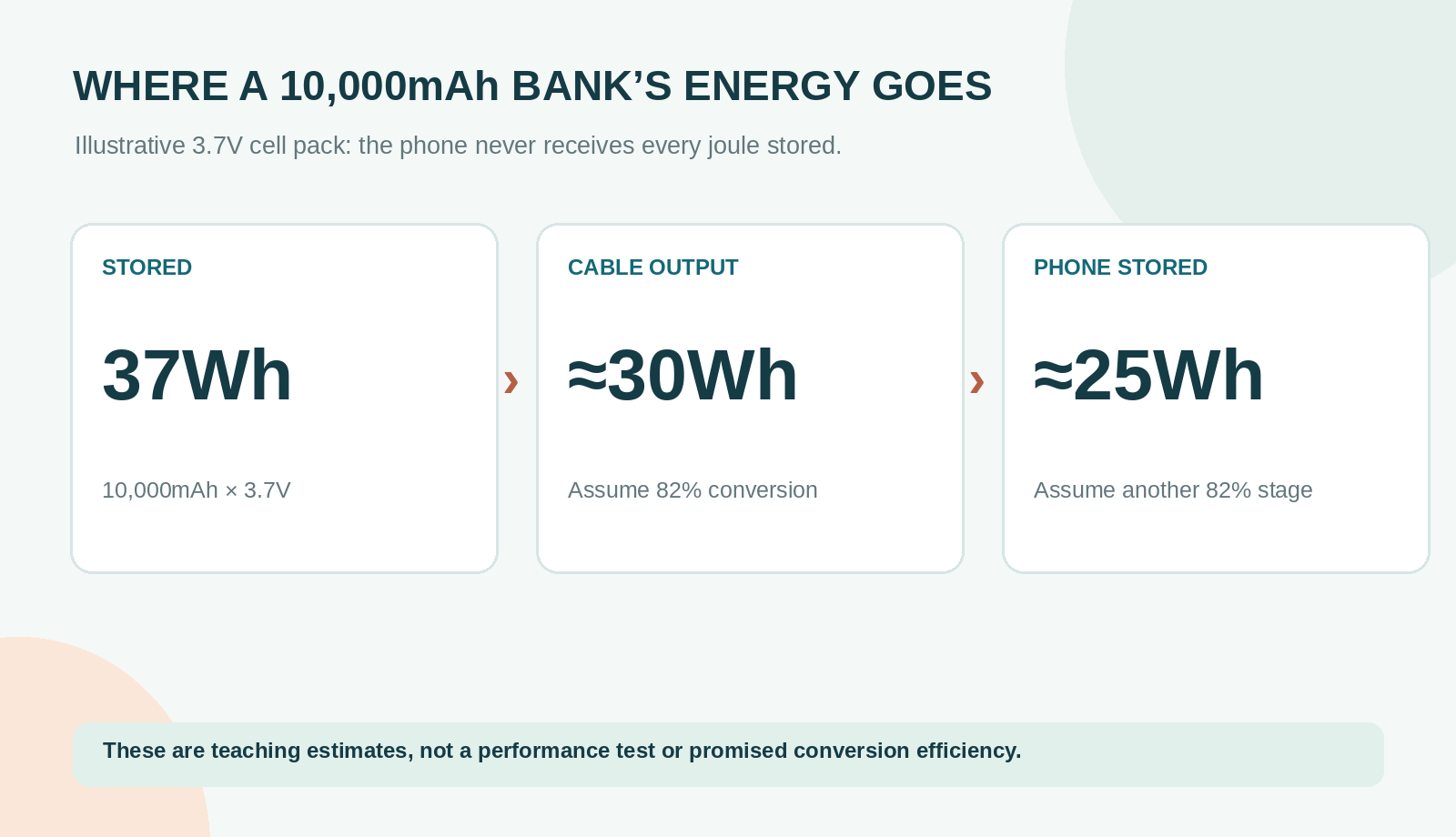
The bank's cells supply energy to its electronics, which provide a suitable USB output. The phone then manages that incoming power and stores some of it in its battery. A cable and connectors sit between them, while the phone may also be running apps or maintaining a network connection.
Anker gives an illustrative explanation using 82% at one stage and 82% at another. Multiplied together, those assumptions give about 67% overall, not 82%. They are useful for understanding why stages compound, but they are not a universal rating for every bank and phone combination. [2]
Keep the accounting boundary clear
Decide what your efficiency assumption includes. In this guide's worked estimates, it means nominal bank energy to energy stored in the phone. If you instead start from a manufacturer's measured USB-output energy, you have already moved past the bank's conversion stage.
Subtracting the same loss again would underestimate the result. Conversely, treating USB-output energy as though all of it must be stored in the phone would overestimate it. The clearest calculation writes down the starting point and finishing point before applying percentages.
Live phone use is another reason to keep the result approximate. A screen-on navigation session can consume incoming energy without adding the same amount to the battery indicator. That does not necessarily mean the bank is defective.
Calculate your own estimate in four steps
First find the stored-energy figures
Read the bank's Wh marking or its exact official specification. For the phone, use a reliable battery-energy figure for that model where available. If you only have mAh, you also need the matching nominal voltage; do not open the phone to inspect a sealed battery just for this exercise.
For example, use a bank marked 37Wh and a hypothetical phone specified as 4,500mAh at 3.85V. The phone's nominal energy is 4.5 x 3.85, or 17.325Wh. Keep enough decimal places while calculating, then round the final answer for ordinary use.
Next apply an explicit transfer assumption
At an assumed 70% overall transfer, 37Wh becomes 25.9Wh stored across the phone's recharges. Divide 25.9 by 17.325 to get about 1.49 complete-charge equivalents.
Now test a less favourable 60% assumption: 22.2 divided by 17.325 is about 1.28. At 80%, the result is about 1.71. The bank has not changed; your assumptions have. That is why a single unexplained claim of two charges is less useful than a transparent range.
Finally turn the result into a travel decision
For that example phone, I would plan around one full refill with some remaining reserve, not two guaranteed full charges. If the outing needs substantially more, either arrange access to a socket or consider a larger bank after checking its size, weight and airline suitability.
Write the estimate in your packing notes once. You do not need to repeat the arithmetic every time you leave the accommodation, but you do need to revisit it when the phone or power bank changes.
Partial top-ups are usually the more useful travel measure
Count the gap you intend to fill
Charging from 20% to 80% covers 60 percentage points, not a complete battery. In a simplified model, multiply the phone's nominal energy by 0.60 to estimate the energy stored during that top-up. Battery indicators are estimates, so this remains planning arithmetic rather than a precision measurement.
Using the same illustrative 25.9Wh available after losses produces the following comparison. It assumes the phone is not consuming substantial extra energy while charging.
| Phone example | One top-up uses | About how many, from 25.9Wh |
|---|---|---|
| 4,000mAh at 3.85V, 20% to 80% | 9.24Wh | 2.8 top-up equivalents |
| 5,000mAh at 3.85V, 20% to 80% | 11.55Wh | 2.2 top-up equivalents |
| 5,000mAh at 3.85V, 40% to 80% | 7.70Wh | 3.4 top-up equivalents |
| 6,000mAh at 3.85V, 20% to 80% | 13.86Wh | 1.9 top-up equivalents |
Two phones share one energy budget
Suppose two travellers each have the example 5,000mAh, 3.85V phone and both want a 20%-to-80% top-up. Together they need about 23.1Wh stored. That fits inside the example 25.9Wh budget, but the remaining margin is small.
Add an evening video call or a second charging device and the reassuring headline number becomes less comfortable. A shared bank can be sensible for occasional help, but not as an unquestioned backup for two demanding users all day.
The number of plug-ins is not the number of full charges
Five short connections may add less total energy than one long session. When comparing your experience with someone else's, ask how far the battery percentage rose each time. Otherwise, one person's five charges may mean five modest top-ups while another person is counting empty-to-full cycles.
That distinction is especially useful when reading reviews. A report that a bank charged a phone three times is incomplete without the starting and ending levels, the phone model and an indication of whether the phone was being used.
Nominal capacity and rated output are different specifications
A current model shows why voltage assumptions matter
NITECORE specifies the NB10000 Gen4 as 39Wh. Its published battery arrangement is 5,000mAh at 7.8V, equivalent to 10,000mAh at 3.9V. Both pairs describe the same nominal energy. This is a concrete example of why every 10,000mAh bank should not automatically be labelled 37Wh. [9]
The same model publishes rated output figures under specified conditions: 6,800mAh at 5V and 3A, or 7,200mAh at 5V and 1A. Those correspond to 34Wh and 36Wh at the output, respectively. They are not promises about the final energy stored in every connected phone. [9]
Compare like with like when shopping
If one product page gives nominal cell capacity and another gives rated output capacity, comparing the mAh numbers directly is unhelpful. Note the voltage, output conditions and what the manufacturer says was measured.
A product with transparent output information is easier to assess than one relying only on a large front-panel number. Still, specifications do not replace checking compatibility or inspecting the condition of the actual unit you receive.
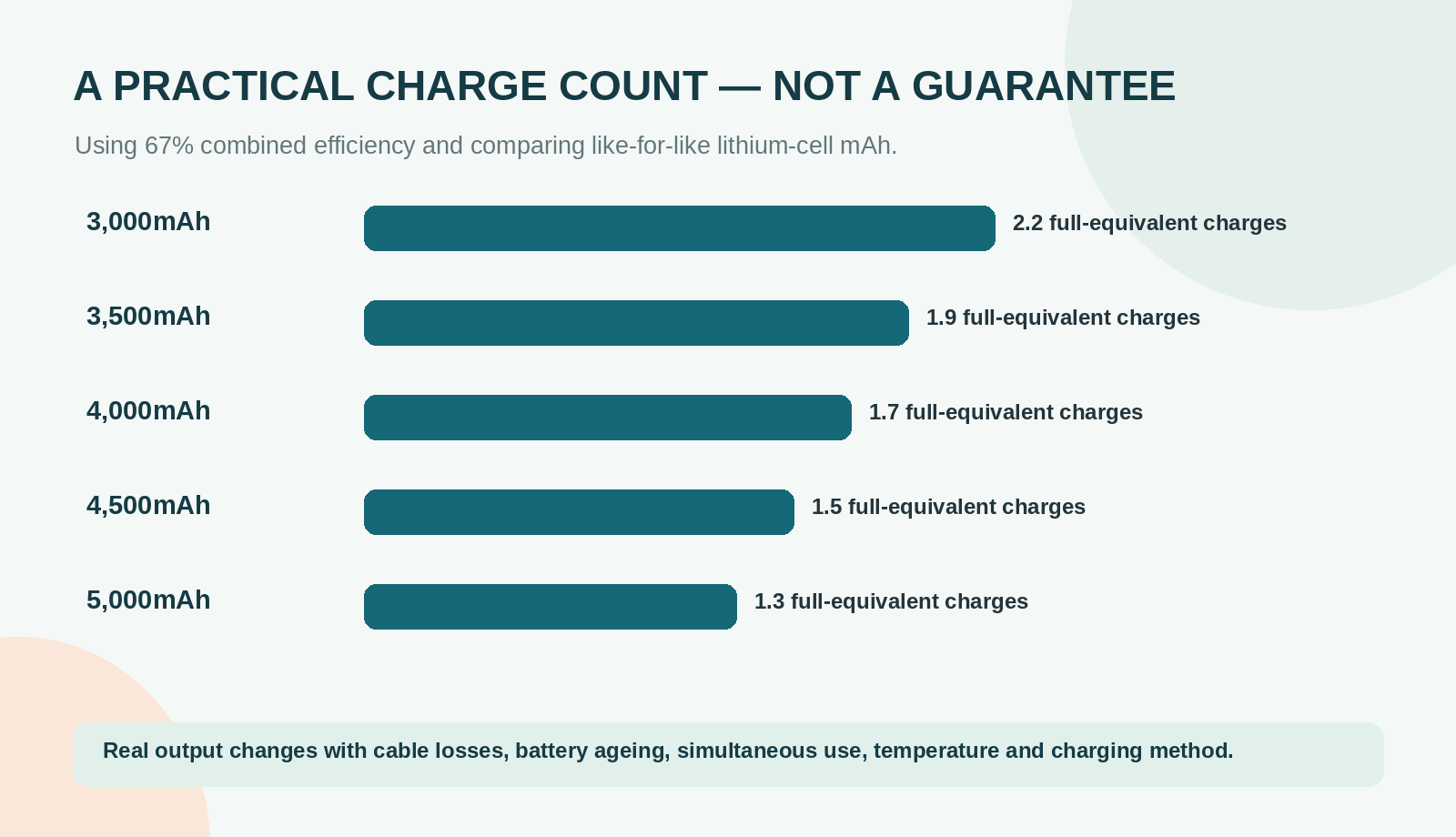
This older-style shortcut remains useful for visualising the effect of phone size, but it must not silently replace the watt-hour method when the voltages differ. Use the labelled energy wherever possible.
Charging speed does not tell you how many refills you get
Watts describe the rate, watt-hours the amount
A 30W bank is not automatically a larger energy store than a 20W bank. The wattage describes an output capability; watt-hours describe stored energy. A higher supported rate can make a short stop more useful without doubling the energy available over the day.
USB Power Delivery also involves compatible equipment agreeing how power will be supplied. A USB-C socket alone does not establish that every connected phone will receive the headline rate. The phone, bank and cable all need to suit the intended charging mode. [3]
Fast at the beginning does not mean fast to 100%
Apple explains that an iPhone reduces charging current as it approaches a full battery to help manage heat and battery wear. Consequently, the final part of a charge can take longer than the first part. A manufacturer's short-interval charging example should not be extrapolated into an empty-to-full time without evidence. [4]
For travel, I would choose adequate compatible output for useful top-ups rather than chase the largest wattage on a box. A modest phone-only kit has different requirements from a setup expected to charge a laptop.
The same logic applies to refilling the bank itself. Its input rating, the wall charger and the cable determine that process. An impressive output specification does not automatically mean the bank can accept power equally quickly.
Wired, wireless and simultaneous charging
Convenience has its own trade-off
Wireless charging removes the need to connect a plug to the phone, but alignment, cases and the charging system become part of the setup. Apple also lists wireless charging among activities that can make a device warmer. [6]
When conserving a limited energy reserve matters, I would start with a compatible wired connection and minimise unnecessary phone activity. That is a practical recommendation, not a claim of one fixed percentage advantage for every wireless product.
A magnetic bank can still be the better choice for someone who repeatedly forgets cables or finds a wired connection awkward. The right purchase solves the user's actual problem rather than winning a theoretical capacity comparison that will not change their routine.
Two outputs do not create two banks
A power bank's total energy is shared between every connected device. Its maximum single-port wattage may also fall when another port is used. For example, the Anker A1259 and Belkin BPB021 publish different single-device and combined-output limits. Check the exact specification rather than multiplying the largest printed wattage by the number of ports. [7][8]
For a phone and earbuds, the energy demand may be modest. For two phones needing major refills, plan the combined energy first and the charging speed second. Do not leave the arrangement operating unseen inside tightly packed clothing while you assume everything is progressing normally.
Four 10,000mAh options for different priorities
Compare the reason to buy, not an invented ranking
These are research-led shortlists, not measured capacity winners. Their meaningful differences are cable convenience, mass, magnetic charging and the transparency of the published specification. Check the exact model identifier because a brand can sell several similarly named 10K products.
| Exact model | Why consider it | Trade-off to consider |
|---|---|---|
| Anker Nano A1259, 10,000mAh [7] | Built-in USB-C; up to 30W single-port | 215g; attached cable is not universal |
| Belkin BPB021, 10K [8] | Integrated USB-C; up to 20W | Less peak output; no percentage screen |
| NITECORE NB10000 Gen4 [9] | 39Wh; 143g stated weight, +/-5g | Two external cables may still be needed |
| Anker MagGo Slim A1664 [10] | Qi2 magnetic charging; wired option | Compatibility and alignment matter |
Anker Nano A1259: the cable is already attached
The A1259 offers a built-in USB-C cable, a percentage display and up to 30W single-port output. Anker lists it at 215g. [7] It is a useful candidate when the main failure in your travel routine is leaving a charging lead in another bag.
The trade-off is that an attached USB-C lead is not suitable for every phone. Also, a displayed percentage tells you the bank's own estimate of remaining charge; it does not count future phone refills. Choose it for a simpler kit, not because the screen makes its energy store larger.
Belkin BPB021: a straightforward 20W alternative
The BPB021 10K model pairs an integrated USB-C cable with a compact body and up to 20W output. It uses indicator lights rather than a percentage screen. [8] That can be perfectly sufficient when you want an uncomplicated reserve for one compatible phone.
The absence of a detailed display is not evidence of poorer battery capacity. It simply means a home top-up check is more useful than trying to interpret each light as a precise quantity of energy.
NITECORE NB10000 Gen4: weight and published output matter
The Gen4's listed 143g weight, with a stated tolerance of plus or minus 5g, makes it worth considering when every item in a walking or small-bag kit must justify its mass. Its published 39Wh and rated-output details also make the energy accounting unusually clear. [9]
It still needs the appropriate cable and storage arrangement. Compare the whole charging kit, not just the bare-bank weight, and make sure the listing says Gen4 rather than assuming an older generation has identical specifications.
Anker MagGo Slim A1664: magnetic convenience first
The A1664 offers Qi2 magnetic charging and a wired USB-C option. [10] It belongs on the shortlist when attaching a compatible phone to the bank is more convenient than managing a loose lead.
Check phone and case compatibility before buying. I would choose it for that interaction, not promise that magnetic charging delivers as many stored watt-hours as every wired setup. Keep a cable available when a more predictable connection is valuable.
Build a small charging kit that actually works together
Match the cable to both ends
For a USB-C phone, a suitable USB-C-to-USB-C cable can make the kit straightforward. Choose a manageable length that lets you place the bank securely without pulling on the phone. A very long lead may be useful at accommodation but cumbersome while standing in a queue.
An older Lightning-equipped phone needs the appropriate cable instead. Check the connector rather than assuming a bank's supplied USB-C lead is universal. Avoid adding adapters merely to rescue a badly chosen main cable.
Refill the bank as deliberately as the phone
A compatible mains charger is part of the complete system when you need to refill the bank overnight. For the phone-sized banks discussed here, a compact USB-C PD charger is a useful category to consider; verify its output and the bank's input specification before expecting a particular recharge time. [3]
Keep the kit together without turning organisation into extra bulk. A small cable organiser can be useful when the charger, lead and bank otherwise migrate into different pockets. However, an existing zipped pocket may solve the same problem without another purchase.
Do one full rehearsal at home using the exact combination you will pack. A bank that charges your phone successfully from one cable does not prove that the older spare at the bottom of a drawer works equally well.
Run a repeatable home check without damaging the battery
Record useful top-ups instead of forcing deep discharges
Charge the bank normally according to its instructions. During ordinary phone use, note the starting phone percentage, the finishing percentage, whether the screen stayed on and which cable you used. Repeat comparable top-ups until the bank is no longer useful for your routine.
There is no need to repeatedly drain the phone to zero to produce a dramatic test. The purpose is a travel estimate, not a laboratory capacity certification. Keep temperature, phone settings and connected devices reasonably similar so that the results tell you something about the kit rather than changing circumstances.
A USB meter measures a different boundary
An appropriate USB energy meter can record energy passing through the connection, but it does not directly measure how much energy ends up chemically stored in the phone battery. It may also affect compatibility, so select one suited to the charging protocol and ratings involved.
For most travellers, a simple log is sufficient. For example, three broadly comparable 20%-to-70% additions represent about one and a half battery-capacity equivalents, with the usual limitations of percentage indicators and live phone use.
Keep the conclusion proportionate
If your own normal use consistently gets less than an attractive marketing example, that does not establish a fault by itself. First check whether the example used the same phone, starting level and charging conditions. A repeatable, unexpectedly poor result with suitable equipment is a reason to contact the manufacturer, not to take the bank apart.
Troubleshoot disappointing results in a sensible order
Check what the phone is doing
Start with the screen and active workload. Navigation, recording and other demanding tasks can use power while the bank is supplying it. Compare a quiet top-up with an active one before concluding that the bank's stated capacity is false.
Next, look at the phone's charging settings. Apple describes charge limits and Optimised Battery Charging that may stop or delay charging at particular levels. A phone pausing around 80% can be following its settings rather than exposing a power-bank problem. [5]
Check temperature and connections
Apple warns that high or low temperatures can slow or stop charging and describes a Charging On Hold message. Move the setup out of direct sun and allow it to return to suitable conditions rather than trying to defeat the protection. Follow the bank's own temperature instructions too. [6]
Inspect the cable and connectors for visible damage or contamination, without poking metal objects into ports. Try a known suitable cable when available. If a connector becomes unusually hot or the bank shows damage, stop using it and obtain appropriate manufacturer advice.
Check the exact unit, not just the brand
Review recall information using the model and serial number. Anker's recall checker identifies particular affected products; a similarly named model is not automatically the same device. [11]
Battery ageing can also change usable capacity over time. Apple describes rechargeable batteries as consumable components whose capacity declines with chemical age. [4] A phone that now stores less energy may refill more often yet still provide less useful running time, which is another reason to separate charge counts from battery endurance.
Decide whether 10,000mAh is enough for your trip
One phone with nightly access to a socket
For someone who begins the day with a charged phone and mainly needs one substantial rescue top-up, this capacity class is a sensible starting point. The remaining choice is the form factor you will actually carry: attached cable, lighter weight or magnetic convenience.
The calculation becomes less comfortable when a large phone must be refilled repeatedly, when two people share the reserve or when there is no reliable overnight charging opportunity. In those situations, a larger bank can be justified, but size and airline restrictions need checking separately.
Compare the whole-day plan, not only the emergency reserve
List the devices that may need energy, then identify where a socket is genuinely available. A hotel room you will reach late at night does not help with an afternoon navigation problem, while a dependable charging stop may remove the need for a heavier bank.
Leave a reserve for the tasks that matter at the end of the day: accessing a booking, contacting someone or finding the accommodation. Spending the entire estimated budget earlier because a table suggested another fraction of a charge is an avoidable planning risk.
Finally, ask whether you will willingly carry the larger alternative. A smaller bank that remains in your day bag can be more useful than a heavier one repeatedly left behind.
Carry the bank safely when flying
Airline acceptance and charging usefulness are separate checks
Power banks belong in the cabin rather than checked baggage, and the exact airline can restrict their number, storage and use. IATA's passenger guidance distinguishes power banks from other battery categories. Check the current operating carrier rather than treating a small capacity as universal permission. [14]
As checked for this guide, Ryanair permits up to two qualifying power banks and specifies on-person or underseat storage, with restrictions on onboard charging activity. Emirates allows one under 100Wh and prohibits using or recharging it onboard. Their handling requirements are not identical. [12][13]
Keep it accessible and protected
Use an appropriate individual protective arrangement that prevents contact with loose metal and leaves the bank accessible for inspection. A small pouch can help with transport, but remove the bank for use and follow the airline's instructions rather than burying it in a sealed bundle.
If your cabin bag is unexpectedly taken for hold carriage, remove the power bank before handing the bag over. Inspect it before travel, keep its rating legible and do not carry a damaged or recalled unit while hoping that its small size will make the issue irrelevant.
The detailed conversion and carrier checks deserve their own decision process. This article's refill calculations explain useful energy, not an approval to board with a particular battery.
Pros, cons and the most common counting mistakes
Pros
- A small bank is convenient for a day out without taking a full charger kit.
- Wired charging makes an emergency top-up easy to control.
- Capacity can be checked with a straightforward energy estimate.
Cons
- Large phones and active use can reduce the number of full refills substantially.
- The capacity on the label is not the energy finally stored in your phone.
- A shared bank is a single point of failure for two travellers.
Avoid three misleading comparisons
First, do not compare bank and phone mAh figures without checking voltage. Second, do not describe every short connection as a full charge. Third, do not compare one manufacturer's nominal cell rating with another product's measured USB output as though they were the same quantity.
A fourth mistake is subtler: quoting an efficiency figure without saying what it includes. A bank-to-USB percentage and a bank-to-phone-battery percentage can both be correct while describing different boundaries. Write the units and the boundary beside the assumption, and most of the confusion disappears.
Frequently asked questions
Does a 10,000mAh bank always contain 37Wh?
No. It contains 37Wh only when that capacity is paired with a nominal voltage of 3.7V. Different cell arrangements or voltages can produce another figure. The NITECORE Gen4 example is specified as 39Wh. Use the exact label or official model specification rather than treating 37Wh as a universal property of the capacity class. [9]
Can I charge my phone from 50% instead of waiting until it is empty?
Yes; a useful travel top-up does not need to start from an empty battery. For estimating the amount added, consider the change in percentage rather than counting the connection as a complete refill. Follow the phone manufacturer's charging guidance, and do not deliberately run the phone flat solely to make a capacity comparison. [4]
Why did my phone stop at 80% while the bank still had charge?
One possibility is a configured charge limit, optimised charging or temperature protection. Check the phone's message and charging settings before blaming the bank. Those are not the only possible causes, so an unexplained repeated failure with suitable equipment still warrants manufacturer support. Apple documents both charging limits and temperature-related pauses. [5][6]
Will a faster cable create more battery capacity?
No. A suitable cable can avoid compatibility or connection problems and allow a supported charging rate, but it cannot increase the energy stored in the power bank. Treat rate, stored energy and the final phone refill as related but different quantities. A cable advertised with a large wattage is not itself an additional energy source.
Is the bank's percentage display a reliable phone-charge counter?
It is an estimate of the bank's state of charge, not a forecast for every phone. A remaining 50% display does not guarantee half of the refills claimed on a sales page. Your phone's battery size, settings and use still matter. A repeatable home top-up log gives a more relevant answer for your actual travel kit.
Should I use two small banks instead of one larger bank?
That can provide separate reserves for two people, but it adds items to track and is subject to the airline's power-bank quantity limit. It is not a way to ignore onboard restrictions. Compare total energy, total carried weight and who needs access, then check the specific carrier. Some airlines are stricter than others about the number carried. [12][13]
Final recommendation: plan in useful top-ups
For a phone-only day bag, choose a 10,000mAh model for the charging arrangement you will actually use, then make a conservative estimate from its labelled watt-hours. The Anker A1259 is a practical attached-cable candidate; the Belkin BPB021 is a straightforward alternative; the NITECORE Gen4 prioritises low stated weight; the MagGo A1664 serves compatible magnetic-charging users.
Do not buy on an unexplained promise of two or three charges. Calculate the energy, allow for losses once, then consider the percentage gap you usually refill. Check the result with a few normal sessions at home.
The most useful outcome is not an impressive decimal. It is knowing that the bank in your bag can cover the next part of your day, with enough margin for the phone call or booking you need at the end.
Sources and fact-checking
Editorial review: 15 October 2026. Numbered references identify the source supporting the adjacent claim. Manufacturer specifications are not independent performance tests. Calculations and trial-packing suggestions are labelled examples; check the exact product and your journey’s current rules before buying or travelling.
- Anker Support – Why rated output capacity is lower than cell capacity
- Anker Support – Why a power bank may provide fewer charges than expected
- USB-IF – USB charger and Power Delivery information
- Apple – Charge and maintain your iPhone battery
- Apple – Charge Limit and Optimised Battery Charging
- Apple – Temperature management for iPhone and iPad
- Anker – Nano Power Bank 10,000mAh with built-in USB-C cable, A1259
- Belkin – BoostCharge Power Bank 10K with Integrated Cable, BPB021hqBK
- NITECORE – NB10000 Gen4 specifications and rated output
- Anker – MagGo Power Bank 10K Slim, A1664
- Anker – Voluntary power-bank recall checker
- Ryanair – Permitted items, spare batteries and power banks
- Emirates – Power-bank usage rules, effective 1 October 2025
- IATA – Passengers travelling with lithium batteries, 31 March 2026
Stock, prices, retailer variants and airline policies can change. A manufacturer’s specification does not confirm availability from another seller, and a permitted battery capacity does not by itself establish permission to use it on board.
Illustrations in this article were created for Taylor’s Trailblazing Travel Gear. Third-party photographs, where used, are credited beside the image or in the source list.