Best Laptop Power Banks for Flights
Build a complete power system around the laptop, not a headline wattage.
AI-generated conceptual gear scene; not a product photograph, specification drawing or hands-on test.
The best laptop power banks for flights are the ones that match your laptop’s charging input, provide enough usable energy for the work planned between sockets, and comply with the operating airline’s rules. Those three requirements are more useful than a large combined wattage on a product box.
There is a complication worth putting first: a battery can be permitted in the cabin while its use during the flight is prohibited. Consequently, this guide treats a laptop power bank as part of a travel-day kit for permitted charging opportunities, especially on the ground. It does not promise an onboard office powered from your bag.
The six recommendations below are research-led comparisons of published specifications. They cover a balanced 100W option, built-in-cable convenience, a higher-output connection, a compact emergency reserve, a lower-power laptop choice and a broad, flat design. No hands-on discharge testing, thermal testing or independently measured charging times are claimed.
UGREEN Nexode 130W
A 72Wh reserve and 100W main USB-C output for a compatible laptop. [1]
Anker A1695 25K
90Wh with built-in cables; check the occupied-port allocation. [2, 3]
Best laptop power banks for flights: six distinct choices
How the shortlist was made
The comparison favours identifiable products with manufacturer-published energy below 100Wh, a documented laptop-relevant USB-C output and a clear reason to choose the form factor. Models are not ranked by invented test scores or unverified battery-cycle claims. Maximum specifications are treated as limits under supported conditions, not promises of constant performance.
USB Power Delivery (USB-PD) is the negotiated charging system discussed throughout the comparison; the connector, cable and laptop must support the intended arrangement. [6]
A battery’s value depends on the job. Someone who needs twenty minutes to send a document has a different requirement from someone editing through a long ground connection. Similarly, a built-in cable can be worthwhile for a frequently used daily arrangement without being essential to every traveller. The table keeps those distinctions visible.
On a small screen, scroll the table sideways.
| Identified model | Energy | Laptop-relevant output | Main reason to compare |
|---|---|---|---|
| UGREEN 130W / 35524 [1] | 72Wh | 100W USB-C1 | Balanced reserve; 476g published weight |
| Anker A1695 25K 165W [2, 3] | 90Wh | 100W USB-C | Integrated leads; about 594g |
| UGREEN 200W / 35525 [4] | 90Wh | 140W USB-C1 | Supported EPR charging; about 609g |
| UGREEN 12000mAh / 35526 [5] | 44.4Wh | 100W USB-C | Short-session reserve; about 311g |
| CUKTECH 15 SE / PB200 [8] | 72Wh / 73.44Wh | 65W USB-PD | Match a known lower-power requirement |
| Baseus original Blade [9] | 74Wh | 100W USB-C | Wide, flat format; not the HD or H1 |
The first comparison I would make
Compare the UGREEN 130W model with the Anker A1695 before deciding whether a special form factor or 140W connection is needed. The former offers a 72Wh reserve with a conventional removable-cable setup; the latter combines 90Wh with integrated leads. Both require the same basic checks of laptop compatibility and airline conditions. [1, 2, 3]
Set the airline boundary before building the work plan
‘For flights’ does not mean ‘usable during every flight’
IATA’s guidance on the ICAO update effective 27 March 2026 describes a two-power-bank maximum and prohibits recharging power banks during flight. Individual airlines can be stricter. Emirates permits one power bank below 100Wh and prohibits using or charging it onboard; Singapore Airlines also prohibits both charging directions and specifies accessible storage rather than overhead compartments. [7, 10, 11]
Therefore, buy for the parts of the journey where use is permitted. A connection, train journey or hotel desk may be the practical charging opportunity. When the work must happen onboard, investigate the aircraft’s available facilities and the laptop’s own battery endurance separately rather than assume a power bank can fill the gap.
Plan for the strictest operating carrier
A codeshare booking can involve more than one operating airline. Check each leg’s current instructions and do not assume the most generous policy governs the whole itinerary. An apparently useful two-bank strategy may be unsuitable when one carrier allows only one.
Keep the bank removable from the bag in case a carry-on is taken for hold loading. Carry-on status is not a permanent property of the suitcase. Your packing plan must still keep the battery in the permitted cabin location, and the crew’s instructions take priority over a product listing’s reassurance. [7, 10, 11]
Identify what the laptop can actually accept
Start with the exact model and charging port
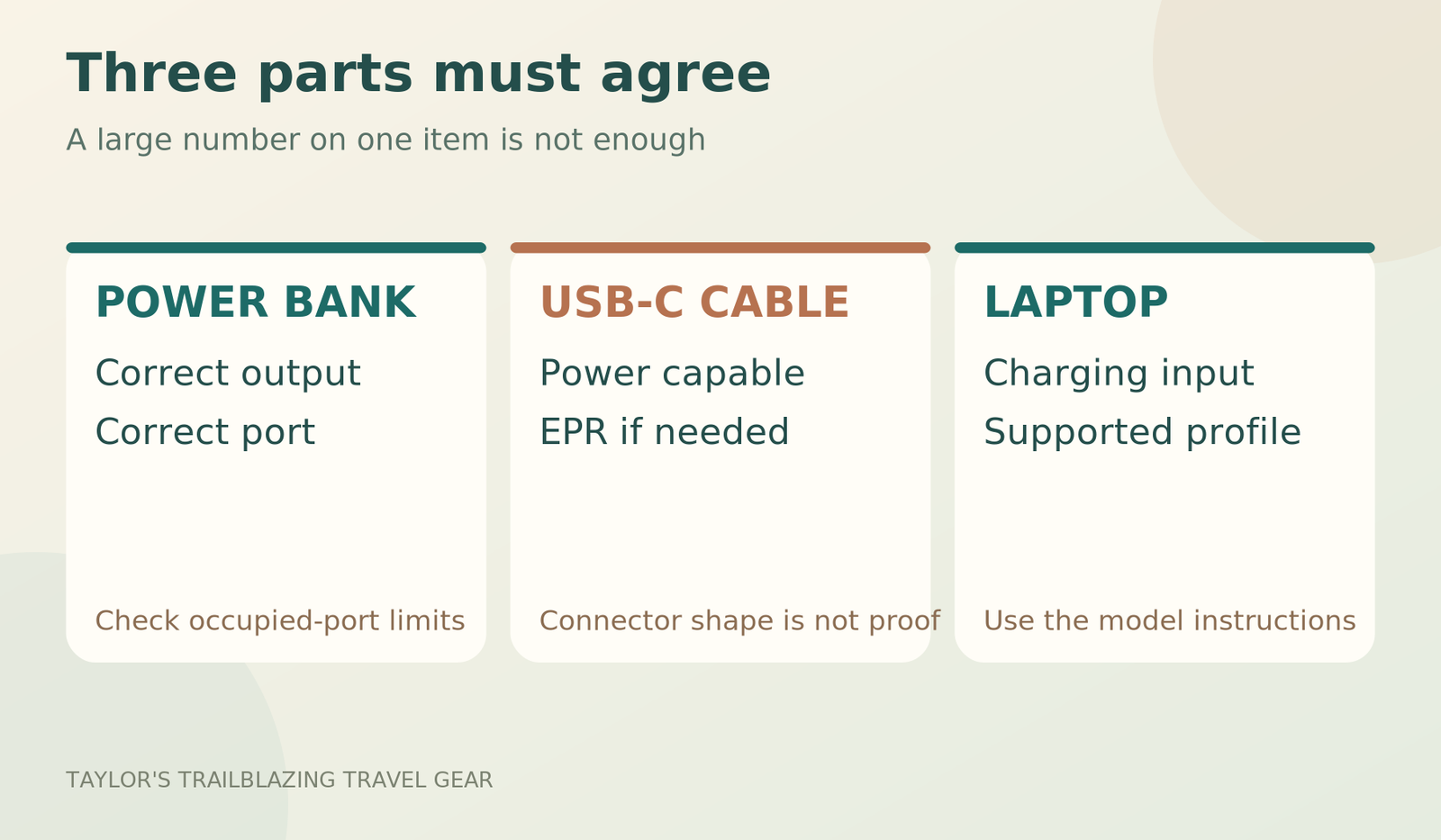
Find the laptop manufacturer’s charging guidance for the precise model, including its supported input and any required cable. The fact that a machine has USB-C ports does not establish that every one can receive power. A USB-C data connection and a USB-PD charging input can look similar while doing different jobs.
For a Mac that charges through USB-C, Apple explains that a suitable USB-PD source can be used and recommends meeting the relevant adapter wattage for the best charging experience. That is useful guidance for those Macs, not a rule to apply automatically to every Windows laptop or proprietary charging system. [12]
Separate ‘charges at all’ from ‘supports the workload’
A laptop may accept a lower-power source yet consume energy faster than that source supplies it during demanding work. In that situation, the bank may slow the decline in the internal battery without producing the refill expected. This is an energy-balance issue, not necessarily a defective power bank.
Decide whether the requirement is a sleeping-laptop top-up, ordinary document work or a more demanding application. Then check that actual task with the intended bank and cable. A successful charging icon while the laptop is idle does not demonstrate that the same arrangement will support a sustained workload.
UGREEN Nexode 130W: the balanced starting point
Why it suits an ordinary laptop travel kit
The SKU 35524 display model combines a published 72Wh battery with up to 100W USB-C1 output and up to 65W input. UGREEN lists its weight at 476g. The separate USB-C2 maximum is 30W, which helps explain why the product name describes a combined capability rather than a 130W single-laptop connection. [1]
I would shortlist it for a traveller whose laptop uses a conventional USB-PD input and who wants a meaningful reserve without immediately moving to the heavier 90Wh options. A removable cable makes it possible to choose a length that suits the working position, although that also creates an item to remember.
The decision turns on your bag and charging schedule
The upright body may work well in a dedicated accessory pocket and poorly in a narrow laptop sleeve. Measure the intended compartment before choosing it from a photograph. Also leave space to remove the battery without unpacking the computer when cabin-baggage arrangements change.
For a traveller replenishing the bank through a suitable charging window each evening, the input specification may be enough. Someone relying on a very short outlet stop should compare the whole refill arrangement more carefully. The published maximum is not a guarantee of a full recharge during an arbitrary airport connection.
Anker A1695: useful when integrated cables earn their space
Convenience is the reason to compare it
The A1695 has a manufacturer-identified 90Wh battery and built-in USB-C leads, with up to 100W from an individual supported USB-C connection. Anker’s UK specification lists approximately 594g. Its value is the combination of reserve and a ready-to-use cable arrangement, not a claim that its 165W name represents a single laptop’s charging rate. [2, 3]
For someone who repeatedly charges a laptop during permitted ground travel, fewer loose pieces can be attractive. However, the built-in leads do not remove every cable question. Reach, routing and the laptop’s connector position still matter, and a separate compatible lead may be useful when the fixed arrangement is inconvenient.
Multi-device use changes the allocation
Anker distinguishes its two-device maximum from lower total output when three or four devices are connected. Do not assume every USB-C connection continues delivering its individual headline simultaneously. The intended laptop-plus-phone combination should be checked against the manufacturer’s allocation diagram. [2]
I would choose it when the integrated leads genuinely simplify a repeated routine and the larger reserve is needed. For a one-off emergency top-up, the additional weight may be difficult to justify. A product can be convenient at the desk yet still be more battery than the journey requires.
UGREEN Nexode 200W: for a genuinely supported 140W connection
Higher output needs agreement across the whole chain
The original SKU 35525 model lists 90Wh and a maximum 140W output on its main USB-C connection, with a published weight of about 609g. Its 200W label concerns combined output. Check that your laptop supports the relevant charging profile before making that higher single-port figure the reason for purchase. [4]
USB-IF describes 140W as part of USB Power Delivery’s Extended Power Range, using 28V at 5A. That differs from the older 100W arrangement at 20V and 5A. The source, cable and receiving device all need to support the intended connection; a larger number printed on only one of them is not enough. [6]
When the extra capability adds little
A laptop that accepts only 65W or 100W will not become a 140W device because it is connected to this bank. Likewise, a workload that needs only a modest refill may not benefit enough to justify the larger unit. Compare the actual requirement before paying for unused capability.
Be especially careful with listings that now include retractable-cable versions under similar names. This guide’s figures refer to the original smart-display model, not every 25,000mAh UGREEN bank. Inspect the selected variant and its energy label rather than transfer a specification from a familiar-looking product photograph.
UGREEN 12000mAh 100W: a shorter-session reserve
High output does not have to mean maximum capacity
The compact Nexode 12000mAh model lists 44.4Wh and a weight of roughly 310.6g, with up to 100W output and 65W input. It is worth comparing when the aim is to finish a task or add a partial charge, rather than replace a large proportion of the laptop’s internal battery. [5]
This is a particularly useful category for travellers who already know their laptop lasts most of the day. The bank becomes a margin against a delayed connection, not the main power source for the entire journey. That narrower job can make carrying less energy a deliberate and sensible choice.
Give the reserve a defined purpose
Write down the task it must cover: perhaps preparing a document during a connection, uploading a small file or reaching the next reliable outlet. Avoid buying it for a vague promise of ‘all-day power’. A smaller battery cannot supply the same energy as a larger one merely because both list 100W outputs.
The compact option is less persuasive when it will also support a phone, tablet and another person’s equipment. Shared use can consume the margin that made it adequate for the laptop alone. Revisit the energy budget whenever the number of devices changes rather than assume one successful trip settles every future use case.
CUKTECH 15 SE: match a known 65W requirement
A lower-power option should be chosen deliberately
The PB200 15 SE is described with up to 65W USB-PD laptop charging, while the manufacturer lists 72Wh/73.44Wh battery variants. Both energy figures sit below 100Wh, but the unit’s own marking is the one to use for travel checks. Do not substitute figures from the 15 Ultra or another CUKTECH model. [8]
For a laptop whose supported charging requirement fits this profile, the model deserves a practical comparison. It is less suitable as a blind purchase for a computer normally supplied by a much more demanding proprietary adapter. Start with compatibility rather than hope a USB-C connection will make the difference irrelevant.
Know what you are giving up
A 65W-class connection may be enough for the intended task without offering the same margin as a 100W or 140W arrangement. That can be a sensible trade-off when the laptop and workload are known. It is not a saving when it leaves the computer unable to complete the work the bank was bought to support.
I would compare the current listing, supplied cable and seller support against the more powerful alternatives only after confirming the requirement. A lower headline is not automatically poor value, just as a higher headline is not automatically better. The useful measure is whether the complete arrangement does the needed job.
Baseus original Blade: when a flatter format fits better
The wide footprint is the point of the comparison
Baseus publishes 74Wh, up to 100W USB-C output and up to 65W input for the original Blade. Its original-model dimensions are around 16.2 x 13.4 x 1.8cm and its weight is 506g. Those details describe a broad, flat battery rather than an especially small object. [9]
This shape may suit a dedicated accessory compartment in a work bag. However, leave it protected from pressure and accessible for removal. Do not use a laptop screen as the surface against which a tightly packed battery is compressed simply because both items are flat.
The exact version needs extra attention
The manufacturer direct listing showed availability restrictions or sold-out status at review, making retailer version checking especially important. Blade HD, Blade H1 and the original Blade should not be treated as identical products. Verify the dimensions, energy label and port behaviour of the version offered. [9]
I would choose this model only when the shape solves a genuine packing problem. A tall bank may be easier to reach from another bag’s side compartment, and neither geometry is universally better. Bring the dimensions back to the actual pocket rather than decide from the apparent thinness in an advert.
65W, 100W and 140W: choose the supported profile
More watts can help the charging window, not the energy total
A higher supported output can transfer energy faster under suitable conditions. It does not increase the amount stored inside the bank. Two 90Wh batteries can have different maximum outputs while holding the same nominal energy; a 44.4Wh bank can support 100W yet still have a much smaller reserve.
This distinction becomes useful during a short ground stop. A laptop that supports the higher input may gain more energy in the available window, but the source and cable must sustain the appropriate arrangement. Do not convert a peak specification into a guaranteed number of minutes without a relevant, clearly described test.
The laptop controls what it requests
USB Power Delivery is a negotiated system rather than a battery forcing its largest output into every connected device. USB-IF describes flexible power management in which devices draw the power they require within the supported arrangement. Consequently, a lower display reading can be normal when the laptop’s demand is lower. [6]
The practical check is whether the laptop charges appropriately for the task and whether the connection matches its instructions. Chasing the maximum readout can distract from that purpose. A bank showing fewer watts near a fuller laptop battery is not automatically worse than one showing a larger figure under different conditions.
The cable is a functional part of the power system
Check power capability rather than appearance
USB-IF distinguishes cable capabilities and uses power-capability markings for certified products. A cable that fits both sockets is not necessarily suitable for the intended high-power connection. For 140W Extended Power Range use, select a properly specified EPR-capable cable; a suitable 240W-rated cable is a straightforward category to investigate. [13, 6]
For a 100W connection, the relevant cable must support the required 5A arrangement. Follow the laptop and bank manufacturers’ guidance rather than assume an unmarked lead from a phone drawer will do. Keep the known-compatible cable with the bank so that the travel kit remains a system instead of a collection of similar connectors.
Length and replacement can change the buying decision
A short cable can reduce clutter on a desk but leave the bank hanging awkwardly when the laptop port is on the far side. A longer cable can improve reach but needs sensible routing. Choose a length that lets both devices rest securely without pulling on their connectors.
Integrated cables are convenient until their length or connector arrangement is wrong for the situation. Removable cables are replaceable but easier to forget. Neither format removes the need to inspect wear and damage. Consider how the bank will be used repeatedly, not only how neatly it can be photographed in an empty bag.

Estimate useful work time without inventing test results
Start with an explicit planning assumption
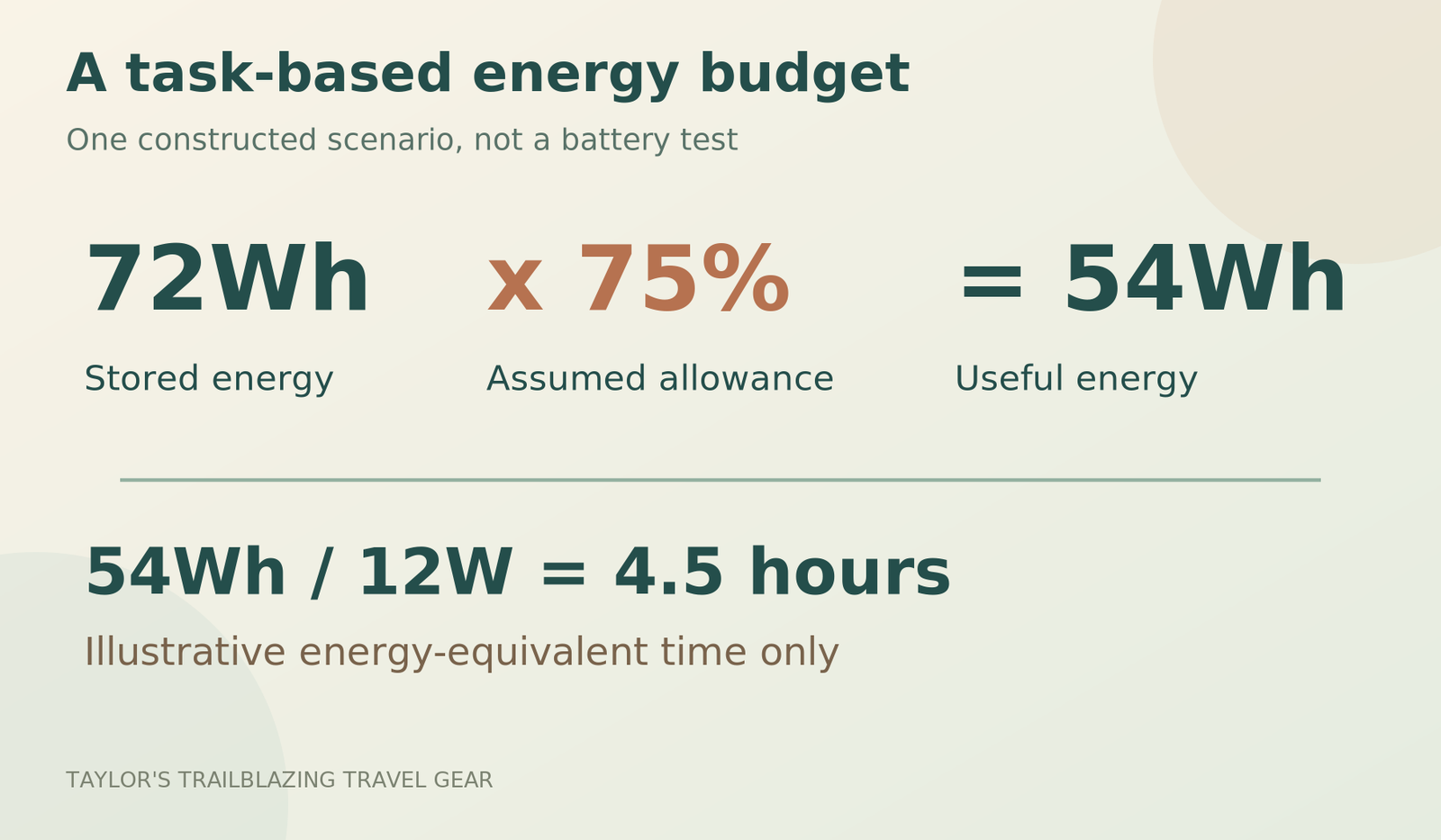
For an illustrative calculation, assume 75% of a bank’s stored energy becomes useful energy for the laptop’s task after the complete charging chain. This is not a measured efficiency for any shortlisted product. Divide that illustrative useful energy by an assumed average task demand to understand the order of magnitude, not to promise a runtime.
For example, 72Wh multiplied by 0.75 gives 54Wh. At an assumed average 12W demand, that represents 4.5 hours of energy; at 25W, it represents about 2.2 hours. These are energy-equivalent scenarios, not independently tested added battery life. Actual use, charging limits, temperature and laptop behaviour can change the result.
On a small screen, scroll the table sideways.
| Stored energy | Illustrative useful energy | At an assumed 12W | At an assumed 25W |
|---|---|---|---|
| 44.4Wh | 33.3Wh | About 2.8 hours | About 1.3 hours |
| 72Wh | 54Wh | About 4.5 hours | About 2.2 hours |
| 90Wh | 67.5Wh | About 5.6 hours | About 2.7 hours |
Why a ‘full recharge’ claim is often the wrong target
A traveller rarely arrives at an outlet with exactly zero charge and then leaves the computer untouched until it is full. More often, the laptop is working while the bank supports it, or the aim is a partial refill before the next connection. A useful plan therefore asks how much work remains, not only how many complete charges fit on an advert.
Keep the laptop’s existing battery separate from the bank’s contribution when comparing scenarios. Otherwise, an apparent all-day runtime may quietly include a full internal battery as well as the external reserve. That can be a useful complete kit, but it is not evidence that the power bank alone supplied the whole day.
One laptop, two laptops or a laptop and phone?
Total output must be read as an allocation
A power bank with several ports does not necessarily give each one its maximum simultaneously. Check the manufacturer’s diagram for the occupied combination and the order of priority. Adding a phone can change the available laptop output, while using a lower-output USB-C socket can produce a different result even before another device is connected.
For an important work session, I would prioritise the laptop on its specified main port and handle smaller devices separately when practical. That is an organisational choice, not a universal rule about every bank. The goal is to avoid discovering a sharing limitation only after the laptop has started losing charge during the task.
Two laptops need a separate energy calculation
Even when a bank supports two useful outputs, the battery reserve is still shared. A 90Wh bank does not become two 90Wh supplies because both USB-C ports are occupied. Add the energy requirements of both users, then compare that total with an explicitly conservative planning allowance.
Also consider whether both computers can be positioned safely near the bank with the available cables. A technically supported two-device arrangement may be inconvenient in a crowded lounge. Separate charging windows can be simpler, provided the schedule permits them and neither traveller depends on an unrealistic recharge promise.
How the bank will be refilled between work sessions
Check the charger, the cable and the bank’s input together
A bank accepting up to 100W cannot benefit from that ceiling when connected to an unsuitable low-output charger. Likewise, a charger’s total headline power may be divided when several devices are attached. Compare the actual port allocation and cable, then check the bank’s own input specification.
The travel adapter is another part of that arrangement when the mains connection changes overseas. Use a suitable charger and adapter for the local supply rather than assume a hotel USB socket can replenish a large laptop bank quickly. The bank’s portability does not remove its dependence on a suitable source of mains power between demanding uses.
Use timing claims only with their stated conditions
Anker gives an approximately two-hour refill example for the A1695 using a suitable 100W-or-higher charger at its stated temperature. That is a manufacturer example, not a measurement from this review and not a promise for every airport socket, cable or partly shared charger. [2]
For planning, allow room for a charging rate that changes during the session. A near-empty battery, temperature protection or a fuller state of charge can alter behaviour. Avoid a schedule that succeeds only when the headline maximum is sustained throughout; the travel day should still work when replenishment is slower than the most optimistic scenario.
Three work-trip decisions that lead to different purchases
The short connection and a mostly charged lightweight laptop
A traveller whose computer normally lasts through the journey may need only a contingency against a delayed departure. The compact 44.4Wh UGREEN becomes worth investigating because its job is limited: finish a document, make a small upload or reach the next outlet. It is not being asked to supply a whole working day.
Keep that role explicit when packing. If the same bank will also refill two phones and a tablet, it is no longer the narrow laptop reserve originally budgeted. Recalculate the shared demand rather than let convenience quietly consume the margin that justified the smaller battery.
The ordinary office workload through a longer ground connection
For document work and other tasks that the laptop can handle within its supported USB-PD arrangement, a 72Wh bank may be the more comfortable starting point. Compare the UGREEN 130W model with your charging input and expected energy use, then test a representative session at home.
This is not a claim that every office laptop behaves the same way. Screen brightness, connected accessories and the actual application mix can change demand. The purpose of the rehearsal is to replace a broad category such as ‘work laptop’ with evidence about the machine and tasks you will actually take.
The demanding laptop or a shared charging routine
A compatible 140W input can make the UGREEN 200W model relevant, while built-in-cable convenience can favour the Anker A1695. Both offer a manufacturer-identified 90Wh reserve, so choose between the connection requirements and practical arrangement rather than assume the larger combined wattage automatically means longer endurance. [4, 3]
For work that must continue without interruption, an external battery is still only one part of the plan. Confirm that use is permitted at the intended time and retain a suitable mains charger. A bank cannot resolve an airline restriction, an unsupported laptop input or a work schedule built around a socket that has not been confirmed.
A useful pre-trip compatibility rehearsal
Test the actual workload and connection
Charge the equipment appropriately, use the intended cable and connect through the designated laptop port. Start a representative task rather than a synthetic stress test that bears no relation to the trip. Observe whether the laptop gains charge, remains broadly stable or continues losing charge while the bank is connected.
Record the bank model, port and cable used so the successful arrangement can be packed intact. If the result is unsuitable, ask the manufacturer about that precise combination. ‘It has USB-C but does not work’ is a much less useful support question than identifying the laptop model and the input profile involved.
Check the same arrangement after adding another device
A laptop-only success does not establish the result with a phone sharing the bank. Repeat the ordinary task with the intended second device attached if that is how the kit will be used. Look for the practical outcome rather than focus exclusively on the largest instantaneous wattage displayed.
Do not cover equipment, leave it under pressure or continue testing a unit that becomes damaged or behaves abnormally. The rehearsal is a compatibility check within the manufacturers’ instructions, not a reason to exceed limits. Resolve any problem before departure rather than hope different surroundings will make it disappear.
A worked energy budget for one specific job
Separate the laptop’s existing reserve from the extra requirement
Consider a hypothetical laptop with a 60Wh internal battery at 50% charge. Ignoring its own reporting uncertainty, that represents about 30Wh already available. Suppose the planned task needs an average 20W for two hours, or 40Wh, and you want to retain another 10Wh afterwards. The additional useful energy required is therefore about 20Wh, not a complete 60Wh refill.
Under this article’s illustrative 75% whole-chain allowance, a 44.4Wh bank represents approximately 33.3Wh of useful energy. On those assumptions, the smaller category could cover the gap. Change the workload, starting charge or required reserve and the answer changes. These numbers are a constructed planning example, not a test result for any laptop or shortlisted bank.
Add accessories to the same budget
A phone or accessory charged from the bank uses part of the same finite reserve. Likewise, equipment powered through the laptop can affect its demand during the session. USB-IF’s discussion of power delivery includes peripherals and hubs because power management is not limited to the computer’s internal battery. [6]
Write down the complete working arrangement before applying a runtime estimate. A bare laptop used for editing text is not automatically comparable with the same machine attached to several accessories. Rather than seek a universal figure for ‘a laptop’, use the most representative setup you can test at home and keep a margin for the parts you cannot measure precisely.
What to check when the connection disappoints
First establish the direction and the correct port
Check which bank port is intended to supply the required output and which laptop port accepts charging. USB-PD can support flexible power direction, so a two-way USB-C connection deserves more attention than an old one-direction charging lead. Follow the model instructions and any input/output indicators rather than infer direction from the cable’s appearance. [6]
Disconnect other devices for the initial check and use the intended cable. If the laptop then behaves as expected, add the other equipment one item at a time. This can help distinguish a shared-allocation limitation from a basic compatibility problem without treating every change in the display as a fault.
Then distinguish slow charging from no useful charging
Compare an ordinary idle or light-task state with the representative workload. A bank that charges the laptop while it is resting but cannot keep pace during demanding work has a different limitation from one that never establishes a supported connection. That distinction gives the manufacturer a much clearer question to answer.
Do not repeatedly reconnect damaged equipment or bypass warnings in search of a better result. A poor connection, abnormal heat or damaged cable should end the test. Troubleshooting here means checking the supported arrangement, not opening the battery, modifying leads or defeating protection features.
Use available mains power without making it a hidden assumption
A working outlet can change the best charging order
When a suitable, permitted mains source is available, it may be simpler to charge the laptop directly and replenish the bank separately. That avoids treating the external battery as an obligatory middle step. Follow the charger’s allocation limits and the manufacturers’ instructions for any simultaneous arrangement.
A bank is most useful when it covers a gap, not when it is constantly cycled through a task the wall charger could already handle. For a work trip, decide whether the immediate priority is the laptop’s internal reserve or rebuilding the external contingency for the next stage. Those priorities can change during the day.
Aircraft power is a separate facilities question
Do not assume the booked aircraft, seat or operating flight will provide a usable laptop outlet. Check the airline’s information and any stated limitations for the journey, then keep the work plan viable without depending on an unconfirmed facility. This guide has not verified an electrical outlet for your particular seat.
Where an airline permits a direct device connection but prohibits power-bank use, those are separate rules to follow rather than a loophole to exploit. Ask the crew when the permitted arrangement is unclear. The presence of a socket does not authorise every charger or battery configuration a passenger might bring.
Make the battery removable without unpacking the office
Design the bag around a quick change of plan
Put the bank in a protective, accessible compartment rather than beneath the laptop, documents and every spare cable. You should be able to remove it when the bag is taken for hold loading without exposing the computer to a crowded gate area. Keep the Wh label visible when it is taken out.
An organised cable arrangement also helps avoid accidental pulling when the laptop is moved. Give the computer and bank a stable resting position, then route the lead without making either connector carry weight. A technically compatible kit can still be impractical when it only works with the battery dangling from the edge of a table.
Check the whole weight, not just the bank
The published battery weight is only one part of the additional equipment. A separate charger, suitable cable, adapter and protective storage can make the complete kit noticeably larger than the product comparison suggests. Weigh your own arrangement rather than combine assumed accessory weights from unrelated listings.
This is particularly useful when choosing between a compact contingency and a large reserve. The larger bank may allow one shared charging arrangement, or it may simply add more equipment to an already capable kit. Compare complete, usable alternatives before deciding which one is lighter in practice.
What this shortlist deliberately does not recommend
A phone-only bank with a laptop-shaped promise
A USB-C connector on a small phone bank is not enough evidence of suitable laptop charging. Check the supported output profile and the receiving computer’s requirements. Buying a lightweight battery that cannot perform the intended task is not a weight saving; it is an extra object to carry alongside an unresolved problem.
Likewise, a generic conversion lead for a proprietary laptop connection needs explicit support for the exact equipment. Matching a round plug’s diameter does not establish suitable electrical behaviour. This guide does not recommend improvising that connection or treating a marketplace compatibility list as a substitute for manufacturer guidance.
A large portable station bought only because it has an AC socket
A mains-style output can look attractive when a laptop does not charge through USB-C, but a much larger battery introduces a different set of capacity, carriage and practical questions. Do not transfer this article’s below-100Wh shortlist conclusions to portable power stations or larger external batteries.
For an unsupported laptop, the appropriate next step is to ask its manufacturer about suitable travel power options and check the airline before purchasing. Sometimes the simpler answer is to adjust the working schedule, use the laptop’s own battery more carefully or use mains power at an appropriate ground stop. The presence of more sockets does not remove those constraints.
Advantages and limitations of carrying laptop reserve
Where a laptop power bank adds real value
It can provide a useful contingency during permitted ground travel, reduce dependence on an immediately available outlet and support a partial refill when the laptop’s internal battery is nearly enough. A well-chosen model can also serve compatible smaller devices, provided their energy needs are included in the plan.
Where the extra equipment becomes difficult to justify
A larger bank adds weight, needs its own refill arrangement and may remain unused onboard because of airline policy. It cannot create a supported charging input on the laptop or guarantee a full recharge without losses. For an occasional short journey, a fully charged laptop and a realistic work plan may be the simpler solution.
Common laptop-power-bank mistakes
Buying combined watts rather than laptop watts
Read the maximum for the actual USB-C connection and the supported voltage profile. A product named 165W or 200W can supply a smaller maximum to one laptop. The number on the front is only useful after you know what it describes.
Forgetting that working consumes part of the reserve
A laptop running applications while charging uses energy at the same time. The bank’s stored Wh cannot all be counted as an increase in the internal battery. Budget for the task and the charging chain together rather than promise a full refill based on capacity labels alone.
Assuming that successful charging proves airline permission
Technical compatibility and travel permission are separate. A bank that works perfectly at home may still have to remain disconnected during the flight. Check the airline before making the purchase part of an onboard working plan, and keep essential work achievable within the rules.
Frequently asked questions
Will any USB-C power bank charge my laptop?
No. The laptop must accept charging through the intended port, and the bank must offer a suitable input profile through a compatible cable. Some banks are designed mainly for phones, while some laptop USB-C ports are not charging inputs. Check the exact laptop model rather than decide from connector shape alone. [6, 12]
Is 65W enough, or should I buy 100W?
Use the laptop manufacturer’s recommendation and the workload as the starting point. A supported 65W arrangement may be sufficient for one laptop and inadequate for another. A higher-capability bank can provide more headroom only when the laptop and cable support it; it does not force the device to accept extra power. [6, 12]
Can a 100W cable be used for a 140W connection?
Do not assume it supports that higher-power arrangement. USB-PD’s 140W Extended Power Range uses a different voltage level from the earlier 100W ceiling. Choose a properly specified EPR-capable cable, such as an appropriate 240W-rated option, and follow the equipment manufacturers’ guidance. Connector compatibility alone is not enough. [6, 13]
Can I use a power bank with a laptop that has a round charging socket?
Only through an arrangement explicitly supported for that exact laptop and power source. Do not buy a generic USB-C-to-barrel lead and assume matching dimensions establish suitable voltage, polarity or charging behaviour. Ask the laptop manufacturer about approved options rather than improvise a power connection.
Why does the laptop battery still fall while connected?
The supported supply may be lower than the laptop’s demand during the task, or the chosen port, cable or shared-output arrangement may be limiting it. Check the exact setup and the manufacturer’s guidance. A charging icon indicates a connection, not necessarily enough incoming power to cover every workload and refill the battery simultaneously.
Does a 90Wh bank supply one complete 90Wh laptop recharge?
Not as a dependable planning assumption. Losses occur in the charging chain, and the laptop may consume energy during the process. Treat the bank as partial-charge or task reserve, then test the actual arrangement. A capacity match without any margin is not a realistic promise of a complete refill.
Which of these models has the highest single-port output?
Among the six identified versions, the UGREEN Nexode 25000mAh 200W lists a 140W maximum on its main compatible USB-C output. That does not make it best for every laptop. Confirm that the receiving device and cable support the relevant profile and that the extra capability is useful for the planned charging window. [4, 6]
Should I replace the mains charger with the power bank?
Usually the bank needs a suitable source to refill, so leaving the mains charger behind can undermine the plan. A power bank is stored reserve, not a source of unlimited electricity. Compare the complete kit and the charging opportunities on the route before deciding which wall charger, adapter and cables are needed.
Can the bank stay in my laptop bag during a gate check?
Remove it before the bag goes into the hold, then follow the operating airline’s cabin-storage instructions. Some airlines also prohibit keeping power banks in overhead compartments. Pack the battery where it can be transferred easily rather than burying it behind the computer and every accessory. [7, 10, 11]
My final recommendation for a laptop travel kit
Begin with the laptop, not the bank. Establish the supported charging input and cable, estimate the energy needed for the intended ground-based task, then apply the strictest airline conditions on the route. Only after those checks should size, integrated leads and display features decide the purchase.
For a conventional arrangement, the UGREEN 72Wh display model is a useful first comparison. Choose the compact 44.4Wh model for a narrower contingency, the Anker A1695 for genuinely useful cable convenience, or the 140W-capable UGREEN when the laptop can use that profile. A smaller bank that does the job is preferable to a larger one bought on an assumption.
Sources and fact-checking notes
Editorial sources checked on 9 October 2026. Manufacturer maxima are not sustained-output measurements. Runtime examples are constructed calculations with their assumptions shown, not hands-on results. Compatibility and airline permission are separate checks; no universal approval or charging guarantee is claimed.
- [1] UGREEN Nexode 20000mAh 130W, SKU 35524Manufacturer specifications; exact model and version matter.
- [2] Anker 25K 165W, model A1695: UK specificationsManufacturer specifications; exact model and version matter.
- [3] Anker A1695: manufacturer 90Wh identificationCanadian manufacturer bundle identifies the A1695 bank as 90Wh; UK buying links are for the bank, not this bundle.
- [4] UGREEN Nexode 25000mAh 200W, SKU 35525Manufacturer specifications; exact model and version matter.
- [5] UGREEN Nexode 12000mAh 100W, SKU 35526Manufacturer specifications; exact model and version matter.
- [6] USB-IF: USB Power DeliveryPower negotiation, direction, 100W Standard Power Range and Extended Power Range.
- [7] IATA: 2026 power-bank operator guidanceGuidance on the ICAO addendum effective 27 March 2026; operator rules still need checking.
- [8] CUKTECH 15 SE, model PB200Manufacturer lists 72Wh/73.44Wh variants; read the delivered unit label. USB-PD laptop output is 65W.
- [9] Baseus original Blade 100W 20000mAhOriginal Blade specifications, not Blade HD or H1. Manufacturer direct availability was restricted/sold out at review.
- [10] Emirates: power-bank restrictionsOne clearly labelled power bank under 100Wh; no onboard use or charging, and no overhead-bin storage.
- [11] Singapore Airlines: carriage of power banksPolicy effective 15 April 2026: quantity, cabin storage and onboard-use restrictions.
- [12] Apple: identify a suitable Mac power adapterUSB-PD compatibility and manufacturer wattage guidance for supported Mac models.
- [13] USB-IF: cables and connectorsPower-capability markings and the limits of what a cable certification establishes.
Illustrations in this article were created for Taylor’s Trailblazing Travel Gear. Third-party photographs, where used, are credited beside the image or in the source list.