Best Travel Earbuds for Flights

Best Travel Earbuds for Flights
Six research-led options, with the fit, battery and seatback-audio checks that matter in the air.
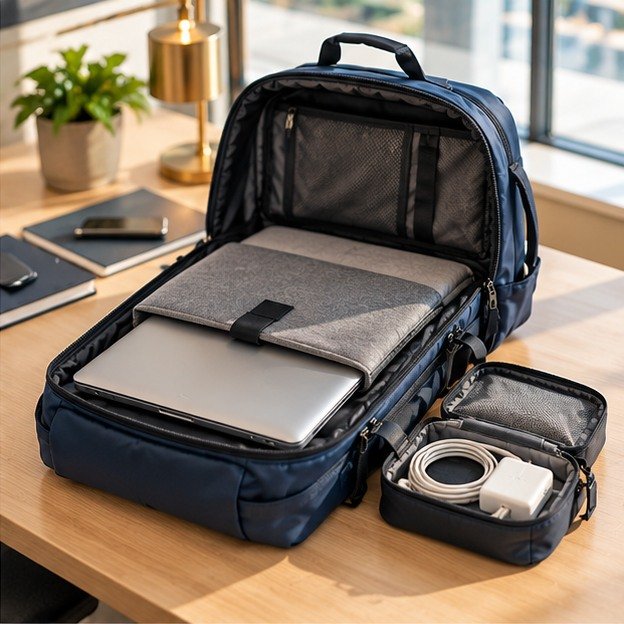
Original editorial concept scene, not a photograph of a recommended product or an in-flight test.
The best travel earbuds for flights are the ones you can wear comfortably, connect to the audio you actually use, and keep running through the listening part of your journey. The most expensive pair is not automatically the best answer. Nor is the largest battery number on the box: it may include several recharges in a case while the earbuds are out of your ears.
This guide compares six current options through those practical questions. It is research-led, using manufacturer specifications and airline guidance, rather than a claim that we have worn every pair on an aircraft. The recommendations are organised by use case, not a supposedly scientific ranking of noise cancellation that we have not measured.
Start with your phone and your typical flight. Then decide whether you mainly watch your own downloads, use the seatback screen, or want quiet while resting. Those three habits can lead to quite different buying decisions.
AirPods Pro 3
A sensible starting point for Apple users, subject to ear-tip fit.
Technics AZ100
A useful AAC/ANC battery specification for longer listening blocks.
JBL Tour Pro 3
The case can transmit from an appropriate wired audio source.
Comfortable seal
The strongest feature list cannot compensate for painful tips.
01Best travel earbuds for flights: the useful shortlist
How these choices were compared
The shortlist gives priority to a sealed in-ear design, active noise cancellation, transparent published specifications and a practical UK buying route. We then separated phone compatibility, uninterrupted listening time, case size and seatback connectivity. That is a selection framework, not a laboratory score or a promise that one model will fit every ear.
Different travellers also value different compromises. A frequent film watcher may gladly carry a transmitting case. Someone who only listens to downloaded podcasts may prefer a simpler, smaller kit. Meanwhile, an earbud that presses against your ear when you lean sideways can be the wrong purchase even when every other feature looks excellent.
The figures below are manufacturers’ maximum listening claims under their stated conditions. They are not directly comparable endurance tests. Volume, calls, audio settings, battery age and the connected device can change the result, so leave a margin rather than planning to use every advertised minute. [1][3][4]
| Earbuds | Most useful starting point | Published ANC-on listening | Main pre-purchase check | Buying route |
|---|---|---|---|---|
| AirPods Pro 3 | An iPhone-centred travel kit | Up to 8 hours | Fit and access to the features you need on your devices | Check AirPods Pro 3 |
| Sony WF-1000XM6 | A feature-rich premium shortlist | Up to 8 hours | Tip comfort and your phone’s supported audio settings | Check Sony WF-1000XM6 |
| Bose QuietComfort Ultra Earbuds, 2nd Gen | Adjustable tip and stability-band fit | Up to 6 hours; 4 with Immersive Audio | Whether the body and band remain comfortable | Check Bose Ultra Earbuds 2 |
| Technics EAH-AZ100 | Longer AAC listening blocks | Up to 10 hours with AAC; 7 with LDAC | Which codec and connection settings you will use | Check Technics AZ100 |
| JBL Tour Pro 3 | A wired seatback-audio route | Up to 8 hours | The aircraft audio output and the case’s required cable | Check JBL Tour Pro 3 |
| soundcore Liberty 5 | A value-focused alternative | Up to 8 hours | Comfort, controls and the exact UK offer | soundcore UK product details |
Specification sources: [2][1][3][4][5][6]
Read the model name twice
WF-1000XM6 means Sony’s earbuds, not its WH-series headphones. The Bose recommendation is the second-generation Ultra earbuds, not the original model. UK marketplace pages were identifiable, but current offers were not consistently visible; the JBL listing displayed no featured offer when checked on 11 October 2026. Confirm the selected model, seller and availability before paying.
02Which pair makes sense for your travel kit?
AirPods Pro 3: start here with an iPhone
AirPods Pro 3 combines Apple’s device integration with a manufacturer claim of up to eight hours of listening with noise cancellation enabled. Its range of supplied tip sizes makes trying the fit worthwhile, rather than assuming an older pair’s tips or shape will feel identical. Many additional features require compatible Apple hardware and software. [2]
The buying case is strongest when your everyday phone, tablet and laptop already work well together. That can reduce the number of apps and connection routines you manage while travelling. Nevertheless, convenience does not justify tolerating pressure points: try both ears, speak, swallow and move your head before deciding the fit is settled.
For a mixed-device household, write down the features that matter rather than buying for the logo. Basic playback, switching between devices and more advanced functions are separate questions. A pair that is convenient on your iPhone may not provide the same experience on a work computer. Check that exact combination while a return is still possible.
Sony WF-1000XM6: a flexible premium candidate
Sony lists noise cancellation, multipoint connectivity and support for several Bluetooth audio formats, including AAC and LDAC. The published maximum is eight hours with noise cancellation on, and the earbuds weigh approximately 6.5 g each including their tips. Those specifications make this a sensible premium candidate, but they do not establish that it cancels more cabin noise than every competitor. [1]
Think about the role of the companion app before departure. A useful setup is one in which you know how to change the listening mode and volume without digging through several screens. Set the controls deliberately, then practise the same sequence with your phone locked and packed where it will be on the aircraft.
Also check what your source device actually supports. A sophisticated codec printed on an earbud specification does not guarantee that your phone or an aircraft transmitter uses it. Choose for the complete connection, not one component in isolation. For downloaded speech, a stable, familiar setup may be more valuable than pursuing the highest advertised audio setting.
Bose QuietComfort Ultra Earbuds, second generation: assess the whole fit
Bose supplies separate ear tips and stability bands, giving two fit adjustments rather than just a tip-size choice. Its battery claim is up to six hours with Immersive Audio off, dropping to four hours with that feature on. The second-generation case adds wireless charging. Treat those as practical differences, not evidence of a universal comfort winner. [3]
The band arrangement may appeal when a conventional earbud feels insecure during head movement. However, extra contact with the ear can also be unwelcome for some people. Try the smallest comfortable combination that stays secure according to the manufacturer’s fit instructions; a tighter arrangement is not automatically better for a long listening session.
For a long overnight flight, the shorter listening window means planning a case break. That may be perfectly acceptable around a meal or a period without audio. It is less attractive when your aim is to listen continuously through a long stretch of sleep. Make that decision from your own routine rather than treating case recharges as uninterrupted playback.
Technics AZ100: useful battery detail instead of one headline
Technics publishes different listening figures for different codecs: up to ten hours with AAC and noise cancellation, compared with seven hours using LDAC and noise cancellation. It also lists connection to three devices through multipoint. The distinction matters because the more impressive headline is not the result for every possible setting. [4]
A traveller using a phone for films and a laptop in the lounge may find the connection options useful. Even so, more remembered devices can create more opportunities for an unwanted switch. Before boarding, disconnect devices you will not use and check how an incoming notification or a laptop waking from sleep affects the audio.
The longer AAC specification makes the AZ100 worth considering for a longer listening block. It does not remove the need for charging slack, particularly after months of ownership. Build your plan around the mode you actually select, and check the battery indication before leaving the gate rather than assuming a case that was charged last week is still full.
JBL Tour Pro 3: a different answer to seatback audio
The Tour Pro 3 case can transmit audio from an appropriate 3.5 mm or USB-C audio source using its supplied audio cables. JBL’s published ANC-on listening maximum is eight hours. The case is more substantial than a simple charging shell, so its extra function needs to earn its place in your cabin kit. [5]
This is the most distinctive option here for someone who regularly watches the aircraft’s films. It can replace a separate transmitter in a suitable setup, but it does not make every seatback socket compatible. Inspect the connection type and keep any required aircraft-jack adapter with the cable. A USB socket intended only for charging is not an audio source.
There is another everyday consideration: the transmitting case must remain accessible during listening. A case zipped deep inside the overhead bag is not useful when it is physically connected to your seat. Plan a stable place for it and enough cable slack that standing up does not pull against the aircraft socket.
soundcore Liberty 5: keep value tied to your actual needs
Liberty 5 is the value-focused option in this selection. The manufacturer lists adaptive noise cancellation, multipoint, LDAC and up to eight hours of listening with ANC enabled, or twelve hours with it disabled. Its longer charging-case totals should still be treated as several listening sessions, not one. [6]
The useful question is whether it solves your flight problem at a price you are comfortable losing or replacing. You may not need a transmitting case, an elaborate spatial mode or the closest integration with a particular phone brand. Removing features you will never use is a more reliable route to value than buying the largest discount badge.
Compare the final basket rather than a promotional headline. A spare charging lead, an aircraft transmitter or a different tip arrangement may change the total kit and its cost. Equally, buying a more expensive pair just to avoid one inexpensive accessory can be poor value when you only use that accessory on an occasional holiday.
03Noise cancellation, isolation and the limits of quiet
A seal comes before a specification
Passive isolation is the physical reduction in outside sound provided by the fit of the earbud and tip. Active noise cancellation adds electronic processing. Both matter in a sealed earbud, but neither should be treated as a guarantee of complete silence. The practical aim is more comfortable listening at a sensible volume, not making every nearby sound disappear. WHO recommends well-fitted noise-cancelling earphones as one way to avoid turning up volume in noisy places. [8]
A useful home check is to compare your left and right fit with the same familiar recording at a moderate level. One side sounding noticeably thinner can be a reason to revisit the seal. However, do not respond by forcing a tip deeper or choosing a size that hurts. Follow the manufacturer’s fitting guidance and stop when the arrangement is uncomfortable.
Try this while sitting normally, not just standing in front of a mirror for ten seconds. Reading, moving your jaw and turning towards an imaginary window can expose an awkward shape that a quick fitting misses. The best return-window test resembles your travel posture without requiring an actual flight.
Do not buy an ANC ranking that was never measured
Manufacturer descriptions such as adaptive, personalised or intelligent do not produce a common measurement scale. Without controlled testing across identical conditions, it would be misleading to assign a numerical cabin-noise score to these models. This guide therefore uses specified features and transparent use-case judgements rather than inventing percentages.
Separate the sounds you want to reduce from the sounds you must still respond to. Announcements, a crew member speaking directly to you and the safety briefing should not become inconveniences that you ignore. Learn how to pause or remove the earbuds quickly. A transparency mode can be convenient, but removing them is the clearer option when instructed.
04Connecting to aircraft entertainment without surprises
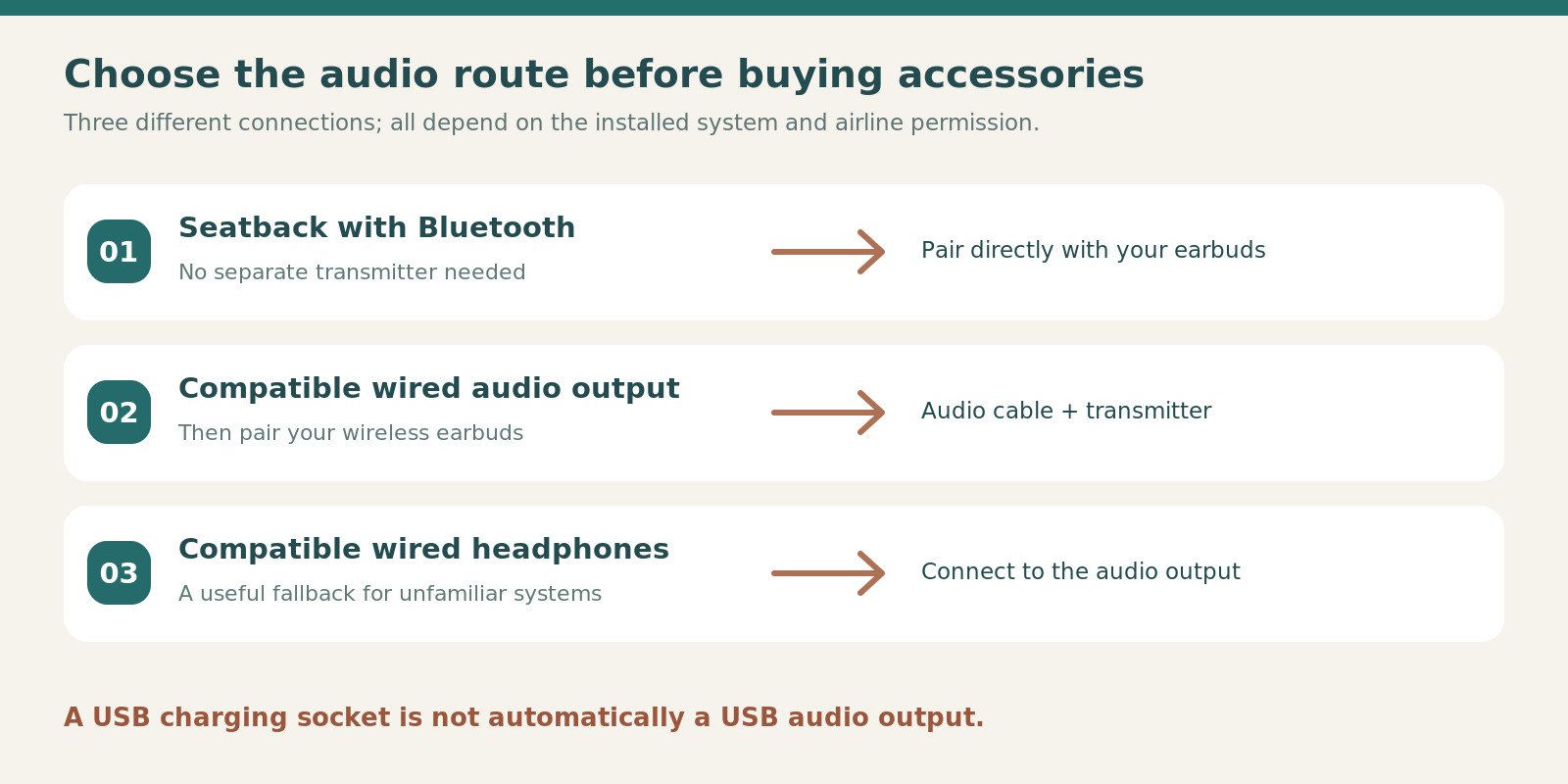
Route one: your own phone or tablet
The least complicated arrangement is often a downloaded film or podcast on a device already paired with your earbuds. Download the actual programme, not merely its thumbnail, and open it once without a network connection. Check subtitles too: they can be useful when you deliberately keep the listening level lower.
Before travelling, test the same app, earbuds and device you will use on board. Streaming-app restrictions, expiring downloads and work-device permissions are separate from earbud quality. Discovering a missing episode at home is a minor inconvenience; discovering it after the doors close can make a premium audio purchase feel rather pointless.
Route two: direct seatback Bluetooth
Use direct pairing only when the installed entertainment system explicitly supports it and the crew permits use. A Bluetooth symbol elsewhere in the cabin, or the airline advertising a newer aircraft, is not proof that your specific seatback screen has the function. Aircraft substitutions also make a fallback useful.
When direct pairing is available, check that you are selecting your own earbuds and not a neighbouring passenger’s device. Give the earbuds a recognisable name before travel. At the end of the journey, follow the screen’s disconnect or forget-device option where provided, then confirm that your phone has regained the connection.
Route three: a transmitter connected to an audio output
A transmitter takes sound from a compatible wired output and sends it to the earbuds. JBL’s case is one example of this arrangement; separate transmitters are another. The necessary pieces are an audio output, the correct cable or adapter, a compatible transmitting device and successful pairing. Power from a USB socket alone supplies none of the missing audio path. [5]
Practise the pairing routine before departure. Some devices use a long button press, some display a light pattern, and some can remember more than one listener. You need to know the routine for your own unit, not a generic sequence borrowed from another model. Keep its instructions available offline.
Finally, take a wired fallback when losing the entertainment would significantly spoil your journey. That may be the airline’s supplied headset or your own compatible wired pair. A fallback is not an admission that wireless technology is poor; it is simply a way to keep an unfamiliar screen or connector from deciding how you spend a long flight.
05Plan battery life around the listening window
Count the hours in your ears
A twelve-hour flight does not necessarily require twelve continuous hours of playback. Meals, conversations, breaks and sleep without audio may divide it into manageable blocks. Conversely, someone using audio for nearly the whole journey should not assume an eight-hour claim covers a twelve-hour flight simply because the case advertises a much larger total.
Write a rough listening plan. For example, two films followed by an hour of music creates a different demand from continuous ambient sound overnight. Put a recharge break where you would naturally remove the earbuds anyway. This is more practical than repeatedly checking a falling percentage because the original plan used the entire advertised maximum.
Leave slack for settings and battery age
Treat the published maximum as a comparison clue, not a departure-day target. Technics explicitly shows how changing codec changes the figure, and Bose separates its Immersive Audio setting. Those examples illustrate why your preferred mode belongs in the battery calculation. [4][3]
A useful personal test is to run your normal setup at home and note roughly when you need to recharge. This is your own observation, not a benchmark transferable to everyone else. Repeat it after a major settings change or when the batteries are noticeably older. A pair you already know may be easier to plan around than a new pair bought the day before departure.
Keep charging organised, not scattered
Give the charging case one predictable home, ideally a small zipped pocket that you can reach while seated. Return both earbuds to it during a proper break rather than leaving them loose on a tray table. A tiny device disappearing under a blanket is a much more ordinary travel problem than most specification sheets acknowledge.
Charge the kit before boarding and check the airline’s rules before using any separate power bank. The CAA’s March 2026 changes say power banks must not be recharged on board and should not be used to charge other portable devices there; airlines may impose stricter rules. Do not assume older travel advice still applies. [10]
06Comfort, controls and the kit you carry
Check leaning comfort, not just walking security
For resting, the part of the earbud outside your ear matters as much as the tip inside it. Try the sort of neck pillow or seat posture you actually use. Pressure from a pillow can change the experience even when the earbuds stay secure while walking. No published gram figure can predict that interaction reliably for every ear shape.
Do not make uninterrupted overnight wear the only acceptable outcome. Being willing to alternate between listening and quiet breaks gives you more options. Persistent soreness, irritation or ear pain is a reason to stop using the earbuds and seek appropriate advice, not a problem to solve by tightening the fit further.
Make the essential controls easy
Decide which three actions you need most: usually pause, volume and a change of listening mode. Test them without looking. Then check how easy it is to trigger a control accidentally when adjusting your hair, putting on a hood or settling against a pillow.
A complicated control scheme can be tolerable at a desk and frustrating in a dark seat. Nevertheless, there is no universally best choice between touch surfaces, stems and buttons. The practical winner is the arrangement you can operate deliberately with your hands and posture. Set it once, practise it, and avoid redesigning the controls mid-journey.
Pack a complete system rather than a pile of accessories
Put the case, its charging lead and any audio adapter together. Check the connector at both ends of every cable. A familiar-looking USB-C plug does not tell you whether a particular cable arrangement carries audio for your transmitter, while a loose adapter is remarkably easy to leave in an aircraft socket.
Keep the kit small enough that you will actually retrieve it before putting your larger bag overhead. A modest pouch that opens cleanly while seated is more useful than an elaborate organiser you cannot comfortably hold. Count components once before boarding and again before leaving the seat; that simple routine also catches a missing earbud.
07A practical buying and first-week routine
Before ordering
Check the exact generation, included accessories, seller and local support route. Look for the full model name in the basket, not just in a search result. Marketplace variations can combine colours, bundles or generations in ways that make a review headline less useful than the selected product details.
Read the retailer’s return conditions for opened in-ear products before assuming that you can wear them extensively and send them back. Hygiene-related conditions and trial offers vary. A manufacturer’s direct trial and a marketplace seller’s policy are not necessarily the same arrangement, so keep a copy of the terms that applied to your purchase.
During the first few days
Start with short sessions and increase them only when the fit remains comfortable. Use familiar spoken audio and music rather than deciding from a dramatic demonstration track. Check each ear separately, then test the controls and connection switching with your usual devices.
Make a note of anything that repeatedly interrupts you: a loose fit, accidental touches, difficult removal from the case or an awkward charging lead. These small frustrations matter more after hours in a narrow seat. Deal with them while you have time to ask the seller or manufacturer questions, not at the departure gate.
Before the first flight
Update and configure the earbuds at home when you have a reliable connection and time to recover from a problem. Afterwards, verify the settings again rather than assuming every update preserves your preferred controls. Save any pairing instructions and necessary apps before travel.
Perform one complete rehearsal: download a film, switch the source device into the permitted offline arrangement, connect the earbuds, use the controls and return them to the case. Rehearse a transmitter separately when you own one. This sequence is a readiness check, not a substitute for following the operating airline’s instructions on board.
08Safe listening and sensible flight etiquette
Follow the airline, not a blanket internet rule
British Airways currently says Bluetooth headphones may be used during the flight but must be switched off for taxi, take-off and landing; it also asks passengers to remove headphones for the safety briefing. Other airlines and aircraft may use different instructions. Check the operating carrier and follow the crew rather than assuming flight mode alone settles the question. [7]
Build the briefing into your routine: put the earbuds safely in their case, listen, and restart only when appropriate. This also avoids balancing loose buds on the armrest while you search for a passport or fasten the belt. Courtesy and organisation solve the same problem here.
Keep the volume modest
WHO advises reducing exposure to loud sound, taking listening breaks and using well-fitting noise-cancelling headphones rather than overcoming background noise by increasing volume. An earbud’s noise-cancelling mode is not permission to play audio loudly for an unlimited time. Persistent ringing or changes in hearing deserve professional attention. [8]
Use the volume and exposure tools on your own device where available, while remembering that an app is not a medical assessment. For general travel comfort, the goal is speech you can follow and music you enjoy without chasing every quiet detail over the cabin background. Pause when you need to speak to someone rather than competing with the audio.
09Fix the connection before replacing the earbuds
When a film looks slightly out of time
First establish where the delay appears. Play the same downloaded clip on your own phone, then compare it with the seatback or transmitter arrangement. A problem present only through one route is a reason to investigate that route, not proof that the earbuds are defective. Keep the comparison simple and avoid changing several settings simultaneously.
Check whether your playback app offers an audio-sync adjustment and whether the transmitter instructions identify a preferred mode. Do not assume a codec advertised by the earbuds is also supported at the other end. When the combination remains distracting, the sensible flight solution may be compatible wired audio rather than spending the journey repeatedly resetting equipment.
When the audio switches to the wrong device
A laptop waking in your bag or a second phone becoming active can complicate a multi-device setup. Temporarily disconnect the device you do not need, then repeat the action that caused the interruption. This helps distinguish an unwanted connection change from a genuine dropout in the link you intended to use.
Before boarding, create a simple travel arrangement with only the source you plan to use actively connected. Restore the more elaborate everyday setup later. Multipoint is convenient when it serves a clear purpose; it is not an obligation to keep every remembered device ready throughout a flight.
When one side sounds different
Check the obvious physical and software causes first: seating in the case, charge level, the selected tip, balance settings and whether any accessible opening needs the manufacturer’s approved cleaning procedure. Do not put sharp objects into the earbud or improvise a solvent treatment. Follow model-specific instructions because meshes, tips and coatings differ.
After any safe adjustment, compare with familiar speech at a modest volume. Avoid compensating for an unexplained imbalance by making everything louder. A persistent change in your own hearing, rather than merely an equipment setting, calls for appropriate professional advice. Keeping those possibilities separate prevents a troubleshooting session from becoming an excuse for uncomfortable listening.
10Match the setup to three different flights
A short hop with your own downloads
For a flight where you will watch one episode or listen to a podcast, the value of a transmitting case may be limited. Prioritise a familiar fit, quick access and easy pausing. You may spend more time moving through terminals and responding to announcements than listening continuously, so a complicated kit can be a poor match for the actual journey.
Pack the case where you can find it immediately when the crew asks you to remove or switch off the earbuds. The shortest flight still benefits from a deliberate storage routine. Buying extra equipment for a theoretical long journey makes less sense when nearly all your travel looks like this.
A long daytime journey with seatback films
Connection flexibility becomes more useful when the aircraft’s entertainment is your main plan. Investigate the output type, bring the correct transmitter arrangement and have a wired fallback. Allow a natural charging break around a meal rather than interrupting a film only when a battery warning appears.
In this situation, a larger transmitting case can be justified by the separate accessory it replaces. However, its cable and storage position remain part of the system. Test the entire arrangement, not just a successful pairing between the earbuds and your phone.
An overnight flight where comfort comes first
When rest is the priority, begin with the position in which you can comfortably sit. Decide whether audio helps for a limited settling period or whether you expect to listen for much longer. That distinction determines whether a shorter battery window is a meaningful limitation or simply irrelevant to your routine.
Keep the option of removing the earbuds without searching for the case in darkness. A small, predictable pocket is useful here. Do not choose an intrusive fit merely to achieve continuous sound: a comfortable break from listening can be the better travel outcome than meeting an arbitrary playback target.
11Pros, limitations and common mistakes
Why earbuds can work well
They take little room, can share an everyday phone setup and avoid carrying full-size headphones. A familiar pair can also simplify the whole journey, from the train to the airport to a film after boarding. Their value is greatest when the fit and connection routine are already comfortable and predictable.
Where they ask more of you
Tiny components are easy to misplace, comfort is highly individual and charging-case totals can disguise a shorter listening window. Seatback audio may need extra equipment. Some travellers will therefore prefer over-ear or wired headphones even when the earbuds look more convenient in a bag.
Mistake: choosing by the biggest battery total
A large combined total can be useful for several travel days, but it says little about how long you can keep both earbuds in your ears at once. Compare the ANC-on earbud figure first. Then decide where a case break would fit into your longest normal listening block.
Mistake: expecting any USB socket to send audio
A socket can supply charging power without offering an audio stream. The transmitter needs an appropriate source and cable, and the earbuds still need to pair correctly. Treat each connection as a separate check rather than buying an adapter because its plug happens to fit a visible hole.
Mistake: discovering the fit during boarding
An airport is a poor place to change tips, install an app and learn a control pattern for the first time. A short home rehearsal can expose those problems while alternatives remain available. Keep the packaging and purchase details until you are satisfied with the fit and have understood the seller’s conditions.
Mistake: putting loose earbuds in a pocket
Loose storage makes it easier to lose a bud, collect debris or accidentally leave it behind with a tissue. Use the case and close it properly. When packing, give that case a repeatable location rather than dropping it into whichever pocket happens to be empty that day.
12Frequently asked questions
Are noise-cancelling earbuds always better than headphones for flights?
No. Earbuds usually make a smaller kit, whereas an over-ear design may suit someone who dislikes in-ear tips or wants a different resting position. The correct comparison is comfortable use over your intended listening period. A smaller object is not automatically the more convenient one if you repeatedly remove it because it irritates your ears.
Will any Bluetooth earbuds connect directly to the seatback screen?
Only when that screen supports a compatible Bluetooth audio connection and the airline permits it. Otherwise, a compatible wired audio output and transmitter may provide a route. The presence of a USB charging socket is not enough. Keep a wired alternative when aircraft entertainment is central to your plan, particularly on trips where the aircraft type may change.
Is the most expensive pair the safest recommendation?
Not necessarily. Price does not establish a comfortable fit, the right controls or compatibility with your devices. A premium pair with a feature you will never use can be a worse purchase than a simpler pair you already understand. Spend more when a specific, verified difference solves a problem you regularly encounter, rather than treating price as a durability or comfort guarantee.
Can I use the charging-case total to judge a long overnight flight?
Use it to judge the number of potential listening sessions, not one continuous session. Recharging requires putting the earbuds back into the case. For overnight planning, first look at the listening claim with your preferred noise-cancelling and audio settings, then leave a margin. A planned meal break is more useful than discovering an unplanned charging break halfway through a film.
Are these recommendations based on hands-on aircraft tests?
No. They are based on manufacturer specifications, connection features, airline guidance and practical selection criteria. We have not measured cabin-noise reduction, long-term battery degradation or comfort across a panel of listeners. That is why the guide identifies suitable starting points instead of presenting invented scores or declaring one pair the measured winner in every category.
What should I do when an earbud is uncomfortable?
Stop using it, check the manufacturer’s fitting instructions and reconsider the tip or model rather than forcing it to stay in place. A secure fit should not require accepting pain. Persistent irritation, pain or hearing symptoms warrant appropriate professional advice. It is reasonable to choose another headphone style; the smallest travel kit is not worth an uncomfortable journey.
13The final choice: buy for your next real flight
Choose the model that solves the greatest number of your actual problems with the fewest extra parts. For an Apple-centred kit, AirPods Pro 3 belongs on the starting list. For a longer specified AAC listening window, examine Technics AZ100. Regular wired seatback entertainment makes the JBL transmitting-case arrangement worth investigating before you buy a separate adapter. [2][4][5]
Sony and Bose remain sensible premium candidates when their particular fit and controls suit you, while Liberty 5 deserves consideration when value matters more than an elaborate accessory system. None removes the need for a comfortable seal, a charging plan and an airline-compatible listening routine.
Before paying, answer four questions in your own words: what will I listen to, what will send the sound, how long will I listen between breaks, and where will every small component live? Once those answers are clear, the product list becomes much easier to use. The best travel purchase is the pair that quietly fits into that plan rather than becoming another problem to manage.
14Sources and fact-checking notes
Information reviewed on 11 October 2026. Manufacturer specifications are attributed, not presented as our measurements. Product names, editions, availability and terms can change. Practical examples and calculations are labelled; this article does not claim hands-on product testing.
- Sony WF-1000XM6 specificationsManufacturer battery, connection, weight and resistance specifications; maximum figures, not our measurements.
- Apple AirPods Pro 3 technical specificationsCurrent UK model and manufacturer listening-time claims; features depend on compatible hardware and software.
- Bose QuietComfort Ultra Earbuds, second generationManufacturer features and battery footnotes, including the effect of Immersive Audio.
- Technics EAH-AZ100 specificationsAAC and LDAC battery figures are different; the comparison preserves the stated settings.
- JBL Tour Pro 3Manufacturer explanation of the transmitting case, included audio cables and maximum battery figures.
- soundcore Liberty 5UK manufacturer specifications; promotional prices and coupons are not assumed.
- British Airways: entertainment questionsAirline device and headphone-use guidance. Crew instructions and the operating airline remain decisive.
- World Health Organization: safe listeningGeneral listening-volume and hearing-protection guidance; not individual medical advice.
- UK Civil Aviation Authority: lithium battery transportBattery-device travel precautions and further passenger guidance.
- UK CAA: March 2026 power-bank changesRules distinguish power banks from other battery devices; check the operating airline before travel.
Where pages disagree, the relevant limitation is stated rather than silently combining specifications. Recheck the exact item and the rules for your own journey before buying or travelling.
Illustrations in this article were created for Taylor’s Trailblazing Travel Gear. Third-party photographs, where used, are credited beside the image or in the source list.