Over-Ear Headphones vs Earbuds for Long-Haul Travel
Over-Ear Headphones vs Earbuds for Long-Haul Travel
Choose the pair you can wear, power and connect for the journey, not just the one with the longest headline battery figure.
Over-ear headphones vs earbuds for long-haul travel is a decision about an entire journey, not a few minutes of music. Your listening starts in the terminal, changes when the seat-screen film begins and may continue after an overnight connection. A comfortable fit, a realistic power plan and a working audio connection matter more than a spectacular feature list.
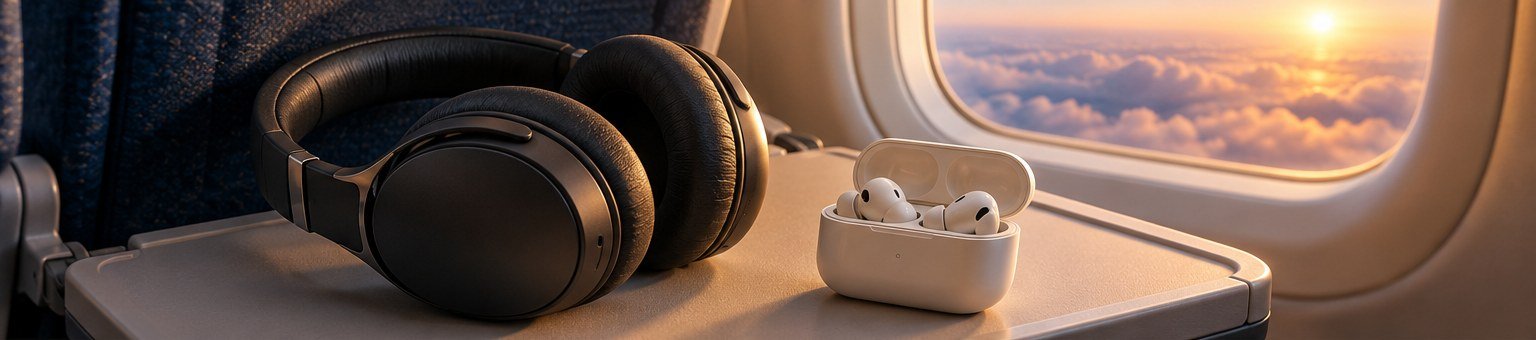
My starting choice for prolonged seated listening is a comfortable over-ear pair with active noise cancellation and a confirmed wired option. Earbuds are the better starting point when luggage space is tight, headband pressure bothers you or the same pair must handle the whole trip. Those recommendations change as soon as either design becomes uncomfortable on your own ears.
The comparisons here use current manufacturer specifications and practical travel scenarios, not claimed listening tests. Battery figures are labelled as manufacturer maxima, and the shortlist is organised by use case rather than an invented sound-quality ranking. Existing headphones that fit and connect properly may be the most sensible option.
Consider over-ears
A suitable pair can avoid mid-flight charging interruptions.
Consider earbuds
Include the case, charging cable and any transmitter in the comparison.
Single charge vs case total
Case reserves do not extend one uninterrupted listening session.
Test the complete chain
A phone pairing does not prove a seat-screen connection will work.
Over-ear headphones vs earbuds for long-haul travel: choose the whole system
Your journey is longer than the advertised flight time
The useful comparison begins before boarding. You may listen during the trip to the airport, while waiting at the gate and throughout a connection after landing. A pair that comfortably covers the flight can still need attention before the next leg. Equally, a long battery figure is of little value when the headphones become uncomfortable after a short period or cannot connect to the entertainment system you intend to use.
Think of the system as four parts: the headphones or earbuds, their case, the charging arrangement and the connection to your audio source. Compare all four together. Earbuds can offer a much smaller packed setup, but a separate transmitter and charging accessories reduce part of that advantage. Over-ears use more space, yet a verified analogue connection can simplify seat-screen listening. Neither outcome can be established from the shape of the earpieces alone.
Define the non-negotiable job
Decide whether you mainly want films, music, a calmer environment for rest or one flexible pair for the entire holiday. Write down the source devices as well: phone, laptop, seat screen or several of them. This prevents buying for an impressive feature that never becomes useful. A traveller who watches seat-screen films needs a different connection plan from someone who downloads everything to a phone before departure.
| Priority | Over-ear headphones | Earbuds |
|---|---|---|
| Long uninterrupted listening | Suitable models can offer a long single-charge window | Check the earbud battery, not only the case-total figure |
| Packed size | Include a protective case and essential cables | Include the charging case and any required transmitter |
| Personal fit | Headband, ear-cup depth, glasses and headrest contact | Tip choice, stability, ear comfort and case handling |
| Seat-screen films | A confirmed analogue cable can be straightforward | May need compatible built-in Bluetooth or a transmitter |
| Awareness | Pause or remove when appropriate and follow crew instructions | Pause or remove when appropriate and follow crew instructions |
Over-ear comfort: check the headband, cups and your own glasses
A soft cushion is only one part of fit
Over-ear headphones need to fit around your ears without forcing them into an awkward position. Check cup depth, the position of the headband and whether the adjustment range suits you. An attractive padded surface may still press in the wrong place. Try the headphones while looking down at a phone and turning your head, rather than assessing them only while sitting upright and still.
Include the glasses, earrings or other items you normally wear. A fit that feels pleasant without glasses can change when the arms sit beneath the cushions. Likewise, hair and a hood can alter how the headphones settle. These are individual fitting questions, so claims that a model is comfortable for everyone are not useful. The best starting point is a return-friendly trial with your normal travel setup.
Consider heat and the position of the headrest
A warm cabin and a close-fitting ear cup may feel different from a cool shop. You cannot reproduce every aircraft condition at home, but you can wear the headphones long enough to notice an immediate problem and take breaks when needed. Do not continue through pain simply because a product is marketed for long listening. A different fit or the alternative format may be more appropriate.
Earbud comfort: the seal must work without becoming a burden
Size each ear rather than assuming a matched pair
Ear tips are part of the fit system, not decorative accessories. Try the sizes supplied with the model and use the manufacturer's fitting guidance. The most suitable tip may differ between ears. A tip that stays in place but feels uncomfortable is not a successful fit, while a loose fit may affect the listening experience. Take time to find an arrangement you can tolerate before making it your only travel audio option. [8]
Test ordinary movements such as talking, looking down and resting your head back. You do not need a vigorous exercise test to assess a pair intended for a flight. Pay attention to whether you repeatedly adjust one earbud or worry that it will fall out. Frequent reseating can become a larger annoyance over a long journey, especially when your hands are occupied with a meal or travel documents.
The charging case is part of the earbud choice
You need somewhere safe to put the earbuds whenever they leave your ears. A case that is awkward to open one-handed or difficult to distinguish inside a dark bag can affect everyday usefulness. Check that the earbuds seat properly and begin charging as expected. The practical system includes the case, its remaining power and the way you store it, not just the tiny devices photographed on their own.
Noise control: fit and settings matter as much as the format
Do not expect either style to erase the cabin
Noise cancellation can reduce parts of the surrounding sound, but it should not be treated as a promise of silence. The physical fit and the selected mode also affect the result. Compare the headphones using the mode you intend to use, not a different setting chosen to maximise a battery claim. Manufacturer guidance should be your starting point for fitting and noise-control settings. [9]
Avoid turning a subjective first impression into a numerical ranking. Without controlled testing, it is not honest to claim that one of these examples blocks a particular percentage more cabin noise than another. For buying purposes, determine whether the sound reduction lets you enjoy audio comfortably at a modest level and whether the sensation of wearing the product suits you. An impressive specification does not override personal discomfort.
Awareness modes are useful tools, not a guarantee
A transparency or ambient mode can make brief interaction easier on supported products, but you still need to pay attention and follow crew instructions. Pause or remove the headphones when appropriate rather than relying on a mode to make every announcement clear. Practise changing modes before the journey so you are not searching an app while someone is speaking to you.
Resting and sleeping: consider your actual head position
Large cups can conflict with a pillow or headrest
Over-ear headphones may suit a traveller who rests upright, but their cups can contact a pillow when the head turns. Try the position you normally use, including a travel pillow if you carry one. The aim is to notice pressure or awkward movement before the flight. Do not assume that a wider seat or a reclining position will solve a fit problem that is already evident at home.
Earbuds remove the headband and large cups, yet they are not automatically comfortable for side resting. Their shape may still press against the ear or be displaced by a pillow. Avoid claims that a particular format guarantees better sleep. Choose the option that remains comfortable in your likely position, take listening breaks and be prepared to put the devices away rather than forcing them to serve as sleep equipment.
Make removal easy in a dark cabin
Know where the case will be before you start resting. Loose earbuds on a blanket or tray can be difficult to find later, while headphones left around the neck may be uncomfortable. A designated pouch or pocket is simpler than searching through a large bag each time. Keep the storage place consistent so a tired retrieval does not become the moment an expensive item is lost.
Battery planning: single-charge time is not case-total time
Separate continuous use from reserve charging
An earbud case contains reserve energy, but the earbuds normally need to spend time inside it to use that reserve. A headline figure that includes several case charges does not describe one uninterrupted listening session. Over-ear figures generally describe playback from the headphones' own battery, although settings and conditions still matter. Compare like with like before deciding that two products have similar endurance.
Sony specifies up to thirty hours of music playback with noise cancellation on for the WH-1000XM6. Its WF-1000XM6 earbuds are specified at up to eight hours with noise cancellation on. Those are manufacturer maxima, not measured results from this guide. The difference matters when you want to listen for a long stretch without stopping, even if the earbud case can replenish the earbuds later. [1] [2]
Use a realistic journey example
Consider an illustrative twelve-hour flight with two hours of listening before boarding and another hour during a connection. That is fifteen hours of potential listening, not twelve. You may take meal and rest breaks, but do not assume they will coincide perfectly with a depleted battery. Plan a charging opportunity or a fallback rather than treating the manufacturer's maximum as a guaranteed schedule with no margin.
| Model | Published claim | Planning caveat |
|---|---|---|
| Sony WH-1000XM6 [1] | Up to 30 hours with noise cancellation on | Single headset battery; actual time varies with use |
| Sony WF-1000XM6 [2] | Up to 8 hours with noise cancellation on | Reserve charging requires time in the case |
| Bose QuietComfort Ultra Headphones (2nd Gen) [3] | Up to 30 hours; up to 23 with Immersive Audio | Headline claim; the page retains different battery footnote wording |
| Apple AirPods Pro 3 [4] | Up to 8 hours with ANC; up to 24 including the case | The 24-hour figure is not one uninterrupted session |
| Twelve South AirFly Pro 2 [5] | More than 25 hours claimed | A separate accessory battery, not headphone playback time |
Charging strategy: reduce dependencies before you leave
Check the complete charging chain
Identify the cable, connector and power source needed by each item, including a transmitter when used. A USB-C socket on two devices does not mean one cable serves every purpose, especially when one connection is for charging and another for audio. Test the actual combination at home. Keep essential cables together rather than assuming a suitable spare will appear in an airport or aircraft seat pocket.
Do not build the plan around a seat socket being available or working. Charge the kit before leaving and use battery reserves sensibly. Where you carry a power bank, follow the operating airline's current restrictions on carriage and use. The CAA advises keeping spare batteries and power banks in the cabin and removing batteries or lithium-powered devices if a cabin bag is moved to the hold. [7]
A short break can be useful without being a promise
An earbud charging break may fit naturally around a meal or conversation, but check the maker's quick-charge claim and the case's own charge level. Do not assume that a few minutes restores every product to full power. Battery age, settings and conditions can change the result. A sensible plan includes some flexibility rather than depending on one precisely timed top-up during a busy part of the flight.
Five examples selected for travel jobs, not invented rankings
Two over-ear reference points
The Sony WH-1000XM6 is a useful over-ear example because Sony documents both battery-powered operation and use with an analogue headphone cable while the unit is switched off. The manufacturer lists an approximate weight of 254 g. Passive cable use does not provide active noise cancellation, but it can be a meaningful fallback. Confirm the supplied cable and the socket at the other end before relying on it. [1]
Bose's QuietComfort Ultra Headphones (2nd Gen) illustrates a different connection option: the brand confirms USB-C audio as well as a supplied 3.5 mm to 2.5 mm cable. It advertises up to thirty hours of playback, or twenty-three with Immersive Audio. The same page also retains 24/18-hour footnote wording, so these are advertised figures rather than independently verified endurance. Those figures do not establish which model will fit you better. The second-generation name matters because features should not be transferred automatically from an older product. [3]
Two earbud reference points
Sony's WF-1000XM6 offers a compact earbud format with a charging case and a published eight-hour maximum for music with noise cancellation enabled. Its IPX4 rating should not be read as permission to immerse it or treat the charging case as waterproof. Choose it only after checking tip fit and your charging-break plan; the small packed size does not remove those requirements. [2]
Apple lists AirPods Pro 3 at up to eight hours per charge with active noise cancellation and up to twenty-four hours including the case. Five ear-tip sizes are supplied, while a USB-C charging cable is sold separately. Those details make fit options and charging preparation worth checking before departure. Some features depend on compatible devices or software, so do not assume every advertised function behaves identically on every phone. [4]
One connection accessory, only when it is needed
The Twelve South AirFly Pro 2 is a transmitter and receiver with support for two wireless headphone connections and a manufacturer battery claim of more than twenty-five hours. It can be useful when a suitable analogue audio output needs to feed Bluetooth headphones. It is not itself a headset, does not improve the fit of your earbuds and adds another device to charge. Buy it to solve a confirmed connection problem, not merely because you are taking a flight. [5]
| Example | Why compare it | Buying option |
|---|---|---|
| Sony WH-1000XM6 [1] | Over-ear option with documented passive analogue operation | View Sony over-ears |
| Bose QuietComfort Ultra Headphones (2nd Gen) [3] | Over-ear option with manufacturer-confirmed USB audio | View Bose 2nd Gen |
| Sony WF-1000XM6 [2] | Compact earbud option; trial the tips and charging routine | View Sony earbuds |
| Apple AirPods Pro 3 [4] | Check device compatibility and the separately sold charging cable | View AirPods Pro 3 |
| Twelve South AirFly Pro 2 [5] | Only when analogue-to-Bluetooth transmission solves your connection | View AirFly Pro 2 |
Seat-screen audio: verify the path before choosing the headphones
Start with the output on the source
An aircraft screen may offer a headphone socket, built-in Bluetooth or another arrangement, and equipment can vary between aircraft and cabins. Check the airline's information for your booking where available, but prepare for an aircraft change. A pair that works perfectly with your phone has not thereby proved it can connect to the seat screen. The source and connection method need their own check.
For analogue listening, confirm the headphone end of the cable as well as the source end. Some headphones use a different socket size at the ear cup. A cable that looks familiar in a drawer may not be the correct one. Use the supplied or approved cable and check whether the headphones need power for that mode. A cable connection alone is not a universal promise of operation after the battery is flat.
Keep a straightforward fallback
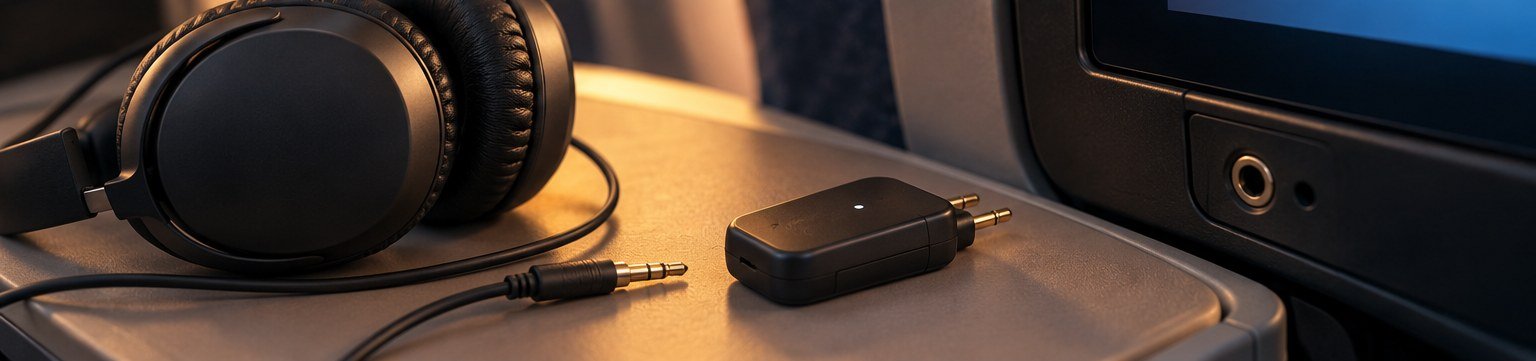
For travellers who mainly watch seat-screen films, a verified direct cable can be simpler than pairing a transmitter during boarding. Those who prefer earbuds may still choose a transmitter, but should understand the extra dependency. A modest compatible wired backup can also be useful, provided it actually connects to the intended source. The fallback should be tested, not an unidentified cable added at the last minute.
Bluetooth transmitters: useful, but not universally necessary
Pair before the airport, then practise reconnecting
Pair the headphones and transmitter at home using the maker's instructions, then switch both off and repeat the connection. This tests more than a first successful setup. You should know which device to place in pairing mode and how to avoid reconnecting the earbuds to a nearby phone instead. Keep any brief instructions accessible offline so you do not depend on terminal Wi-Fi to solve a simple problem.
Check the transmitter's operating mode. A device that can receive audio for a car stereo may also transmit audio from a screen, but the correct mode must be selected. Similarly, a USB Bluetooth adapter intended for a computer is not automatically an analogue audio transmitter for an aircraft socket. Identify the exact job before buying something that merely uses the same wireless term. [5]
Add the adapter only to a confirmed system
A Twelve South AirFly Pro 2 is worth considering when your headphones are comfortable and the missing piece is a suitable Bluetooth link from an analogue output. Check whether an airline socket adapter is included in the version offered; accessory bundles differ. Do not infer that a transmitter's two-headphone feature also provides microphone support for calls, or that every advanced codec feature will work with your particular earbuds.
Phone, laptop and codec compatibility
Compatible Bluetooth is only the first layer
Basic playback and optional features are separate questions. A pair may connect to a phone while its app, spatial-audio functions or device-switching features have additional requirements. Read the compatibility notes for the functions you actually want. Buying for a feature demonstrated on another operating system can lead to disappointment even when the headphones are otherwise working normally.
Codec names should not dominate the travel decision. A capability needs support across the relevant devices, and your content and environment also matter. A transmitter advertising a particular codec does not establish that your headphones will use it. For long-haul use, dependable connection, comfortable fit and suitable volume are more useful first filters than collecting the longest list of wireless labels.
Test switching rather than assuming it will be seamless
Move between your phone and laptop before the trip. Stop one source, start the other and check what happens when a notification arrives. Some travellers value automatic switching; others find deliberate reconnection less distracting. Configure the system around your preference. A feature that works well during an office day may behave differently when a transmitter and two personal devices are nearby.
Offline preparation and app settings
Make necessary changes before travel day
Install the manufacturer's app, complete any updates you choose to make and test the headphones afterwards with time to resolve problems. Do not start a major setup at the boarding gate simply because the box advertises quick pairing. Learn the basic controls without relying exclusively on the app: volume, pause, noise mode and power or case behaviour. The functions you need in a dark cabin should be familiar. [8]
Download the audio or video you expect to use and verify offline playback before leaving. A successful stream at home does not prove that the file is available without a connection. Check any service-specific access requirements separately. This preparation concerns the content source rather than the headphones, but it can make more difference to the journey than an incremental hardware upgrade.
Disable features you do not intend to use
Automatic pause, speech-triggered modes or touch controls may be helpful, yet not every traveller likes every behaviour. Try them during normal use and keep the settings that support your routine. Avoid switching off safety-relevant awareness deliberately to ignore the crew. The purpose is to prevent unwanted changes during a film, not to remove your responsibility to pay attention when needed.
Packed size: compare cases and accessories, not bare devices
A complete over-ear kit is larger than its ear cups
Include the protective case, analogue cable and charging cable when comparing volume. A pair that folds compactly may still have a substantial rigid case, while a flatter design may stow more easily in a particular bag. Try the actual packed shape in the compartment where it will travel. Do not force hinges or crush cushions to make a product fit a space that is too small.
Earbuds usually occupy less space, but add their case and any transmitter required for your setup. The comparison remains favourable for many minimal packers, yet it should be honest about the complete kit. A loose cable and tiny adapter can also be harder to track than one larger headphone case. Choose a small organiser only when it makes those pieces easier to manage, not as another container without a defined job.
Keep the audio kit accessible during boarding
Put the items needed on board where you can reach them without emptying the main bag. Once seated, avoid scattering cables and cases across the tray. A consistent storage place reduces the chance of leaving something behind at a connection. If the bag is moved to the hold, follow the CAA and airline guidance for removing batteries and lithium-powered devices before it leaves you. [7]

Listening levels, breaks and crew awareness
Quieter listening is a better target than louder audio
The World Health Organization recommends safe listening habits that include keeping levels down, taking breaks and using well-fitted, noise-cancelling headphones where helpful. Noise control should support comfortable listening rather than encourage you to raise the volume until nothing else is audible. Long duration matters as well as loudness, so avoid treating the flight as a challenge to listen continuously without pauses. [6]
A volume percentage is not a universal measurement of sound at your ears because devices and recordings differ. Use the available listening-level tools as an aid, not a guarantee that any chosen setting is safe. If listening causes pain, ringing or persistent hearing changes, stop and seek appropriate professional advice. A shopping guide cannot diagnose those symptoms or prescribe a headset as treatment.
Acknowledge people deliberately
Pause or remove the headphones for safety briefings and whenever the crew instructs you to do so. Make sure your travel companion can get your attention without guessing whether a transparency mode is active. For some travellers, a clear habit of removing one device during conversation is simpler than relying on automatic detection. The best system is one that makes considerate interaction easy as well as improving entertainment.
Care, cleaning and moisture
Follow the instructions for the actual materials
Clean ear tips, cushions and contact areas according to the manufacturer's guidance. Do not assume a liquid or wipe suitable for one model is safe for another. Let components dry as instructed before charging or putting them away. A long trip can involve sunscreen, sweat and humid conditions, so checking the care routine before departure is more useful than improvising when the headphones become dirty.
Water resistance claims need careful reading. A rating attached to earbuds does not automatically apply to their charging case, and it is not permission for unrestricted water exposure. Keep charging connections dry and do not use damaged equipment. When something becomes wet, follow the maker's instructions rather than placing it on charge to see whether it still works. [2] [8]
Think about service life before buying
Check whether replacement tips, cushions or approved accessories are available. A small worn part can affect comfort long before the whole product appears unusable. Also consider battery decline over time when planning future trips. A pair that once covered the complete journey may need a revised charging routine later. Practical aftercare and a realistic replacement path can be more valuable than an additional feature you rarely use.
Losing an earbud or dropping a device beside the seat
Prevention is a storage habit
Open the case over a clear, stable area rather than above a gap between seats. Put earbuds into the case when removed instead of resting them on a blanket or meal tray. Keep the case in the same pocket after every use. These are simple habits, but they remove opportunities for tiny objects to disappear during an otherwise routine movement.
A headphone cable can also catch on an armrest or pull an item off the tray. Keep enough slack for ordinary movement without leaving long loops in the aisle. Do not route cables where they obstruct another passenger or make standing difficult. An apparently tidy setup should still allow you to stop listening and move safely when required.
Ask the crew before moving seat mechanisms
If a powered device falls into or beside a seat mechanism, tell the crew and avoid operating the seat to retrieve it yourself. Do not probe blindly with another object. Keeping devices protected from damage is part of safe battery handling, and the crew can advise on the appropriate response. A lost earbud is frustrating, but it should not become a reason to improvise around moving equipment.
Travelling with another person
Shared audio needs shared compatibility
A transmitter that supports two headphones can be useful for watching one source together, provided the exact combination is supported and both connections are set up correctly. Test it before the trip, including the volume controls each person will use. Do not assume the second connection is identical to the first or that both listeners will want the same level. The feature is useful only when it works comfortably for both people. [5]
Each traveller still needs an independent way to hear instructions and store their equipment. A shared film should not require one person to manage every device during a meal or conversation. Agree where the transmitter and cables will be kept, especially when using separate seats or changing aircraft. Small accessories are easier to lose when responsibility is vague.
Do not duplicate equipment without a reason
Two different headphone formats can be a sensible personal backup, but carrying several near-identical pairs often adds more charging and storage decisions than benefit. Start with one reliable setup per person. Add a shared accessory or modest fallback only when it solves a clear problem. The aim is a calm travel routine, not a miniature electronics collection in the seat pocket.
Microphones, calls and entertainment are separate jobs
Good listening does not guarantee the call setup you expect
Noise cancellation for the listener and microphone processing for the person on a call are different functions. A marketing claim about one should not be transferred automatically to the other. Test calls with the device and connection you intend to use, especially when moving between a laptop and phone. A compatible music connection may use different behaviour when a microphone is active. [9]
Likewise, a transmitter connected to an entertainment socket should not be assumed to carry your microphone back to the source. Its intended job may simply be sending programme audio to the headphones. Check the specific product documentation rather than buying it as a universal wireless replacement for every cable. This distinction can matter for work use during stopovers even when it is irrelevant to a film on the aircraft.
Keep the flight's communication rules separate
Follow the airline's instructions about devices and communications. The fact that your headphones support calls does not establish that calls are permitted in flight or that the required connection is available. For most entertainment planning, concentrate on downloaded content or the aircraft's supported system. Treat work calls as a separate use case with its own practical and policy checks.
Three journey profiles to compare against your own
A long daytime flight focused on films
Comfortable over-ear headphones with a verified cable option are a strong starting point when most listening happens upright at the seat screen. The main trade-off is packing space. Trial the cups with your glasses and check the exact cable before departure. A Sony WH-1000XM6 is one documented example to compare, but an existing pair with the right connection can serve the same job.
An overnight journey with frequent listening breaks
Earbuds can suit a traveller who values compact storage and expects to pause for meals, conversation and rest. The fit must remain comfortable, and the charging case needs enough reserve for the planned breaks. AirPods Pro 3 illustrates the distinction between an eight-hour single-charge claim and a larger case-total claim; the case reserve is useful only when the earbuds spend time in it. [4]
A minimal-packing trip with a phone as the main source
Choose the smallest complete kit that works with your phone and content. You may not need a transmitter at all. Compare earbuds with a compact over-ear option only after accounting for their cases and cables. Avoid buying seat-screen accessories for a journey where you will watch your own downloads throughout. Compatibility with the actual plan is more useful than preparing for every hypothetical source.
A home trial that exposes the main problems
Test fit and connection in separate stages
First, assess fit at a modest listening level during a normal seated activity. Include your glasses and likely resting position. Then test the connections separately: phone, laptop, analogue cable and transmitter where relevant. Keeping the stages separate makes it easier to identify whether a problem is physical discomfort, an app setting or a connection issue. Do not change several things at once and lose track of what helped.
Next, pack the complete kit and retrieve it as you would after boarding. Locate the case, find the cable, connect, pause and put everything away. This simple sequence can reveal an inconvenient accessory arrangement even when the headphones themselves are excellent. A travel product is useful when it supports the whole routine, not merely when it sounds good during a short demonstration.
Check return and hygiene terms before trying products
Retailer terms for opened headphones and in-ear products can differ. Read them before purchase and keep the packaging and documentation required for any permitted return. Do not assume that every retailer offers an unrestricted home trial. Resolve an unsuitable fit early rather than hoping it will improve on the aircraft, and do not continue using a product that causes pain simply to justify the purchase.
Check the headphones you already own before upgrading
Identify the actual reason for replacement
Write down what failed on the last journey: discomfort, insufficient battery, an incompatible socket or an awkward case. Each problem has a different solution. A replacement cable or approved set of cushions may solve one issue, while a completely different fit may be necessary for another. Buying a newer version of the same format without identifying the problem can leave the travel experience largely unchanged.
Inspect the existing kit and test it using the planned modes. Do not assume an old battery still matches its original specification, but do not assume it is unusable merely because a newer model exists. If it covers the required listening periods with a sensible charging plan, replacement may be unnecessary. Keep damaged or suspect battery-powered equipment out of the travel kit and use the manufacturer's support rather than improvising a repair.
Compare the full cost of changing systems
A new format may require a different case, cable or transmitter. It can also change how the kit fits in your bag and how many devices need charging. Those practical consequences matter alongside the purchase price. The best-value choice may be keeping a comfortable pair and solving one connection problem, rather than replacing the headset and then discovering that the same problem remains.
Troubleshoot the connection before blaming the format
Separate source, cable and headphones
When playback fails, reduce the system to the simplest supported connection. Confirm that the source is playing and sending audio to the intended output, then check the headphones with a known working device at a modest volume. Add the cable or transmitter back into the chain one step at a time. This helps distinguish a faulty accessory or wrong setting from a problem with the headphones themselves.
For a quiet or one-sided signal, do not immediately turn every volume control to maximum. Check that the correct plug is fully seated in the appropriate socket and consult the manufacturer's troubleshooting guidance. Some apparent failures arise from an incomplete connection or an unexpected output setting. Keep testing calm and systematic rather than changing several settings and losing track of the original issue.
Stop when the problem needs proper support
Repeated disconnections, damage or abnormal battery behaviour should be investigated before the trip. Avoid making a long flight the first serious test of a questionable device. A simple working fallback is more useful than a technically impressive setup that depends on a last-minute fix. When asking for help, record the model, source device and connection method so support can address the actual system rather than a vague description of 'Bluetooth not working'.
Pros and cons without an overall winner
Over-ear strengths and compromises
Over-ear headphones can offer long uninterrupted playback, a fit that avoids inserting tips into the ear and useful cable options on suitable models. Their compromises include larger cases, headband or cushion pressure and possible conflict with a pillow. These are not reasons to reject the format, but they are reasons to trial it personally. A strong specification does not eliminate the need for a comfortable fit.
Earbud strengths and compromises
Earbuds can keep the complete travel kit small and work well across different parts of a holiday. The trade-offs are tip fit, easy-to-lose small components and the need to distinguish case reserves from continuous playback. They may be the better choice even for a very long flight when charging breaks and comfort suit the traveller. Conversely, minimal size is not an advantage when the earbuds need constant adjustment.
Over-ears: sustained seated listening
Advantages: Compare comfortable fit, single-charge endurance and verified cable options.
Trade-offs: Larger cases, headband fit and pillow contact can matter.
Earbuds: minimal packed volume
Advantages: Compare tip fit, easy case storage and a workable charging-break plan.
Trade-offs: Small parts, short uninterrupted playback and case management need attention.
Common mistakes before a long-haul flight
Buying by headline battery life alone
Check the mode, the type of use and whether the figure includes a charging case. A communication-time claim is not necessarily the same as a music-playback claim, and optional processing can affect endurance. Use the manufacturer figure as a planning ceiling, then allow for real-world variation. A realistic fallback is better than a schedule that works only if every battery performs at its published maximum.
Assuming any USB-C cable carries audio
USB-C describes a connector, not a guarantee that the headphone port accepts audio. Confirm the model's supported connection and the source device's role. An aircraft USB port may be present for charging rather than programme audio. Test with an appropriate source and cable before travel instead of discovering at the seat that the connection you packed performs a different job.
Adding accessories before checking what is already included
A suitable analogue cable, protective case or required adapter may already be supplied, while another product may exclude a charging cable you expected. Check the exact box contents and model version. This avoids buying duplicates and reduces the number of small parts to manage. The useful kit is the smallest complete system, not the one with the most optional accessories.
Frequently asked questions
Are over-ear headphones always better for a long flight?
No. They are a strong starting point for prolonged seated listening when the fit and connection suit you, but a larger case or uncomfortable headband can outweigh that benefit. Earbuds may be preferable for minimal packing or personal comfort. Compare the complete system and trial the fit rather than choosing by format alone.
Can earbuds last through a twelve-hour flight?
Some listening plans can work by including charging breaks, but compare the single-charge figure with your intended uninterrupted use. A case-total claim does not mean the earbuds play for that entire period without returning to the case. Build the plan around the exact model, selected modes and realistic pauses, with some margin for battery variation.
Do I need a Bluetooth adapter for aircraft entertainment?
Only when your chosen headphones need a compatible wireless link from an output that does not already provide one. Check the airline's equipment where possible and the exact socket and adapter requirements. A transmitter adds another charged device, so a verified cable connection or your own downloaded content may be simpler.
Will noise cancellation let me sleep better?
It may make parts of the environment less intrusive, but this guide cannot promise a sleep outcome. Fit, head position, personal preference and the cabin all matter. Try the headphones with your likely resting position and put them away when they become uncomfortable. Neither earbuds nor over-ears should be forced into service through pain.
Can I use noise cancellation without music?
Check the operating behaviour of the specific model. Some products support noise control without active audio playback, while power-saving settings may affect how long they remain on. Test the intended mode at home and learn the controls. Do not assume every headset behaves the same way simply because it has an ANC label.
Should I carry a second pair as backup?
A small, tested backup can make sense when audio is important to your trip, but it should solve a specific failure such as a depleted battery or incompatible connection. Carrying another pair with the same weakness may add little value. Start by checking the reliability and included accessories of your main setup before buying more equipment.
What should I do if an earbud falls into the seat?
Tell the crew and avoid moving powered seat mechanisms or probing blindly. Keep the other components secure while assistance is arranged. For future flights, open the case over a clear area and return the earbuds to it whenever they are removed. A consistent storage routine is more useful than relying on locating technology after an item disappears.
Final recommendation: comfort first, then power and connection
Choose the format you can use for the whole journey
For sustained seated listening, start with comfortable over-ears and a confirmed cable path. For minimal packing and a flexible holiday pair, start with well-fitting earbuds and an honest charging-break plan. The named products are examples to compare, not a claim that any one of them is universally best. A QuietComfort Ultra Headphones (2nd Gen) setup only earns its larger case when its fit and connection options benefit your travel routine.
Before buying, check the full kit against your journey: fit, one-charge endurance, case reserve where applicable, audio source and storage. Then test it with time to fix problems. The best travel audio choice is the one that lets you listen comfortably, respond to the people around you and put everything away without stress when the aircraft arrives.
Sources and fact-checking notes
- Sony UK: WH-1000XM6 specifications
Manufacturer battery maxima, weight, analogue connection and passive operation.
- Sony UK: WF-1000XM6 specifications
Manufacturer continuous-playback maxima, charging case and IPX4 rating.
- Bose UK: QuietComfort Ultra Headphones (2nd Gen)
Published battery life, supplied cables, USB audio and power requirements. Applies to the second generation.
- Apple UK: AirPods Pro 3 technical specifications
Single-charge and case-total battery figures, included ear-tip sizes and charging-cable exclusion.
- Twelve South: AirFly Pro 2
Transmit/receive functionality, two-headphone pairing and manufacturer battery claim.
- World Health Organization: safe listening
Listening volume, exposure duration, good fit, noise cancellation and listening breaks.
- UK Civil Aviation Authority: Pack right. Safe flight.
Lithium-battery precautions and removal of batteries or powered devices when cabin baggage is moved to the hold.
- Sony: WF-1000XM6 Help Guide
Manufacturer guidance for fit, noise modes, pairing, settings and moisture-related care. Follow the instructions for the exact model.
- Sony UK: what to expect from noise cancellation
Noise cancellation does not remove all sound; fit affects its performance, and listener noise control differs from microphone noise processing.
Illustrations in this article were created for Taylor’s Trailblazing Travel Gear. Third-party photographs, where used, are credited beside the image or in the source list.