UGREEN Nexode 100W Charger Review: Research-Led Port and Power Check

UGREEN Nexode 100W Charger Review: Research-Led Port and Power Check
Four sockets are useful only when the power left for each device matches your travel routine.
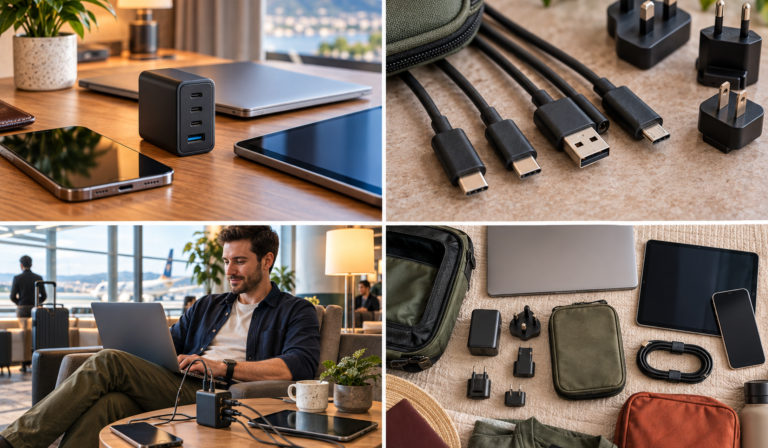
Original concept illustration of a travel charging kit; not a product photograph.
This UGREEN Nexode 100W charger review starts with the question a travelling laptop owner actually needs answered: what happens to the computer when a phone and two smaller devices are connected as well? The large number on the case describes a maximum, not a permanent allocation to every socket. UGREEN’s published chart makes the difference unusually concrete. [2]
The model assessed here is the UK four-port wall charger associated with SKU 40749, with three USB-C sockets and one USB-A socket. The desktop unit with a mains lead, the Nexode Pro family and the retractable-cable version are different products. Their photographs, weights and charging arrangements should not be mixed into this assessment. [1]
No charger was purchased, thermally tested or used to power a laptop for this article. The verdict combines manufacturer diagrams, UK product identification, cable requirements and practical travel scenarios. Where a result depends on your own laptop, the guide gives you a check to perform rather than inventing a charging time.
One mixed-device kit
Useful for a laptop, phone and smaller accessories.
45W with four occupied
The leading USB-C allocation falls when every port is used.
5A for full 100W
A suitable cable is part of the system, not an optional detail.
SKU 40749 family
Do not merge it with desktop, Pro or retractable editions.
01UGREEN Nexode 100W charger review: the useful verdict
Buy the allocation, not the label
The case for this charger is strongest when one USB-C laptop is the priority and the remaining devices can accept smaller allocations. Think of a work trip with a computer, phone, headphones and a watch puck, rather than four equally demanding devices. The charger can reduce the number of mains plugs, but it cannot remove the need to decide which device gets priority.
Its weakness is therefore closely related to its strength. Consolidating everything into one block makes packing simpler, yet also concentrates your charging into one set of shared outputs and one mains connection. A traveller who needs two computers charging quickly at the same time should not assume four sockets solve that problem.
For my research-led assessment, the decisive evidence is the actual port diagram. That is more useful than comparing unqualified claims about charging a particular laptop to a particular percentage. Your computer’s workload, starting charge and supported input can all change the result. [2] [3]
Keep an existing solution when it already works
A working original laptop adaptor plus a small phone charger may remain the more sensible kit. Before replacing both, count how many plugs you actually carry and whether they create a repeated problem. Saving one socket at home is not automatically worth buying a new travel charger, especially when charging times can be staggered without inconvenience.
02Identify the exact Nexode before comparing specifications
Four similar names do not describe one product
UGREEN uses Nexode across several charger formats. This article centres on the original UK four-port wall model, not every product that happens to contain both Nexode and 100W. Use the connection layout and exact listing together, and compare the delivered label with the order confirmation before your first trip. [1]
| Product to identify | Physical arrangement | Role in this comparison | Buying reference |
|---|---|---|---|
| Nexode 100W four-port wall charger | Three USB-C sockets and one USB-A | Main subject; sharing charts below | Check wall model |
| Nexode 65W folding UK charger | Two USB-C sockets and one USB-A | Lower-output, folding alternative | Check 65W model |
| Nexode 100W retractable version | Built-in 0.75m cable plus separate sockets | Different cable-management approach | Check retractable model |
| Nexode 100W desktop charger | Separate mains lead and desktop body | Useful when wall access is awkward | Check desktop model |
These references identify alternatives; they do not certify identical electrical behaviour. In particular, do not transplant the wall charger’s allocation chart onto the retractable or desktop design. Manufacturer listings for the latter describe different physical arrangements. [8] [9]
Treat marketplace photographs as a cross-check
Check the plug in the selected variant, not only the first gallery image. A listing can contain international marketing pictures alongside a UK offer. Likewise, reviews attached to a product family may discuss an older colour, bundle or version. The useful evidence is the exact model you are buying, not the total number of reviews collected under a familiar name.
03Read the actual power-sharing chart
The main combinations
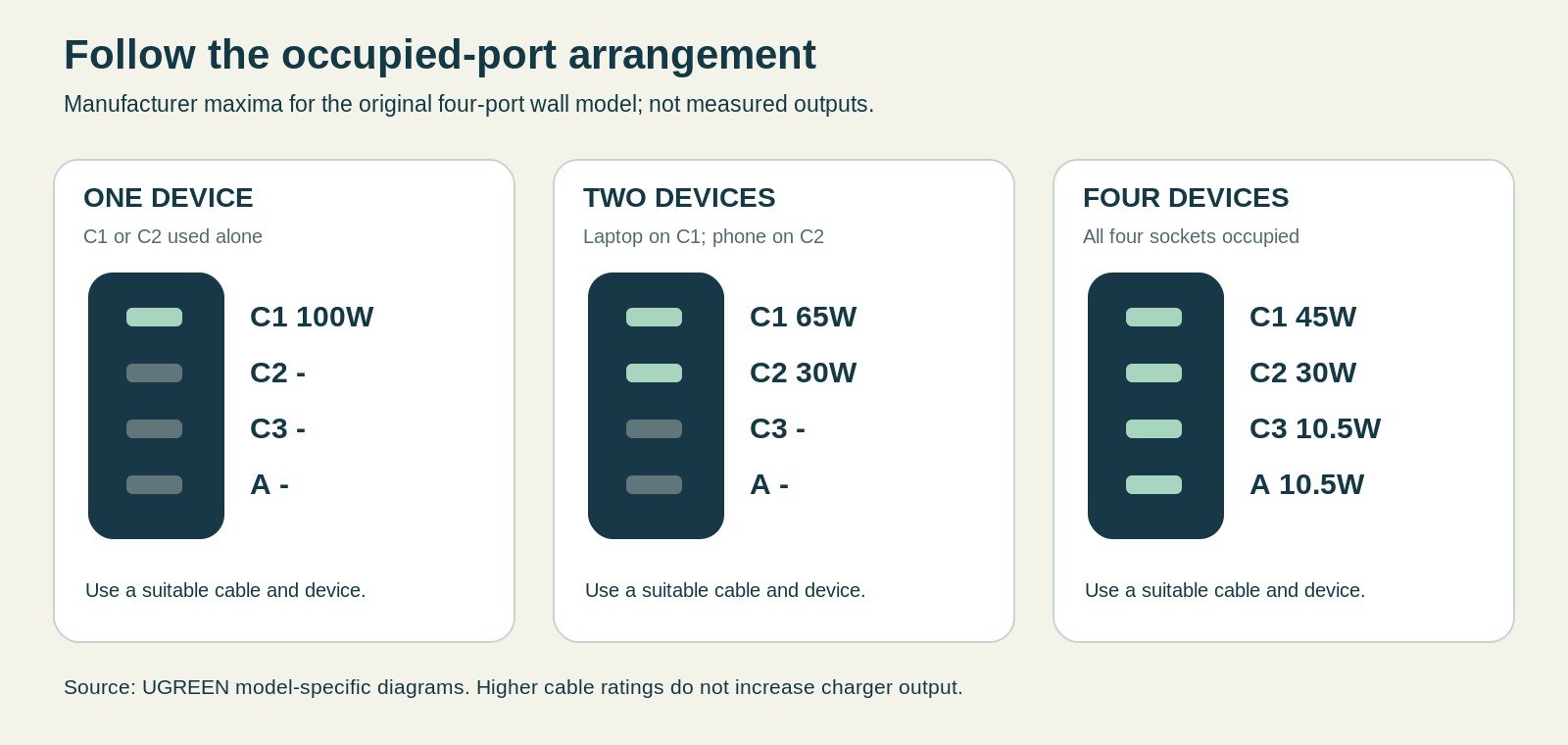
UGREEN’s diagrams show the following maxima for this four-port wall model. C1 is the upper USB-C socket, C2 the next one, C3 the lower USB-C socket and A the USB-A socket. These are manufacturer allocations, not measurements made for this review. [2] [3] [4]
| Occupied sockets | Published maximum allocation | What it means for the laptop |
|---|---|---|
| C1 alone or C2 alone | Up to 100W | Single-device arrangement has the largest available allocation |
| C1 + C2 | 65W + 30W | Laptop priority belongs on C1 |
| C1 + C3 | 65W + 22.5W | Lower USB-C device receives a smaller ceiling |
| C1 + C2 + C3 | 45W + 30W + 22.5W | Main laptop allocation falls again |
| All four sockets | 45W + 30W + 10.5W + 10.5W | Four connected devices do not each receive fast-laptop power |
The arithmetic itself is instructive. The four listed ceilings add to 96W, while the two upper USB-C allocations add to 95W. There is no reason to round those arrangements up to a fictional 100W shared in whichever way you prefer. Use the published configuration rather than inventing a more convenient one.
Lower sockets are not interchangeable with upper sockets
If the laptop is charging slowly, moving it from C3 to C1 may be more useful than changing the mains socket. Similarly, freeing a port can change the available allocation. Plan the connections before adding every cable you own; a clear arrangement is easier to repeat in an unfamiliar room than a daily experiment with four leads.
04Match the laptop’s requirement before adding accessories
Charging while working is the demanding case
Look up the recommended adaptor and USB-C charging support for the particular computer. Do not use the size of its screen as a substitute for that information. Two laptops with similar dimensions can have different power requirements, and a USB-C socket is not by itself proof that the computer accepts charging through it.
As a planning example, imagine a computer whose normal adaptor is 65W. The C1/C2 arrangement deserves consideration because the published leading allocation is 65W. Connecting two more devices changes that ceiling to 45W. Whether the computer still gains charge during your normal work is something to check with that exact computer, not something this review can promise.
Consider what must happen during a short stop
A laptop-only recharge while you eat dinner can be a better plan than connecting everything for the same short period. Once the computer has enough reserve, move attention to the phone and smaller items. This costs a little organisation but can prevent buying a much larger charger solely to cover a rare simultaneous peak.
However, a time-critical work trip changes the trade-off. Someone joining a video meeting while powering a demanding computer cannot rely on the same schedule as someone charging an idle laptop overnight. Write down that real use case before choosing between one shared block and separate adaptors.
05Build a device-by-device port map
Start with the device that cannot wait
Make a small note for the charging kit listing the laptop, phone and accessories, their required connectors and which item must be ready first. The purpose is not to collect every possible technical specification. It is to stop an apparently convenient combination from leaving the important device with the smallest allocation.
For example, a hypothetical laptop that needs a 65W-capable supply and a phone that is content with 20W fit the published C1/C2 ceilings more naturally than a four-device arrangement. That does not mean the laptop continuously draws 65W or the phone continuously draws 20W. It means the available ceilings are a sensible starting match for those stated requirements. [3]
Add the departure deadline next to each device. A watch that is already charged need not compete with a nearly empty work computer simply because both cables are available. Once the map is established, keep the cables in that order or identify the laptop lead with a simple removable marker.
Allocate time as well as sockets
Suppose you have an hour in the room before dinner and another relaxed period afterwards. Treat those as two different charging opportunities. The first might give the laptop an uncontested socket; the second can concentrate on the phone and accessories. There is no need to claim an exact percentage gain to recognise that this is a more deliberate use of a shared charger.
Conversely, a short stop with all devices nearly empty exposes the weakness of consolidation. If every item has a hard deadline, the lower simultaneous allocations may not fit the task. In that situation, retaining the original laptop adaptor can be more rational than trying to optimise every gram out of the bag.
The port map also helps someone sharing the room. They can see which lead is intended for the computer and which accessories can wait, rather than moving cables around and unknowingly changing the arrangement. A clear repeatable routine is often the charger’s most valuable accessory, and it costs nothing.
06Charging connections are not a data hub
Keep power and data jobs separate
This product is a mains charging block, not a dock that connects your keyboard, display and external drive to the laptop. Multiple USB sockets on the front should not be read as a promise of data connectivity between the attached devices. Plan any monitor, storage or network connection separately from the charging arrangement.
That distinction matters when packing a work kit. A traveller may reduce the number of mains adaptors yet still need a separate dock or display cable. List those items before declaring that one compact charger replaces the entire desktop setup. It may replace several power supplies, but it does not replace every device connection.
Consider the dock’s own requirements
Some docks can accept an external USB-C power supply and pass part of it to a laptop. That is a different chain from connecting the laptop directly to the charger. Consult the dock’s specifications for its input requirements and any power reserved for the dock itself before assuming the computer receives the charger’s full advertised output.
A useful compatibility trial therefore follows the actual travel chain. Test charger to cable to dock to laptop if that is how you will work, rather than testing only the direct connection and assuming the result transfers. Keep the dock’s supplied guidance with your own device notes when the arrangement is essential to the trip.
07Read the mains label without confusing input and output
What the printed input range establishes
UGREEN’s UK specification lists 100-240V, 50/60Hz and a maximum 2.3A input for this model. Confirm that wording on the delivered unit. The input range concerns the mains supply; the 100W headline concerns the USB output capability. They describe different sides of the charger and should not be combined into a made-up device charging figure. [1]
In particular, a maximum input current printed on a label is not a statement that the charger continuously draws that current at every voltage and workload. Do not use it as a precise electricity-consumption measurement. If your aim is merely to choose a destination adaptor, focus on the supply compatibility, socket connection and the adaptor’s own rating.
Check what the box actually provides
The primary UK specification lists the charger and a quick-start guide. Do not assume that a review mentioning a bundled cable means your selected offer includes the same lead. A separately advertised bundle can be valid, but its contents need their own check. [1]
That small distinction can change the total price and readiness of the kit. Someone who already owns a suitable laptop cable may not need a bundle, while someone starting from scratch should budget for the required connection rather than discovering the omission after arrival.
08USB-C cables can become the limiting part
Check current rating as well as connector shape
UGREEN’s own multi-port guidance explains that a typical 3A cable can limit the familiar 20V charging arrangement to 60W. For the charger’s full 100W capability, choose an appropriate 5A electronically marked USB-C cable. A 240W-rated cable does not make the charger supply 240W; it simply has a higher supported cable rating. [5]
USB-IF also distinguishes cable capabilities and requires power markings for cables passing its current certification programme. Data speed and charging capability are separate matters. A lead bought mainly for a fast external drive may cost more than you need for charging, while a charge-capable lead may not support the monitor connection you had imagined. [6]
Choose a useful length rather than the smallest coil
Although a very short cable keeps a pouch tidy, it may leave your laptop balanced near a wall socket. A long, stiff cable can pull against a small charger or create a loop across a walkway. Place the computer on a stable surface, then measure a sensible route to the socket with enough slack to avoid tension.
Keep one clearly identified laptop lead rather than several unlabelled lookalikes. A small reusable tie is enough to distinguish it; there is no need to cover connectors with permanent decorations or obscure any rating. Pack a spare only when it covers a meaningful failure or a different device connection.
09Phone, tablet and accessory charging need separate expectations
Supported does not always mean fastest
A phone may charge through a USB-C socket without using its manufacturer’s highest advertised charging mode. The relevant combination includes the phone, charging protocol, port allocation and cable. Therefore, a 100W headline is not evidence that every Samsung, Apple or other handset will achieve its maximum charging rate.
The practical question is whether the charger supplies enough for your routine. A phone that is connected while you shower and organise the next day may not need its absolute fastest mode. Conversely, a traveller relying on a brief cafe stop should verify the actual phone charging standard rather than selecting a charger by total watts alone.
Remember proprietary accessory connections
A watch may still require its own puck, while a camera may need an external battery charger. The wall charger does not replace those interfaces. List the leads and charging docks that must remain in your bag, then assess the saving in plugs honestly. Four USB outputs are not four universal device interfaces.
Also consider the last accessory you connect. A low-demand item may be small, but the act of occupying an extra socket can move the charger into another published sharing arrangement. Avoid promising yourself a particular laptop allocation while casually adding a fourth lead.
10Build a charging schedule for your actual trip
The one-person business stop
Imagine arriving with a partly depleted laptop and phone, plus headphones that can last another day. Give the computer priority on an upper USB-C socket and decide whether the phone needs to charge simultaneously. Leave the headphones disconnected until the higher-priority work is complete. The principle is to prioritise a task, not to fill empty sockets.
Before sleeping, review what must be ready in the morning rather than automatically charging every item to full. This is an organisational exercise, not a battery-health prescription. You may discover that one high-output window and a later lower-demand window are enough for the whole kit.
The two-person room
Two travellers may need their phones together but their laptops at different times. Discuss this before departure, particularly when one person works late. A single shared charger is convenient only when access is genuinely shared; otherwise a small independent phone charger can be a worthwhile backup rather than unnecessary duplication.
The early departure
For a very early start, avoid leaving the most important device dependent on the last untested socket combination. Set up the known arrangement before the final evening becomes busy. Put the charger near the item you will pack last, and use a departure check that includes every wall socket you used.
11Check the mains connection independently of USB output
An adaptor does not change the supply voltage
Electrical Safety First explains that a travel adaptor changes the physical connection, not the voltage or frequency. Check the exact charger’s input label against the destination supply, and ensure the adaptor suits the socket and any earthing requirements. Do not assume a UK plug is a worldwide solution merely because the USB outputs are familiar. [7]
A useful pre-trip note contains the charger input range, destination socket type and adaptor you intend to take. It is especially worthwhile when an itinerary involves more than one country. A multi-country adaptor can be convenient, but convenience does not remove its electrical limits or guarantee a secure fit in every socket.
Avoid making a tower of adaptors
Stacking a heavy charger, a travel adaptor and another extension connector can create an awkward load on the wall connection. Prefer the simplest properly rated arrangement with a secure fit. A loose, damaged or visibly suspect outlet is not a challenge to solve with extra pressure or an improvised wedge; use another suitable outlet or ask the accommodation for help.
Do not use this USB charger for a hairdryer or other mains appliance. Those require their own voltage, power and connection assessment. The fact that the charger can run a laptop says nothing about the suitability of a separate high-power appliance.
12Packed size is more than the rectangular body
Include the pins and cables in your comparison
The manufacturer’s size illustration shows a roughly 70 x 50 x 50mm body; the protruding UK pins occupy additional packing space. Do not compare that body-only illustration with the full packed dimensions of a different charger and call the result a fair size test. [1]
Lay out the complete kit: charger, required adaptor, laptop lead, phone lead and any watch or camera interface. The most compact arrangement may depend on how those pieces nest rather than which block looks smallest. A folding-plug alternative can be easier to accommodate even if its main body is not dramatically smaller.
Protect neighbouring items
Give exposed pins enough room that they cannot rub a phone screen or press into soft toiletries. A pouch can help organise inactive equipment, but it is not necessary to buy a large padded case for a tiny kit. A divider or existing compartment may solve the problem with less extra bulk.
No independent weight measurement was made for this review, and a reliable exact UK-unit weight was not established from the primary page. We therefore do not convert a shipping weight or a different regional edition into a confident carried-weight figure.
13Heat, sustained output and what this review cannot establish
Manufacturer protection is not a laboratory result
UGREEN advertises thermal and electrical protections for the charger. That is useful product information, but it is not evidence that this particular review measured case temperature, sustained full-load output or long-term component durability. Those would require controlled testing with suitable equipment and clearly described conditions. [1]
For practical use, follow the manufacturer’s instructions and keep operating equipment on a stable, uncovered surface. Do not run the charger inside a closed organiser or under bedding just because the cables can reach outside. Organisation and active charging are different jobs.
Respond to abnormal behaviour
Stop using a charger with damaged pins, a cracked enclosure, burning smells, smoke or unusual discolouration. Do not open it or attempt a mains-side repair. A charging interruption also deserves investigation, although it is not automatically evidence of a dangerous fault: first distinguish an allocation change, a loose connection and an actual defect.
During an initial supervised trial, observe your normal device combination rather than deliberately driving equipment beyond its stated ratings. The aim is to check that the kit suits your use, not to improvise a stress laboratory on the hotel desk.
14When the folding 65W alternative makes more sense
Less output can still be the better purchase
The folding UGREEN 65W alternative has two USB-C sockets and one USB-A socket. Its lower ceiling is not automatically a disadvantage for a trip centred on a modest laptop and phone. The sensible comparison is the exact occupied-port arrangement you need, not a percentage difference between headline numbers. [8]
A traveller carrying only a phone and earbuds may gain little from either large multi-port option. Keep a compact existing charger when it covers the job. Similarly, do not replace a reliable 65W kit solely because 100W sounds more future-proof; an uncertain future device is a weak reason to increase today’s luggage.
Compare the complete arrangement
Check whether folding pins actually improve your pouch layout and whether the lower output changes your charging schedule. A smaller mains block that forces you to carry a second charger may not save space overall. Conversely, a well-matched smaller unit with one good cable can be an elegant solution for a genuinely light-tech trip.
15When a retractable or desktop design earns its place
Cable convenience has a trade-off
The retractable 100W version is a separate candidate with a built-in 0.75m USB-C cable. It can reduce cable handling, but the retracting mechanism becomes part of the product you rely on. Consider whether that length reaches the surfaces you use and whether you would still pack an independent lead. [9]
A built-in lead is most valuable when it replaces an inconvenience that happens regularly. It is less persuasive when you already have a good laptop cable of the right length and prefer easily replaceable separate parts. Neither design is universally better; the right choice depends on your packing and repair priorities.
A desktop unit solves a different socket problem
A desktop charger with a mains lead can sit on the desk instead of hanging from a wall adaptor. However, it introduces the lead itself and possibly another regional connection to verify. Treat it as a solution for reach and stability, not as the same wall charger with a free convenience upgrade.
16A wall charger and a power bank solve different gaps
No stored power in this charger
This Nexode is a mains charger, not a battery. It cannot keep a phone running during a socket-free walk simply because its output is high. A power bank stores energy; a charger replenishes devices when an appropriate electrical supply is available. Decide whether your trip needs one, the other or both.
The distinction also matters at the airport. Current CAA guidance places specific restrictions on power banks, including cabin carriage and a prohibition on recharging them on board. Do not extend a permission to use a device charger into permission to refill a battery bank during the flight. [10]
Refill timing may favour a different kit
When a bank needs a high input rate, connecting it alongside the laptop can become another sharing problem. Work backwards from the available time and the two devices’ requirements. Sometimes the sensible arrangement is a dedicated refill window, rather than buying a higher-capacity bank that you cannot conveniently replenish.
17Judge price and warranty without assuming the cheapest offer wins
Read the actual seller and variant
The direct UK page displayed a £30.99 offer when checked on 11 October 2026, but prices, codes and availability can change. Marketplace pages inspected during research did not reliably expose a current featured offer. Compare the final price for the exact UK variant, including delivery, rather than treating a dated reference as a promised checkout total. [1]
UGREEN’s direct page presents a two-year product warranty and 30-day returns. Read the applicable terms and seller responsibilities before relying on them, especially when purchasing from a marketplace seller rather than the direct store. A banner is not a complete explanation of exclusions, return condition or proof-of-purchase requirements. [1]
Keep records that identify what arrived
Save the order confirmation and photograph the model label while it is readable. If a future problem develops, those records are more useful than remembering that the charger was grey and said 100W. They also make it easier to verify that a replacement is the same edition rather than a similarly named alternative.
18Run a realistic pre-trip check
Start with one device, then add the real combination
First connect the laptop using the intended cable and upper USB-C socket. Confirm that the device recognises charging. Then repeat with the phone and accessories that actually travel with you, following the published allocation chart. Watch for the practical result on the devices rather than assuming a charging symbol proves the rate is adequate.
A useful trial includes the work you intend to do: ordinary documents, a video call or another representative task. This is a personal compatibility check, not proof of laboratory performance. Record any arrangement that repeatedly causes charging to stop or the laptop battery to fall despite being connected.
Test packing after use, too
Let the equipment return to a normal safe handling temperature, then pack it with the real cables and destination adaptor. Check that the pouch closes without bending connectors or forcing pins against other items. A charger that works perfectly on the desk can still be a poor fit for the kit you actually carry.
19Diagnose slow charging in a sensible order
Separate the four possible bottlenecks
Begin with the device’s supported charging input. Next check the occupied-port configuration, then the cable, and finally the mains connection. This order avoids replacing an otherwise suitable charger when the real issue is a lower-power cable or a laptop connected to the wrong socket.
Also distinguish a low starting rate from a rate that changes as a battery fills. Device charging control may reduce demand rather than drawing the maximum continuously. A wattage printed on the charger is a capability ceiling, not a command that the phone or computer must consume that amount throughout the session.
Know when to stop troubleshooting
Repeated failures with a known-compatible device, suitable cable and stable connection justify contacting the manufacturer or seller. Do not keep manipulating a damaged connector to find the one angle that works. Likewise, do not interpret a hot smell or visible damage as a normal side effect of fast charging.
20Keep the organiser smaller than the problem
Separate storage from charging
A small tech organiser can keep inactive cables and connectors together, especially when several people are sharing a room. Remove operating equipment from it during charging. An organiser is not a cooling system or a fire-containment product.
BAGSMART’s Bubble organiser is one optional example, with a published 21 x 13.5 x 5.8cm size and 100g empty weight. The selected beige variant was notification-only when checked on 11 October 2026. It is therefore a reference to compare, not an assurance of immediate availability. [11]
Use an existing compartment first
Try the charger’s complete kit in the bag you already own before buying storage. A neatly labelled lead and a simple divider may be sufficient. Carrying a bulky organiser to protect a supposedly compact charger can erase much of the space saving that motivated the purchase.
21Advantages and drawbacks
Advantages
The original four-port layout is useful when one computer takes priority and smaller devices can share the remaining supply. Its published allocation diagrams make it possible to plan connections rather than infer them from a large headline. Separate cables also let you choose lengths and replace a worn lead independently of the charger.
Drawbacks
Using every socket reduces the leading allocation, so the wall model is not equivalent to four dedicated fast chargers. Exposed UK pins and a destination adaptor affect packed size. In addition, this research-led review cannot establish long-term reliability or sustained thermal performance, and changing product-family listings require care when ordering.
22Common mistakes that change the result
Filling every socket automatically
An empty socket does not need a device. Connect the equipment that needs energy now, and leave already-charged accessories until later. This is particularly useful when the laptop’s requirement sits near the edge of a shared allocation.
Forgetting the non-USB parts of the kit
A good charging block still needs suitable cables, destination input compatibility and a secure socket connection. Do not leave those checks until arrival. Equally, do not assume a phone’s fastest proprietary mode follows automatically from USB-C compatibility.
Comparing unlike Nexode editions
A weight from one regional unit, a cable from a bundle and an allocation chart from another version do not create a meaningful specification. Keep the main wall model, the folding 65W alternative and the retractable design separate throughout the buying process.
23Frequently asked questions
Can this charger give a laptop 100W while charging a phone?
Not in the main two-upper-port arrangement shown by UGREEN. The chart gives C1 up to 65W and C2 up to 30W when both are occupied. The laptop may still charge adequately if it supports that arrangement, but it is not receiving the single-port maximum. Check your device’s needs and try the actual combination before departure. [3]
Are all three USB-C sockets equally powerful?
No. The manufacturer’s single-port diagram shows up to 100W from C1 or C2, but a lower maximum from C3. Shared use changes the figures again. Choose the socket according to the diagram, not just according to whichever cable reaches most conveniently across the desk. [2]
Will a 240W cable damage a lower-power phone?
A suitable standards-compliant cable’s higher rating does not force that amount of power into the device. It describes the cable capability. The charger and device still need a compatible charging arrangement. Check quality, connector type and the required rating; buying a larger printed cable number does not upgrade the charger or the phone. [5] [6]
Does it replace a travel adaptor?
Only where the delivered plug already fits the destination socket and the input rating matches the supply. Otherwise, a suitable adaptor may still be needed. Adaptors do not convert voltage, and some do not support equipment requiring an earth connection. Check the complete electrical arrangement, not just the charger’s USB output. [7]
Is the retractable version the same charger?
No. It is a distinct design with an integrated lead and a different physical connection arrangement. It may suit someone who values cable convenience, but this review’s allocation table belongs to the original four-port wall model. Consult the retractable unit’s own specification before transferring any power-sharing assumptions. [9]
Should I take a backup charger?
That depends on the consequence of losing access to the main one. For a work-critical trip, a small independent charger or the original laptop adaptor may be reasonable. For a phone-only weekend near shops, an extensive backup kit can be unnecessary. Build redundancy around a real dependency rather than around every imaginable inconvenience.
24Final recommendation: a good fit for a planned mixed-device kit
Choose the UGREEN Nexode 100W four-port wall model when its published shared allocations match your laptop and accessory routine. Its appeal is the ability to consolidate a sensible kit, not the promise of maximum power from every socket. Give the laptop the right port, bring the right cable and keep the mains connection check separate from USB charging.
Keep an existing charger when it already meets those needs, and consider the folding 65W or a lead-based desktop design when their physical arrangements solve the actual problem better. The best purchase is the one that makes charging predictable without creating a heavier or more complicated travel kit.
25Sources and fact-checking notes
Sources and product pages checked 11 October 2026. Manufacturer maxima, supplier details and illustrative calculations are distinguished from independent test results. No hands-on product use, capacity discharge testing or thermal testing is claimed.
- UGREEN UK: Nexode 100W four-port wall chargerUK product identity, dimensions illustration, current direct-store offer and warranty presentation.
- UGREEN: single-port and four-port allocation diagramManufacturer diagram viewed directly; maximum output by occupied port.
- UGREEN: two-port allocation diagramManufacturer two-device combinations, including C1/C2 and the lower ports.
- UGREEN: three-port allocation diagramManufacturer three-device allocations; not a measurement by this website.
- UGREEN: how multi-port wattage is allocatedGeneral explanation of shared output and 5A electronically marked cables; generic examples are not substituted for the exact model chart.
- USB Implementers Forum: cable and connector requirementsCable capabilities and current USB-C power-marking requirements.
- Electrical Safety First: travel adaptor safetyDestination sockets, voltage, earthing and adaptor ratings.
- UGREEN manufacturer listing: folding Nexode 65WIdentified UK three-port alternative; no current marketplace price guaranteed.
- UGREEN manufacturer listing: retractable Nexode 100WSeparate version with a built-in 0.75m USB-C cable.
- UK Civil Aviation Authority: power-bank rule changesRules effective 27 March 2026; distinguishes mandatory carriage/recharging rules from advice against using a power bank in flight.
- BAGSMART UK: Bubble Electronic Organizer, beige21 x 13.5 x 5.8cm and 100g; selected colour was notification-only when checked. Not fire-resistant battery storage.
The exact four-port wall model is kept separate from desktop and retractable editions. Prices are dated observations. The original illustrations are visual concepts, not photographs of the named products.
Illustrations in this article were created for Taylor’s Trailblazing Travel Gear. Third-party photographs, where used, are credited beside the image or in the source list.