Top 10 Portable Travel Routers for Hotels
Hotel captive portals, wired uplinks, Wi-Fi generations and real-world setup trade-offs explained.
A portable travel router for hotels lets your own devices join a familiar local network while the router connects upstream to hotel Ethernet, Wi-Fi or another supported internet source. That can simplify repeated device logins, but it cannot magically give a hotel faster broadband, override a paywall or guarantee that a captive portal will accept the connection. Getting that distinction right matters far more than buying the model with the largest advertised Wi-Fi number.
This researched selection now includes four GL.iNet hotel routers, three TP-Link options, an ASUS Wi-Fi 6 model, Cudy’s compact Ethernet-focused router and a NETGEAR 5G hotspot. That mix matters because an independent mobile hotspot solves a different problem from a device that rebroadcasts permitted hotel internet. We compare those roles rather than treating a 5G modem speed as directly comparable to a Wi-Fi router’s advertised link rate.
The simplest setup is often the best: a compact router, supported power supply, a short Ethernet cable when useful, and a method for opening the hotel login page. Some hotels explicitly restrict additional networking hardware, so check their network rules before using one.
GL.iNet Beryl AX
Balanced Wi-Fi 6, travel-friendly Ethernet and modes.
TP-Link TL-WR1502X
Pocket Wi-Fi 6 and multiple connection modes.
Cudy TR3000
Compact travel router with a 2.5GbE port.
TP-Link M7450
Cellular-only fallback: needs a SIM and data plan.
At-a-glance comparison: ten exact models
Start here: each row names one verified manufacturer model, its most useful role and the main trade-off. The buying recommendations are research-led, not the result of first-hand product testing or equivalent laboratory scores. Use the linked model page to confirm region, version and current stock before ordering.
| Product and official model page | Best for | Key trade-off |
|---|---|---|
| GL.iNet Beryl AX (GL-MT3000) | Best overall permitted hotel Wi-Fi | A hotel with slow or throttled broadband will still be slow |
| TP-Link TL-WR1502X AX1500 Travel Router | Best mainstream Wi-Fi 6 choice | Those radio rates are combined specifications, not a promise of hotel-internet |
| ASUS RT-AX57 Go AX3000 Portable WiFi 6 Router | Best for ASUS home users | The 9V/2A input is a key buying caveat: you cannot safely |
| Cudy TR3000 1.0 AX3000 Mini VPN Travel Router | Best wired workstation ports | The 2.5GbE port is of little practical benefit when the hotel |
| GL.iNet Slate 7 (GL-BE3600) | Best for advanced Wi-Fi 7 users | A touchscreen does not remove captive-portal terms or mean the hotel |
| TP-Link TL-WR902AC AC750 Travel Router | Best straightforward Wi-Fi 5 | AC750 marketing does not promise 750 Mbps of hotel throughput. The |
| GL.iNet Opal (GL-SFT1200) | Best lower-cost GL.iNet | It runs an older wireless platform and its advertised VPN performance |
| GL.iNet Mudi V2 (GL-E750V2) | Best cellular-capable hybrid | Carrier bands, SIM restrictions, device availability and mobile reception differ across |
| TP-Link M7450 LTE-Advanced Mobile Wi-Fi | Best 4G independent hotspot | It uses cellular data; data costs, roaming rights, indoor signal and |
| NETGEAR Nighthawk M6 MR6150 5G Mobile Hotspot | Best premium independent 5G | This is a premium cellular device, and the advertised 5G or |
How the ten products were selected
Research-led selection, not claimed hands-on testing
Each model is a distinct design, not a colour variation. The primary button links to the exact official product page where available. A second Amazon UK link, clearly labelled a model-specific search, is included only as a shopping fallback; results can contain unrelated variants. Review seller identity, exact model, returns and country compatibility before ordering.
Relevant background: Consult the GL.iNet travel-router catalogue [11]. Review TP-Link travel-router mode specifications [12]. Follow NCSC account-security guidance [13].
GL.iNet Beryl AX (GL-MT3000)
Published design and useful specifications
Beryl AX is an AX3000 dual-band Wi-Fi 6 travel router. GL.iNet lists a 2.5GbE WAN port, gigabit LAN port, USB 3.0, 5V/3A Type-C input and 196g weight, with WireGuard and OpenVPN capability.[1]
Best for repeat hotel stays where you want a modern connection to several devices, with Ethernet as a backup when Wi-Fi repeater setup is awkward. Its port flexibility is more relevant than headline speed alone.
The meaningful drawback
A hotel with slow or throttled broadband will still be slow. Beryl AX needs suitable USB-C power; a casual low-current phone charger may not meet its requirements. Its software interface also rewards a little home setup before travelling.
Configure the private Wi-Fi name and password at home; test repeater mode with a guest network, and carry a short Ethernet lead plus the recommended power supply. Save the admin address offline.
A real comparison against alternatives
Choose Opal if simplicity and cost matter more; consider Beryl 7 only if you already have a reason to pay for higher-end Wi-Fi hardware.
Beryl AX is worth considering when you regularly work from the same hotels and can benefit from a familiar device network. It is less compelling for a traveller who opens one smartphone and uses hotel Wi-Fi for an hour. Think through what you will connect: laptops, tablets, streaming devices and work-approved equipment may have different security requirements. A travel router must not interfere with hotel policy or company restrictions.
TP-Link TL-WR1502X AX1500 Travel Router
Published design and useful specifications
TP-Link publishes dual-band Wi-Fi 6 specifications up to 1,201 Mbps at 5 GHz and 300 Mbps at 2.4 GHz, with a gigabit WAN port and a gigabit LAN port. Supported modes include router, hotspot, range extender, access point, client and USB tethering.[2]
Best for travellers who want a recognisable networking manufacturer and clearly described mode options for wired and wireless hotel connections. Its dual Ethernet ports are useful when a hotel supplies a live wall socket.
The meaningful drawback
Those radio rates are combined specifications, not a promise of hotel-internet speed. Confirm the precise hardware revision, power adapter and country-specific features, because retailer listings sometimes shorten the model name and omit important mode detail.
Practise the hotel-like hotspot procedure on a home phone hotspot before departure. Write down whether client or hotspot mode is appropriate; the wrong mode can leave you connected to the router with no internet.
A real comparison against alternatives
Choose GL.iNet when custom VPN client controls are your main reason for carrying a router; choose TP-Link if its stated modes better match your networking confidence.
TP-Link lists several operating modes, but the mode names can be confusing when viewed on a small phone screen. At home, put the router into a mode that resembles your next hotel connection, then test whether its own management interface remains reachable. Know how to factory-reset safely without losing essential passwords. The documentation matters far more than a marketing claim that setup takes only a few seconds.
ASUS RT-AX57 Go AX3000 Portable WiFi 6 Router
Published design and useful specifications
ASUS lists the RT-AX57 Go as a dual-band AX3000 Wi-Fi 6 device with public Wi-Fi (WISP), router, repeater, media bridge and access-point modes. The UK specification lists one gigabit WAN port, one gigabit LAN port, a USB-C power connector and a 9V/2A supply; the small body is approximately 120 by 120 by 21.5mm and weighs around 210g. Its 2402 plus 574 Mbps wireless figures are theoretical link-rate classes, not predicted hotel speed.[3]
A good fit for a traveller who likes the ASUS management interface and wants both public-Wi-Fi sharing and ordinary wired hotel networking. It can double as a compact node in a familiar ASUS home setup, an advantage that a one-purpose hotspot cannot offer.
The meaningful drawback
The 9V/2A input is a key buying caveat: you cannot safely assume an ordinary 5V phone charger will power it correctly despite the USB-C-shaped connector. It is not a battery-powered cellular hotspot, and it cannot solve a hotel portal that rejects repeaters.
Before departure, test public-Wi-Fi mode at home, pack the correct power source and check that both your phone and laptop can reconnect after the router has restarted. Keep the original network details available for a direct-login fallback.
A real comparison against alternatives
Compared with the TP-Link TL-WR1502X, this has a different software and home-network ecosystem rather than a guaranteed speed advantage. Against the premium GL.iNet Slate 7, it targets a more conventional Wi-Fi 6 workflow.
ASUS specifies a 9V/2A adapter, so the power question is more consequential here than with a 5V travel gadget. Check adapter availability for your departure country and leave ventilation room on the desk. If you simply need to share one Ethernet jack for two devices, do not pay for features you will never configure.
Cudy TR3000 1.0 AX3000 Mini VPN Travel Router
Published design and useful specifications
The TR3000 1.0 is a compact Cudy Wi-Fi 6 mini router with an AX3000 class radio, a 2.5GbE port, a separate gigabit Ethernet port, USB 3.0 and USB-C power. Cudy lists a body roughly 118 x 80 x 27.5mm and 160g weight, with 5V/3A power or a suitable PD supply. Its configurable VPN switch is a convenience feature, not evidence that every VPN connection will work on every hotel network.[4]
Best for someone who expects to use wired Ethernet and wants a small, comparatively flexible router with documented VPN features. It makes a more meaningful alternative to the mainstream travel-router brands than buying another GL.iNet model simply because of a higher advertised number.
The meaningful drawback
The 2.5GbE port is of little practical benefit when the hotel internet connection itself is slow or rate-limited. A third-party USB-C charger needs to meet the specified input, and you must verify compatibility with the specific hotel terms.
Set up the WAN port and a private SSID at home, then test the guest-network/login route before travelling. Take a short Ethernet cable if the hotel actually exposes a permitted port; otherwise prepare for a direct Wi-Fi or phone-hotspot fallback.
A real comparison against alternatives
Compared with the ASUS RT-AX57 Go, Cudy emphasises its compact 2.5GbE-plus-gigabit port combination and quick VPN switching. It does not include the same ASUS AiMesh ecosystem and it cannot guarantee access around captive-portal controls.
This product deserves a slot because its port layout, power and management are clearly specified by Cudy, not because speed marketing assures performance in a particular hotel. Confirm whether the local supplier provides the exact 1.0 hardware version and appropriate plug before ordering.
GL.iNet Slate 7 (GL-BE3600)
Published design and useful specifications
Slate 7 brings dual-band Wi-Fi 7, two 2.5GbE ports and a built-in touch display for certain controls. GL.iNet publishes rated bands of 688 Mbps on 2.4 GHz and 2,882 Mbps on 5 GHz.[5]
Best for frequent hotel workers who value a more visible way to view and switch network status and have newer devices able to use Wi-Fi 7 features. Dual 2.5GbE ports may also suit advanced wired setups.
The meaningful drawback
A touchscreen does not remove captive-portal terms or mean the hotel service is fast. Wi-Fi 7 adds cost and potentially complexity with no benefit if your client devices and upstream link do not support corresponding features.
Run the firmware update at home, use the display to verify status, and still keep access to the full admin interface for portal handling and troubleshooting.
A real comparison against alternatives
Beryl AX is typically a more rational buy for hotel broadband that is merely adequate; Slate 7 targets users who want newer networking controls.
Slate 7 targets people who deliberately want Wi-Fi 7 capabilities, not those hoping a fast label fixes slow hotel internet. Check whether your laptop and phone support the corresponding bands and features and whether you really need the additional wired speed. If using VPN functions, review terms, endpoint speed and any IT policy separately; these may be more restrictive than the wireless radio.
TP-Link TL-WR902AC AC750 Travel Router
Published design and useful specifications
TP-Link lists the TL-WR902AC as a dual-band AC750 travel-sized router supporting router, hotspot, range-extender, client and access-point operation. Its connectivity is based on Wi-Fi 5 rather than Wi-Fi 6, and the manufacturer specifies Micro-USB power rather than a USB-C connector. It can connect to hotel Ethernet or supported upstream networks and create a separate local network for your devices.[6]
Best for occasional guests who value a familiar compact travel-router design and do not need a newer wireless standard. A person who carries only a phone and tablet may find this more proportional than a premium Wi-Fi 7 box.
The meaningful drawback
AC750 marketing does not promise 750 Mbps of hotel throughput. The older Micro-USB power connection means one extra lead in a bag that may otherwise use USB-C, and there is no integrated mobile-data connection.
Carry the correct Micro-USB cable and confirm the hardware version when checking instructions or firmware. Test the hotel-hotspot mode and your device reconnection at home rather than learning the interface on arrival.
A real comparison against alternatives
Compared with the TP-Link TL-WR1502X, this is the older and simpler choice; the AX1500 model offers a newer wireless standard and different power options. It is a useful lower-complexity alternative to GL.iNet Opal where TP-Link instructions are preferred.
This is deliberately not positioned as the fastest router in the list. Its case is compact and capable of several connection modes, but USB standards and firmware age deserve more attention than headline speeds. Check the exact hardware revision and regional support before purchase.
GL.iNet Opal (GL-SFT1200)
Published design and useful specifications
Opal is a Wi-Fi 5 travel router with manufacturer-rated 300 Mbps on 2.4 GHz and 867 Mbps on 5 GHz, a WAN port plus two LAN ports, USB 2.0 and 5V/3A Type-C input. GL.iNet lists it at about 145g.[7]
Best for occasional hotel use where the goal is keeping phones and a streaming stick on one local network rather than buying the latest radio standard. Three gigabit Ethernet ports are unusually useful for its value bracket.
The meaningful drawback
It runs an older wireless platform and its advertised VPN performance is far below newer GL.iNet models. A busy hotel network may still make repeater performance variable, especially when the same radio is receiving and retransmitting traffic.
Set up the private network at home and ensure the hotel actually permits repeater use. If all you need is a single phone online, the added router and charger may be needless luggage.
A real comparison against alternatives
It is the natural cheaper alternative to Beryl AX, not a direct substitute for Wi-Fi 7 or strong VPN throughput.
Opal can be the sensible option when you value an easy repeater arrangement and several wired ports over the latest wireless standard. Connect one device first; if the hotel network uses a login page, confirm that normal browsing works before adding further devices. Be careful with public hotel Wi-Fi expectations: a private wireless network created in your room is not a guarantee that every website connection is protected.
GL.iNet Mudi V2 (GL-E750V2)
Published design and useful specifications
Mudi V2 is a portable 4G LTE travel-router option listed by GL.iNet, combining mobile-data capability with local Wi-Fi. It should not be confused with an ordinary Wi-Fi-only hotel repeater; a compatible SIM and data plan may be required.[8]
Best for someone who needs a cellular fallback at accommodation with unusable Wi-Fi, and who is comfortable arranging a local or roaming data plan. Its value comes from the second upstream option, not faster hotel internet.
The meaningful drawback
Carrier bands, SIM restrictions, device availability and mobile reception differ across countries. A local 4G connection can incur significant data charges; coverage is not guaranteed indoors, and hotel equipment policies still apply to use on their network.
Check supported cellular bands for your destination before travelling and test the SIM at home where possible. Do not count on a generic eSIM service working in a physical-SIM router without explicit device compatibility.
A real comparison against alternatives
Choose a Wi-Fi-only model if you never intend to buy or manage mobile data, because cellular hardware adds cost and configuration.
When Ethernet is available, a cable can remove some repeater complexity, but a live socket is not guaranteed just because there is a wall plate. Hotel networks may require device registration or prohibit additional routers. Keep a direct phone connection as a fallback so that a difficult network setup does not prevent you from accessing bookings, emergency information or employer systems.
TP-Link M7450 LTE-Advanced Mobile Wi-Fi
Published design and useful specifications
The TP-Link M7450 is a battery-powered LTE-Advanced mobile Wi-Fi device, not a standard hotel-Wi-Fi repeater. TP-Link lists a Category 6 mobile-data modem with published peak LTE download capability up to 300 Mbps, dual-band Wi-Fi, a small status screen and a removable-SIM/mobile-plan workflow. The manufacturer lists a 3280mAh battery with up-to-15-hour use under specified conditions.[9]
Best for a hotel where you want an independent mobile-data connection rather than relying on the building Wi-Fi, assuming you have suitable mobile coverage and a permitted data plan. It can also travel on trains or day trips as the same personal network.
The meaningful drawback
It uses cellular data; data costs, roaming rights, indoor signal and coverage can outweigh the apparent simplicity. It should never be listed as a device that magically logs into a hotel captive portal or rebroadcasts free hotel Wi-Fi.
Check local network bands, SIM compatibility and roaming allowances before travel; configure the APN and secure Wi-Fi password before leaving home. Charge the battery and test the signal in the region you expect to use.
A real comparison against alternatives
Unlike GL.iNet Beryl AX or ASUS RT-AX57 Go, this is a mobile hotspot rather than an Ethernet or hotel-Wi-Fi sharing tool. Compare total SIM costs and data needs before choosing it over an inexpensive Wi-Fi repeater.
Choose a cellular hotspot because you specifically need independence from hotel internet, not because its listed modem figure appears faster than a router’s Wi-Fi rating. Those figures describe different parts of the connection and cannot be compared as travel throughput.
NETGEAR Nighthawk M6 MR6150 5G Mobile Hotspot
Published design and useful specifications
NETGEAR identifies the Nighthawk M6 MR6150 as a portable 5G mobile hotspot with Wi-Fi 6 and support for multiple connected devices. It uses a mobile carrier and SIM/data plan for internet access and is marketed for faster 5G connectivity when coverage and service support it. It is not a drop-in substitute for a normal travel router that logs into existing hotel Wi-Fi.[10]
A specialist choice for a traveller working from multiple places who needs their own 5G connection and is prepared to budget for hardware, local network compatibility and data service. For two short hotel stays per year, that cost may be difficult to justify.
The meaningful drawback
This is a premium cellular device, and the advertised 5G or Wi-Fi speeds cannot predict performance in a reinforced hotel building. Carrier band support, roaming agreements, service cost and battery care are as important as a specification sheet.
Check the exact MR6150 model, regional/carrier compatibility and data-plan eligibility well before travel. Configure security and a data usage alert, then test with all devices that genuinely need the connection.
A real comparison against alternatives
Compared with the TP-Link M7450, Nighthawk M6 offers a different mobile-network generation and premium configuration, but neither is principally intended to share hotel Wi-Fi. Against Cudy TR3000, it solves a distinct independent-internet problem.
A cellular fallback is useful only if there is usable reception, a suitable SIM and an economical plan. The high purchase price is a genuine drawback, and a phone hotspot may already cover a traveller’s occasional need without another expensive device.
Hotel connection modes, captive portals and Ethernet
How a travel router uses hotel internet
A travel router creates a private local wireless network for devices you own. The upstream connection may be a hotel Ethernet socket, an available hotel Wi-Fi network used in repeater or hotspot mode, USB tethering from a phone or cellular service in a supported model. Each method depends on the exact hardware and configuration. The router does not generate an internet connection of its own unless it has a supported active cellular source.
Sharing one upstream connection can make it easier to keep a streaming device, laptop and tablet on a familiar network, but hotel terms may limit device counts or prohibit secondary access points. It is essential to ask what your accommodation allows. Never describe MAC cloning or repeating as a way to avoid paying for a service or bypassing authentication.
Captive portals: the problem most round-ups skip
A captive portal is the webpage asking you to accept terms, enter a room number or sign in before internet access works. Some hotels associate that approval with the connecting device. A router may require you to log in from a browser on a device joined to its local Wi-Fi, and some networks simply will not cooperate. Modern routers offer tools to help, but none can guarantee universal compatibility.
Set up the router at home on a guest Wi-Fi network that shows a login screen if possible. At the hotel, first test internet directly on your phone, then connect the router using the permitted procedure. If you have no connectivity, turn off optional VPN and unusual DNS settings temporarily, because these can complicate portal access. Respect access charges and network terms.
Ethernet, repeater and hotspot modes
Hotel Ethernet can provide a simpler and often more stable uplink, although not every room socket is live or open for guest use. Plug an Ethernet cable into the port the router designates as WAN and verify that you receive a valid connection before troubleshooting the private Wi-Fi. A LAN port can then connect a laptop or another wired device if permitted.
Repeater mode relies on the hotel radio signal and may incur performance overhead when the device must both receive and transmit on congested spectrum. Hotspot or client modes describe different behaviours across brands; read the manual for the exact model. A menu label alone is not enough to know how captive authentication will work.

Wireless speed, VPN and power requirements
Why Wi-Fi 7 may not help in a hotel
Advertised wireless rates measure the radio technology under particular conditions, not the bandwidth provisioned to a room. A hotel with a 20 Mbps guest limit will not become a 3 Gbps service because a router displays a newer Wi-Fi standard. Physical distance from the access point, wall materials, noise and simultaneous guests influence actual results more than a large marketing number.
Wi-Fi 6 and 7 can have advantages for compatible devices and busy environments, but buying more capacity than the uplink can supply is not automatically useful. Compare port speed, power requirements and firmware support first. A well-positioned older unit with a clear line of sight may outperform a badly placed expensive model for ordinary browsing.
VPN settings without magical security claims
Some travel routers support OpenVPN or WireGuard clients, making it possible to route compatible devices through a configured VPN service. That may protect traffic between the router and your VPN endpoint, but it does not guarantee anonymity, secure a compromised device or make an untrusted website safe. HTTPS, updates and account security still matter.
Enable the VPN after ordinary hotel connectivity and portal login are working. Confirm any service you use allows router connections and supports the router’s chosen protocol. The manufacturer’s measured VPN throughput often comes from laboratory-like local tests and should never be presented as a speed promise for your hotel. A VPN can also complicate streaming or workplace authentication.
The security discussion here is grounded in general connection principles rather than any manufacturer guarantee. Also consult the cited independent security background [11].
Power planning: USB-C does not mean interchangeable
Compact routers use different USB-C current requirements. GL.iNet lists Beryl AX at 5V/3A, ASUS RT-AX57 Go at 9V/2A and older models may require another specified input. A generic cable marked USB-C tells you little about the charger’s actual output. Bring the recommended adapter or a compatible, properly rated supply; avoid experimental hotel-room setups with uncertain chargers.
Do not assume a portable router has an internal battery just because its product name includes travel. Check the specification: Opal, Beryl AX and several Slate models are externally powered, while some cellular Mudi models integrate their own batteries. If using a power bank, read airline carriage rules and test runtime in advance.
Room placement, firmware and everyday setup
Router placement in a small hotel room
Position the router where it receives a strong upstream Wi-Fi signal, not behind a metal minibar, television or thick wall. A raised desk away from metal obstructions is often better than the floor beside a power socket. The best location also needs adequate ventilation and a secure cable route that will not trip anyone. Do not place it under bedding or near water.
Hotel Wi-Fi access points can be in the corridor, so moving a compact router a metre or two may change performance. Check speeds only after the connection is stable, and remember that your phone may be using mobile data without making that obvious. Disable mobile data briefly during a controlled test if necessary, then restore it.
Three example travel-network setups
For a one-night business trip with a laptop and phone, a basic Wi-Fi repeater can be adequate if the hotel’s network terms permit it. For a family holiday with a streaming device, laptop and tablet, a separate private SSID may simplify device setup. For a remote-working month, Ethernet plus a reliable Wi-Fi 6 router and a permitted VPN could be worthwhile.
These examples are not promises of compatibility. Some streaming devices cannot open a captive-portal browser and may require authorised help from the hotel. Business VPN or corporate security policy may prohibit connecting through personal routers, so confirm with your IT team before using one for work. The right approach may simply be your phone hotspot.
Firmware updates and security basics
Do the first configuration at home, change default credentials, install current stable firmware and record the recovery process. Most connectivity problems are harder to troubleshoot under time pressure abroad. Verify you can log back into the admin page after a restart without internet. Use a strong private Wi-Fi password and avoid reusing the hotel’s own network name.
After the trip, remove saved hotel networks when appropriate, especially if you will not return. Keep an offline copy of the setup instructions and understand the factory-reset process. If a device has reached the end of security support or requires unsigned firmware from a third party, that should weigh heavily against using it on an untrusted network.
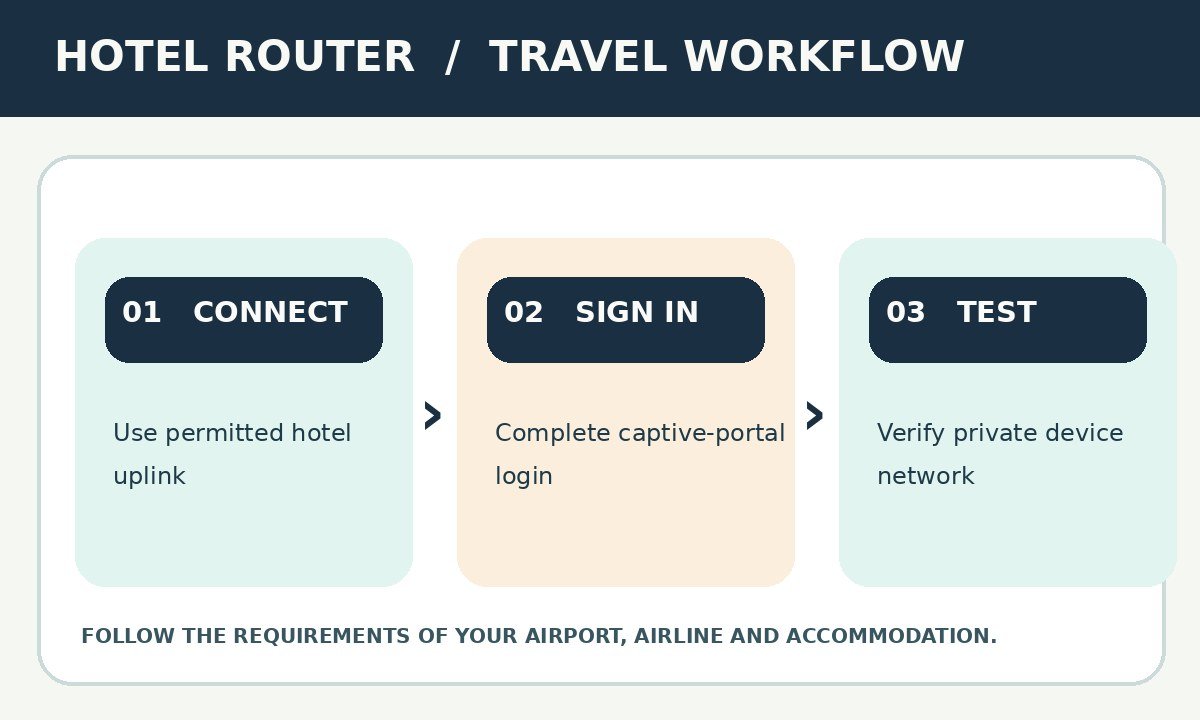
Connection checks before your hotel stay
A realistic hotel connection checklist before you travel
First identify how you expect to connect to the hotel: a usable Ethernet socket, an open guest wireless network with a web login, or a phone hotspot. Every upstream method has limits. Hotels may forbid personal routers, assign connections to a device identity or isolate guests for security. Obtain permission and follow the network terms. A router can centralise your own device access but should not be used to evade charges or restrictions.
At home, update the router firmware and create a strong private SSID and password. Test whether the interface works from the phone you will have during the trip and write the official reset procedure into an offline note. Check a compatible power supply, not just a cable that happens to fit the port. Avoid leaving admin credentials at their factory defaults.
If the connection fails in the hotel, troubleshoot systematically. First determine whether the router itself has upstream internet access; only then investigate whether client devices receive a working connection. Try the hotel’s instructed captive-portal method if permitted. Do not change five settings at once: a simple known-good configuration is valuable during a late arrival.
What a travel router does not protect you from
A private Wi-Fi network can keep your own devices on familiar credentials and reduce repeated association work, but the underlying internet route still belongs to the upstream provider. It does not guarantee secrecy from every network operator, defeat malicious websites or bypass encryption requirements. HTTPS, device updates, multi-factor authentication and sound account practices remain important when travelling.
VPN features vary by model and configuration, and speed claims typically describe specific tested conditions rather than the hotel network you encounter. Some employers require company-managed VPN software and prohibit unknown routers on work equipment. Follow those rules rather than assuming a built-in VPN is an acceptable substitute. Be cautious of attempts to use router features to circumvent legitimate hotel policies.
Device isolation also matters. Some TVs, printers and smart-home gadgets need local discovery and may not work through every network arrangement. Configure the minimum you need and switch off unnecessary features. When a login is unexpectedly blocked, reverting directly to hotel Wi-Fi may be safer than experimenting with advanced networking settings.
Privacy, power and packing constraints
Power, heat and bag space in a real hotel room
Small routers have widely differing power requirements. A USB-C shaped socket does not mean all models accept the same current or negotiation scheme. Compare the exact input label with the maker’s supplied adapter. A unit requiring 5V/4A may not run properly from a lightweight 5V/2A phone brick, even if the connector looks identical.
Heat is a practical issue when the router runs for hours in a small room. Position it where ventilation is adequate, keep it away from bedding and damp sinks, and avoid burying it under piles of travel accessories. A short Ethernet cable should not cross a walkway. A tidy travel tech tray can help you identify which cord and adapter belongs to which device.
Before leaving the room, consider whether to unplug the router and how to avoid forgetting it behind a desk. Pack the correct charger with the actual router rather than assuming it will remain paired with another cable in the bag. A single missed adapter can make an otherwise well-researched travel-router purchase unusable.
Router purchasing and setup mistakes
When a router is not worth carrying
If you need only your phone and email, and the hotel offers an uncomplicated guest network, another powered device may add no meaningful value. A router occupies bag space, needs a socket and can create extra points of failure. Its benefit increases when several devices lack good captive-portal handling or you need a reliable private network between them.
A mobile hotspot can be simpler in some destinations, but charges, data limits and local coverage may make it impractical. Conversely, a cellular router is not a guarantee of inexpensive data and may be blocked by frequency incompatibility. Choose the upstream connection before the accessory that distributes it.
Common problems and careful troubleshooting
If your devices see the private network but nothing loads, confirm whether the router itself has internet access. Then check portal authentication, DNS resolution and VPN settings in that order. Rebooting blindly can lose the approved session. Make one change at a time and note the result so you can revert easily.
If the router constantly drops connection, examine signal strength, interference and power supply. A charger that cannot sustain the required current can look like a network fault. If the accommodation explicitly forbids private access points or the login portal refuses them, stop and ask staff for an authorised connection method rather than attempting to bypass restrictions.
Pros, cons and common trade-offs
Advantages
- Familiar private network for several devices
- Ethernet, repeater and tether modes are practical
- Security controls can be managed in one place
Limitations
- Hotel captive portals can break a setup
- Extra power and cables take up luggage space
- A travel router does not create faster hotel broadband
None of these trade-offs is automatically decisive for everyone. Start with the physical demands of your trip, identify the worst plausible failure for your bag and favour the simplest model that avoids it. A predictable routine usually delivers more value than unused premium features.
Frequently asked questions
These answers cover recurring questions that affect packing, aircraft use, compatibility and product choice. Always follow the current instructions for the exact manufacturer model and transport provider.
Will a travel router make hotel Wi-Fi faster?
Not automatically. It can improve your local device arrangement, but the hotel internet speed and congestion remain. The wireless figure on the router box is not the hotel’s actual internet rate.
Can I use a router with a hotel login page?
Sometimes. The hotel may require a browser sign-in and may limit each device. Some routers support a practical login workflow, but compatibility is not universal. Follow the property’s rules.
Is using a travel router allowed in every hotel?
No. Hotels can restrict additional access points or device sharing in their terms. Ask the hotel when in doubt; a technical workaround does not grant permission to bypass charges.
Do all travel routers take a SIM card?
No. Most compact units use existing Wi-Fi or Ethernet. A Mudi cellular model is materially different and needs a supported SIM/data plan or other compatible mobile setup.
Do I need Wi-Fi 7 for a holiday?
Usually not. Wi-Fi 6 or Wi-Fi 5 can be adequate when the main bottleneck is ordinary hotel broadband. Pay extra for Wi-Fi 7 only when you have compatible devices and a specific use case.
Will a VPN built into the router protect every device?
A correctly configured VPN client can route some traffic through the VPN, but it is not complete protection against phishing, malware or insecure endpoints. Check the router rules and VPN provider documentation.
Can I power a router from a USB port on the hotel television?
Do not assume it supplies enough power. Compare the router’s specified voltage and current to the socket output; use an appropriate adapter when needed.
Should I use hotel Ethernet where available?
It is worth checking, with the hotel’s permission. Ethernet can be more predictable than wireless repeater mode, though a physical socket may be disabled or reserved for staff equipment.
Are travel routers useful for streaming sticks?
Potentially, because some streaming sticks have poor captive-portal interfaces. However, hotel terms, media-device compatibility and streaming restrictions still apply.
What should I configure before leaving home?
A unique admin password, private Wi-Fi credentials, current firmware, a tested upstream setup, the correct power lead and a reliable method to restore factory settings.
Final recommendation: match the model to your trip
Best for a typical hotel stay
Choose GL.iNet Beryl AX if you need a practical Wi-Fi 6 hotel router and plan to use its Ethernet or public-Wi-Fi modes. TP-Link TL-WR1502X is an equally legitimate mainstream brand alternative. ASUS RT-AX57 Go suits users comfortable with ASUS management, while Cudy TR3000 deserves consideration for its compact 2.5GbE layout. A 5G or 4G hotspot is not a hotel-Wi-Fi repeater: TP-Link M7450 and NETGEAR Nighthawk M6 need compatible mobile coverage and a paid data plan.
When to spend less
For occasional trips, a compact TP-Link TL-WR902AC or GL.iNet Opal may be sufficient. Research power input, captive-portal method, permissions and firmware support before paying for Wi-Fi 7. No listed router can guarantee faster broadband than the hotel provides, and a phone hotspot may already solve the occasional connection failure.
Sources and fact-checking
References [1]–[10] are official pages for the precise named products. References [11]–[13] support the relevant regulatory, travel, shopping or general context. Manufacturer claims are not presented as independent tests; availability and specifications may change. Checked for this editorial review: 13 October 2026.
- GL.iNet Beryl AX (GL-MT3000) — official product information — manufacturer’s published design and specification; checked 13 October 2026.
- TP-Link TL-WR1502X AX1500 Travel Router — official product information — manufacturer’s published design and specification; checked 13 October 2026.
- ASUS RT-AX57 Go AX3000 Portable WiFi 6 Router — official product information — manufacturer’s published design and specification; checked 13 October 2026.
- Cudy TR3000 1.0 AX3000 Mini VPN Travel Router — official product information — manufacturer’s published design and specification; checked 13 October 2026.
- GL.iNet Slate 7 (GL-BE3600) — official product information — manufacturer’s published design and specification; checked 13 October 2026.
- TP-Link TL-WR902AC AC750 Travel Router — official product information — manufacturer’s published design and specification; checked 13 October 2026.
- GL.iNet Opal (GL-SFT1200) — official product information — manufacturer’s published design and specification; checked 13 October 2026.
- GL.iNet Mudi V2 (GL-E750V2) — official product information — manufacturer’s published design and specification; checked 13 October 2026.
- TP-Link M7450 LTE-Advanced Mobile Wi-Fi — official product information — manufacturer’s published design and specification; checked 13 October 2026.
- NETGEAR Nighthawk M6 MR6150 5G Mobile Hotspot — official product information — manufacturer’s published design and specification; checked 13 October 2026.
- GL.iNet travel-router catalogue and current availability — www.gl-inet.com.
- TP-Link TL-WR1502X operating modes — www.tp-link.com.
- UK National Cyber Security Centre: top tips for staying secure online — www.ncsc.gov.uk.
Illustrations in this article were created for Taylor’s Trailblazing Travel Gear. Third-party photographs, where used, are credited beside the image or in the source list.
Back to this guide ↑