One-Bag Business Travel: Laptop, Clothing and Charging System
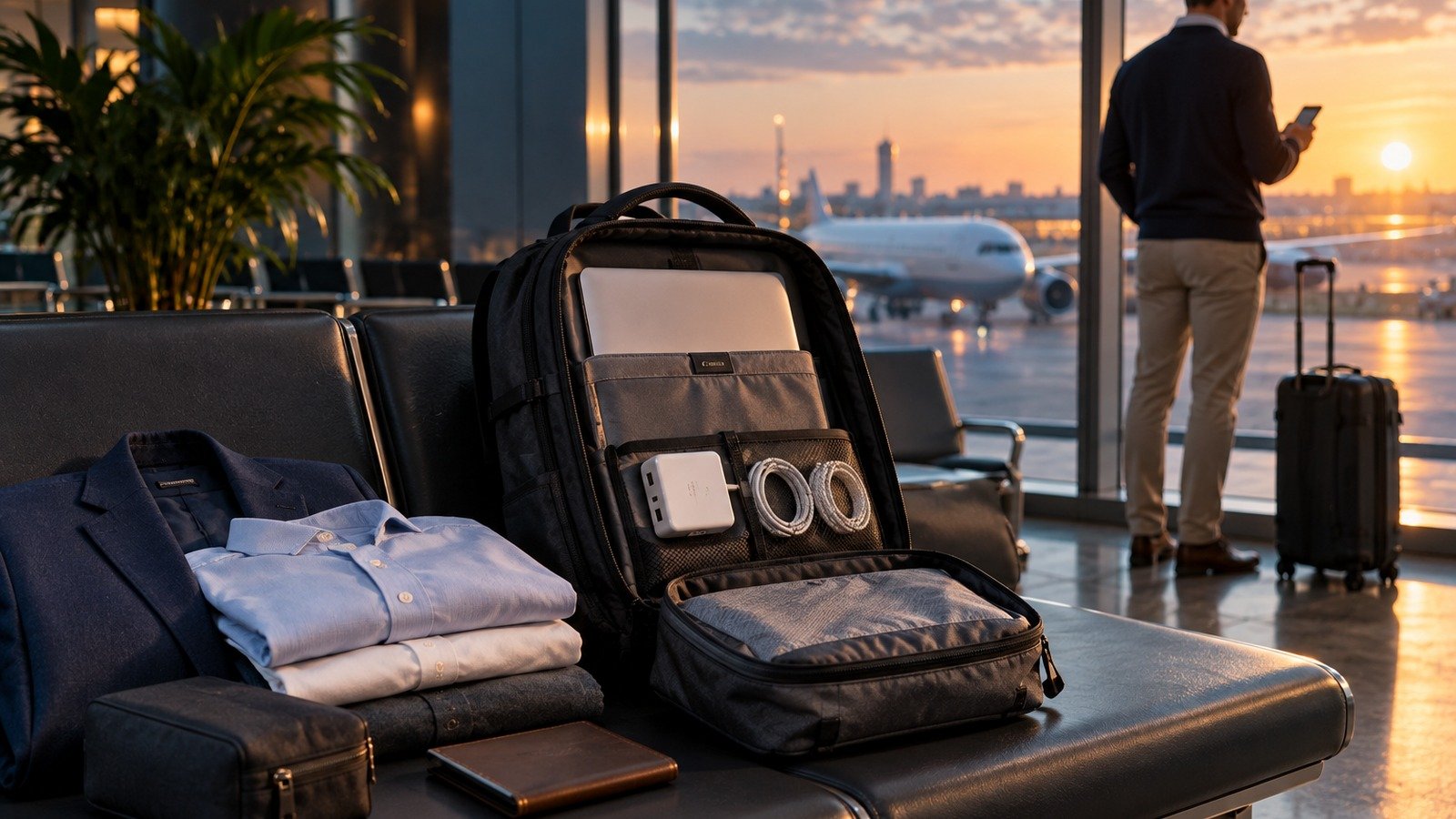
Build one cabin bag around three linked systems: protected work technology, a meeting-led clothing capsule and one dependable charging kit.
Original Travel Gear image
One-bag business travel is not simply leisure packing with a laptop added at the end. The bag has to protect expensive work equipment, keep clothing presentable enough for meetings, remain comfortable between stations and terminals, and still open sensibly at a security tray or a small hotel desk. A bag can be technically within an airline limit and still fail every useful transition on the trip.
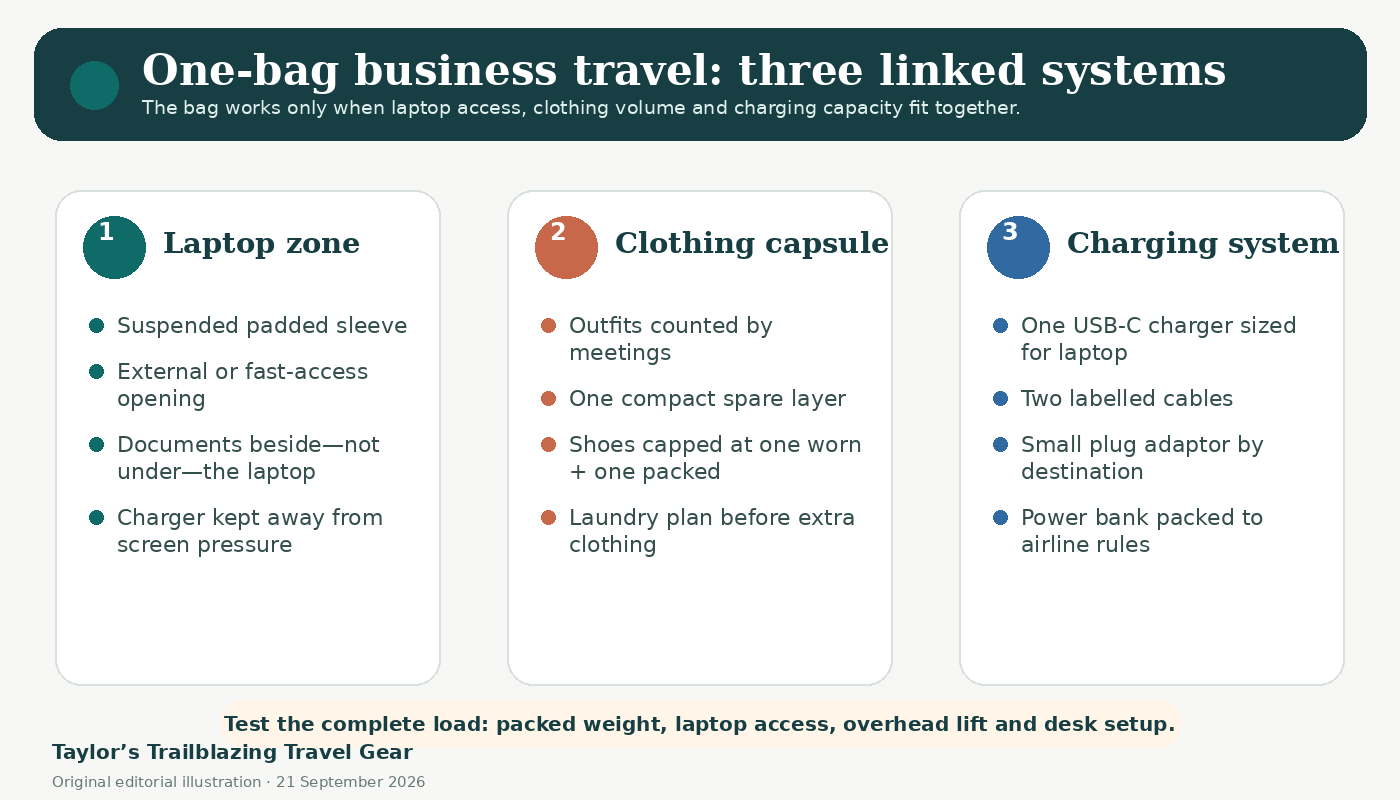
The simplest planning method is to treat the load as three connected systems. The laptop zone controls structure and access. The clothing capsule controls most of the volume. The charging system controls loose items, electrical safety and the number of plugs that need to be found at the destination. When one system grows without restraint, the others become awkward.
This guide uses current official aviation guidance, current manufacturer specifications and research-led packing methodology. It does not claim first-hand ownership or testing of the products mentioned. Prices are dated examples checked on 21 September 2026 and can change with stock, colour and promotion.
Laptop access
A suspended sleeve, stable back panel and opening that does not disturb clothing matter more than decorative business styling.
Count meetings
Pack around the diary, wear the bulkiest pieces and schedule laundry before adding a second version of everything.
One capable plug
A reputable 65-70W USB-C PD charger can replace several bricks when the device and cable ratings genuinely match.
Batteries stay with you
Power banks belong in cabin baggage and current 2026 limits require more care than simply checking the watt-hours.
Airline allowance is only one boundary; weight, access and the working day create the others.
Start with the strictest booked carrier
Check the exact airline and fare for every sector rather than relying on a generic idea of cabin luggage. Measure the packed bag including handles and any stuffed front pocket, then weigh the complete load. A 30-litre bag can become unusable when a rigid organiser, thick laptop and dense charger push it beyond a low weight allowance. Conversely, a slightly smaller bag with good structure can carry more useful equipment because the volume is not lost to sagging corners.
Do not treat an airline collection chart or a manufacturer’s phrase such as “carry-on compatible” as a guarantee. Aircraft, fares and carriers vary, and a connecting itinerary may be governed by its strictest leg. The practical target is a bag that remains inside the smallest booked allowance with enough spare room that the zips close normally.
Add the non-airline constraints
A business bag also has to fit beside a chair, stand upright at a client site, open without exposing underwear, and leave both hands available for a coffee, ticket or phone. If the bag will be carried for more than ten minutes at a time, harness shape and load placement deserve the same attention as appearance. A thin laptop against the back and dense charger low and central usually feels more stable than heavy items in a front pocket.
| Boundary | Question to answer | Design response |
|---|---|---|
| Airline | What are the smallest size and weight limits on the booked itinerary? | Choose and test the packed bag against that sector, not a generic global allowance. |
| Workday | Can the laptop, ID, notebook and charger be reached without opening the clothing compartment? | Use a separate access path or a clearly divided tech zone. |
| Carry | Can the loaded bag be lifted overhead and carried from station to hotel? | Keep dense items close to the back; reject a harness that pinches when loaded. |
| Room | Can toiletries and sleepwear be reached without emptying the bag? | Pack by access sequence, not by category alone. |
The computer is the least compressible, most expensive and most frequently accessed object in the load.
Look for a suspended and stable sleeve
A laptop sleeve should hold the computer away from the bag’s base so that setting the bag down does not put the edge directly onto the floor. The sleeve should fit the real device, including any protective shell, without bowing the screen or allowing the computer to slide sideways. A rigid back panel or structured foam can stop clothing from pressing unevenly against it, but heavy internal frames may use weight that would be better spent on the load.
Decide whether separate access is genuinely useful
A full-height laptop zip can be valuable at security and during a train journey because clothing stays closed. However, every additional opening adds weight, hardware and another possible path for rain. If the laptop is removed only once each way, a well-designed internal sleeve may be enough. The useful test is whether the device can be removed one-handed while the packed bag remains stable.
Load the bag before judging comfort
Empty-shop comfort is not evidence of loaded comfort. Recreate the real load with a laptop, charger, water bottle and clothing bundle. Tighten the shoulder straps, walk stairs, lift the bag above shoulder height and sit with it at your feet. A sternum strap can stabilise the harness, while a ventilated but overly curved back panel may consume internal depth. There is no universal winner: the bag should fit the user and the actual journey.
Fast access is useful only when the items return to the same place every time.
Separate working equipment from spare equipment
Keep the laptop, one charging cable, notebook, pen and meeting credential in the primary work zone. Backup adapters, an emergency cable and a power bank can sit deeper in the bag because they do not need to appear at every desk. This prevents the main pocket becoming a mixed drawer that must be searched in public.
Create a document boundary
Paperwork should not share a loose pocket with plugs, keys or a wet bottle. A slim folder beside the laptop or a separate flat pocket protects corners and makes travel documents easier to audit. For confidential material, a closed folder is more discreet than an open mesh pocket. Keep the only copy of an essential document out of a pocket that will be opened repeatedly.
Plan for a forced gate check
A cabin bag can still be taken at the gate. Pack the laptop, phone, power banks, medicines, passport and essential work credentials so they can move into a small personal item quickly. Current aviation guidance also requires power banks and spare lithium batteries to remain in the cabin. A fold-flat tote or the removable tech organiser from the main bag can provide the contingency without adding a second everyday bag.
The diary, dress code and laundry opportunity determine the clothing volume.

Count distinct appearances rather than calendar days
Two meetings with the same people may justify two tops but not two complete suits. A conference with different audiences can often use one jacket and two shirts. Start with each event, note the expected dress level, then identify garments that can repeat without looking like an accidental duplicate. Neutral colours and compatible layers are useful because every packed item can support more than one outfit.
Wear the awkward items
Travel in the bulkiest shoes, jacket and insulating layer unless doing so would be uncomfortable or impractical. The packed shoe should solve a different job, such as exercise or a less formal evening, rather than being a second version of the same smart option. Shoes consume disproportionate volume, so limiting the system to one worn pair and one compact packed pair can save more space than compressing every shirt.
Choose fabrics for recovery, not marketing labels
Wrinkle behaviour depends on weave, finish, fibre blend, packing pressure and time. Instead of trusting a “travel” label, crumple a small hidden section in the shop, check care instructions and decide how the garment will be refreshed in the room. A piece that can hang dry overnight is often more useful than one that promises odour control but needs a long, careful wash.
| Trip pattern | Travel-day clothing | Packed core | Recovery plan |
|---|---|---|---|
| 1-2 nights | Jacket or knit, work top, trousers and main shoes | One business top, underwear and socks, sleepwear, compact spare top | Spot clean and hang; no duplicate shoes. |
| 3-4 nights | Bulkiest meeting outfit and shoes | Two business tops, one alternate lower or dress, casual layer, underwear and socks | One sink wash or hotel laundry; rotate outer layers. |
| 5-7 nights | Jacket, heaviest shoes and largest layer | Three tops, two lowers, flexible evening piece, four or five underwear sets | Plan a wash by night three rather than packing seven complete outfits. |
Compression is helpful only until it blocks access, crushes structure or makes repacking unrealistic.
Use one or two deliberate modules
A shallow cube for underwear and sleepwear and a second cube or folding panel for meeting clothes is usually easier to manage than many tiny organisers. Too many cubes create rigid edges and dead spaces. The laptop compartment must still close without bending the computer, and the toiletry bag should remain reachable without removing both clothing modules.
Protect the first meeting
Pack the first required outfit where it can be removed with minimal disturbance. If checked luggage exists elsewhere in the itinerary, keep at least one complete meeting option in the cabin bag. A thin garment folder can be useful for shirts, but it should not force the bag to open like a display case in a public space.
Create a return-trip state
Clean and worn clothing should have defined places. A lightweight laundry bag can expand as the clean cube contracts, maintaining roughly the same total volume. Damp items should not be sealed with the laptop or charger. The return configuration needs to be tested because folded purchases, documents and hotel laundry bags often make the homebound pack harder than the outbound one.
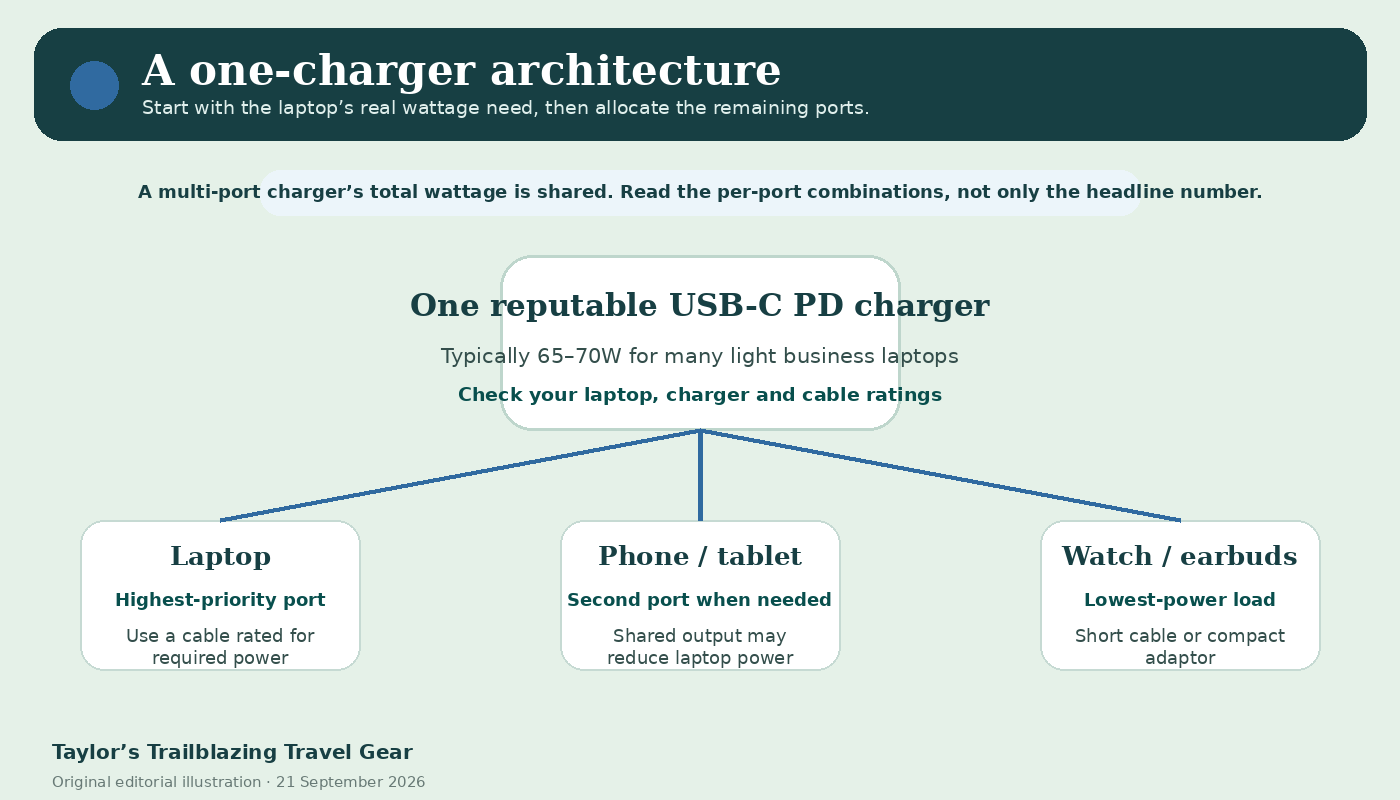
A single charger works only when its ports, protocols, cable ratings and shared output match the devices.
Start with the laptop input
Read the original laptop charger and the device manufacturer’s specifications. Many light business laptops can run from a 65-70W USB-C Power Delivery source, while larger workstations may require more power or a proprietary connector. A charger that can technically charge a laptop at a low rate may still lose battery during video calls or heavy processing. The correct target is enough power for the real workload, not merely a charging symbol.
Read multi-port output combinations
The headline wattage usually describes the maximum from one port or the total available under a particular combination. When a phone is connected, the laptop port may fall to a lower allocation. Official product tables are more useful than front-of-box numbers. Test the exact laptop, cable and secondary device together before travel and confirm the laptop remains stable during the intended work.
Use cables with known power capability
USB-C describes a connector, not a guarantee of power or data performance. Choose reputable cables marked for the power required, keep one primary cable and one small backup, and avoid a pouch full of visually identical unknown leads. USB-IF guidance distinguishes cable power ratings and certification marks; the practical buyer lesson is to record what each cable is meant to do.
Separate plug shape from voltage conversion
A passive travel adaptor changes the physical plug arrangement; it does not automatically transform voltage. Many laptop and phone chargers accept 100-240V input, but the label must be checked. Equipment that is not dual voltage needs the correct transformer or should stay at home. Avoid stacking loose adapters where weight can pull a charger from the socket.
| Item | What to verify | Packing decision |
|---|---|---|
| Laptop | Connector, required wattage and performance while working | Size the charger around this device first. |
| Multi-port charger | Per-port combinations, input voltage and safety markings | Use one reputable unit only after testing the real device mix. |
| USB-C cable | Power rating, length and data need | Label primary and backup; remove unverified duplicates. |
| Plug adaptor | Destination socket and mechanical fit | Carry the smallest suitable adaptor; it is not a voltage converter. |
| Power bank | Wh rating, airline policy, visible capacity label and condition | Cabin only; protect terminals and keep within the current limit. |
The charging kit must be useful on the ground and legal to carry in the air.
Power banks stay in cabin baggage
UK Civil Aviation Authority guidance effective from 27 March 2026 separates power banks from ordinary spare-battery provisions. Power banks must be carried in cabin baggage, individually protected when not in use and limited to two per person. They must not be recharged on board and should not be used to charge other portable devices on board under the amended provisions. Airline procedures can be stricter, so the operating carrier remains the final check.
Check watt-hours and visible labelling
Power banks up to 100Wh are generally allowed without operator approval when the other conditions are met. Units above 100Wh and not exceeding 160Wh require operator approval, while higher capacities are not accepted in passenger baggage. Where only voltage and milliamp-hours are shown, watt-hours can be calculated as voltage multiplied by milliamp-hours divided by 1,000. A bank without clear capacity information can create avoidable difficulty.
Pack for a gate-check scenario
If the main bag is removed at the gate, take the laptop, power banks and spare lithium batteries out before it goes into the hold. British Airways currently states that power banks must display capacity information and are limited to two per person, with storage instructions that keep them accessible rather than in an overhead locker. Other airlines may implement the same safety framework differently.
These are not ranked winners; they were selected to show different decisions in the bag and charging system.
| Example | Current official specification | Price checked | What it illustrates |
|---|---|---|---|
| Osprey Daylite 26+6 | 26L expanding to 32L; 43 x 33 x 16cm; 0.84kg; laptop sleeve and AirScape back panel | £90 | Low empty weight and flexible capacity, but the sleeve and personal-item fit still need testing with the real laptop and airline. |
| Patagonia Black Hole Mini MLC 30L | 30L; 51 x 31 x 18cm; 1.29kg; dedicated compartment for most 15-inch laptops; three carry modes | £180 | More structure and organisation with a higher empty weight. |
| Anker Prime 67W three-port charger | 67W single-port maximum; 65W dual-port maximum; 64.5W total across three ports; 149.1g | £34.99 | Why multi-port combinations matter more than the headline number. |
| Apple 70W USB-C power adapter | Single USB-C output; 70W; cable sold separately | £59 | A simple one-port reference when multi-device charging is not needed. |
Prices and availability are dated examples, not promises. Commercial links are labelled and product claims come from the manufacturers.
Osprey Daylite 26+6
Official UK dimensions, 26+6L capacity, 0.84kg and laptop sleeve.
£90 checked 21 September 2026
Patagonia Mini MLC 30L
Official UK 30L convertible pack with a padded laptop compartment.
£180 checked 21 September 2026
Anker Prime 67W charger
Three ports with published single-, dual- and three-port output combinations.
£34.99 checked 21 September 2026
Useful Amazon comparison searches
These links are optional starting points for comparing current listings. Check exact dimensions, power output, seller and returns rather than buying from the search title alone.
The system is ready only when it works packed, at security, at a desk and in the room.

- Pack the final clothing, laptop, charger, toiletries, water bottle and every “small” accessory. Close all zips normally and record the packed weight.
- Lift the bag from floor to overhead height. Walk stairs and ten minutes at normal pace. Adjust the load, not only the straps, if it pulls backwards.
- Remove the laptop and liquids as the booked airport requires, then restore them without spreading clothing across a bench.
- Set up the laptop, charger, notebook and phone on a table no larger than a cafe tray. Time the process and confirm the charger remains stable in the socket.
- Simulate arriving late: remove sleepwear, toiletries and next-day clothing while the work zone remains intact.
- Repack with a damp outer layer and a small stack of papers to test the return journey.
Templates reduce decision fatigue, but meetings and laundry still control the final list.
| Trip | Clothing core | Technology core | Contingency |
|---|---|---|---|
| Day trip or one night | Travel outfit, one spare top, underwear, compact toiletries | Laptop, charger, one cable, phone, credentials | Fold-flat tote and minimal overnight kit. |
| Two to three nights | Two business tops, one alternate lower or dress, sleepwear, underwear, one compact casual layer | Laptop, 65-70W charger if compatible, two known cables, small adaptor | One complete meeting outfit remains accessible; laundry bag. |
| Four to five nights | Three business tops, two lowers, flexible jacket, sleepwear, four underwear sets | Same technology core; optional cabin-compliant power bank | Laundry planned by night three; small repair and stain kit. |
| Six to seven nights | Capsule as above rather than seven outfits; add only for distinct formal requirements | Do not multiply chargers; add backup cable or approved power bank only when needed | Confirmed laundry, duplicate critical medication and document backup. |
Example: three nights with two client meetings
A realistic plan might use one jacket, two shirts, one pair of smart trousers, one casual top, sleepwear, underwear and socks, with the jacket, trousers and main shoes worn in transit. A compact second shoe is justified only when the evening or exercise plan genuinely needs it. The laptop, one 67W charger and two labelled USB-C cables stay in the work zone; toiletries and underwear sit in one shallow cube.
Example: five nights with a conference
The conference diary may require three tops but still only one jacket and two lower garments. A scheduled laundry or sink wash by the third night prevents the bag from filling with duplicate basics. Keep the return-day outfit separate from worn clothing so the final morning does not require reopening every module.
The method removes hand-offs and clutter, but it also concentrates risk.
Advantages
- No checked-bag wait and fewer transfer points for essential work equipment.
- Laptop, documents and medicines remain under direct control.
- A small, repeatable charging system reduces forgotten plugs and cable clutter.
- A meeting-led capsule makes packing decisions faster on repeat trips.
- One bag is easier on trains, stairs and short hotel changes.
Limitations
- The complete load can become heavy even when the dimensions are acceptable.
- A single bag concentrates the effect of theft, damage or a forced gate check.
- Smart clothing and shoes can consume more volume than leisure gear.
- Laundry or garment recovery may be required on longer trips.
- A rigid one-bag rule can create worse choices than paying for the right luggage on an equipment-heavy itinerary.
Most problems come from packing categories separately instead of testing the complete workflow.
- Buying the maximum-volume bag before checking the strictest booked size and weight rule.
- Judging laptop fit by screen size alone rather than the device’s external dimensions and case.
- Packing a charger against the laptop screen or placing dense items in the outermost pocket.
- Counting outfits by days rather than meetings, dress codes and laundry opportunities.
- Adding a second pair of bulky shoes without a distinct planned role.
- Assuming every USB-C charger or cable can deliver the laptop’s required power.
- Reading only the charger’s total wattage and ignoring shared multi-port output.
- Packing a power bank in checked baggage or failing to re-check the airline’s 2026 rules.
- Using compression until zips, clothing and laptop structure are under constant pressure.
- Testing the outbound pack but not the return configuration with laundry and documents.
The right answer changes with the laptop, airline, trip length and dress code.
What size bag is best for one-bag business travel?
There is no universal size. A 26-32 litre pack is a practical starting range for many two- to five-night trips, but the packed dimensions, weight, laptop, dress code and booked airline are more important than nominal volume.
Is a 30-litre backpack enough for a business trip?
It can be enough when the clothing capsule is planned around meetings, bulky shoes are limited and laundry is available. Formalwear, winter layers or specialist equipment may justify a larger allowance or second bag.
Should the laptop compartment be separate?
Separate access is useful when the laptop is removed frequently, but it adds weight and another opening. A stable internal sleeve can work when access is infrequent. Test the exact packed bag rather than choosing by feature count.
How many business outfits should I pack for four nights?
Start with the number of distinct meetings. A common capsule is two or three tops, one jacket, two lower garments or one dress alternative, one casual layer and planned reuse. Laundry can replace duplicate basics.
Can one 65W charger power a laptop and phone?
Often, but not always. Confirm the laptop requirement and the charger’s published multi-port allocation. Connecting a phone may reduce the laptop port below the power needed for sustained work.
Do I need a power bank for business travel?
Only when the itinerary includes long periods without reliable sockets. It adds weight and regulatory obligations. Current UK guidance limits passengers to two power banks and keeps them in cabin baggage.
Can a power bank charge my laptop?
Only if the bank supports the required USB-C Power Delivery voltage and wattage and the cable is suitable. The airline capacity limits still apply, and onboard use may be restricted.
What should move into a personal item if the bag is gate checked?
Move the laptop, phone, power banks, spare lithium batteries, medicines, passport, keys and essential work credentials. Pack these so the transfer can happen quickly.
Are packing cubes necessary?
No. One or two modules can improve access, but many small cubes waste space and make the bag rigid. Use them only when they create a repeatable clean/worn or work/overnight boundary.
When is one-bag business travel the wrong choice?
Use another arrangement when heavy equipment, multiple formal shoes, medical needs, long winter trips or low cabin-weight limits make the single bag too heavy or fragile. The goal is a reliable journey, not one-bag purity.
Build the system around the least flexible items, then test every transition.
For most two- to five-night work trips, use a 26-32 litre backpack with a genuinely protective laptop zone, supportive carry and a suitcase-style clothing opening. Keep technology and documents separately accessible. Pack clothing from the meeting diary, wear the bulkiest pieces and plan laundry before adding duplicates.
Use one reputable USB-C charger only when it can supply the laptop during real work and still behave predictably with secondary devices. Carry two known cables rather than a tangle of unknown ones. Treat the power bank as regulated cabin equipment, not as an ordinary accessory, and re-check the operating airline before each trip.
Finally, run the bag through the full transition test. If it cannot move from security tray to desk to hotel room without a full unpack, reduce the load or change the layout. The best one-bag business system is not the smallest-looking setup; it is the one that remains calm and usable throughout the journey.
Rules, current specifications and price examples were checked against the following official sources.
- UK Civil Aviation Authority – Pack right. Safe flight. — Current passenger guidance on cabin baggage, lithium devices, power banks, capacity and packing.
- UK Civil Aviation Authority – 2026 changes to lithium battery and power-bank rules — Rules effective 27 March 2026, including cabin carriage, maximum of two power banks and onboard-use restrictions.
- IATA – Passengers travelling with lithium batteries, 2026 guidance — International aviation guidance for devices, spare batteries, power banks and smart baggage.
- British Airways – Restricted and prohibited items — Current airline-specific power-bank limits, storage and capacity labelling requirements.
- USB-IF – USB Charger (USB Power Delivery) — Official overview of USB Power Delivery capabilities and negotiation.
- Osprey UK – Daylite 26+6 Expandable Travel Backpack — Current official dimensions, capacity, weight, laptop sleeve and price.
- Patagonia UK – Black Hole Mini MLC 30L — Current official dimensions, weight, laptop compartment and price.
- Anker UK – Prime 67W GaN Wall Charger — Published single-, dual- and three-port outputs, dimensions, weight and price.
- Apple UK – 70W USB-C Power Adapter — Current official price, compatibility and cable-sold-separately information.
Manufacturer and retailer pages support current specifications, prices and stated features; they are commercial sources and do not independently prove durability, comfort or environmental superiority. Government, standards and industry-body sources support the relevant rules and definitions. Practical recommendations are editorial comparisons and not invented first-hand testing.
Illustrations in this article were created for Travel Gear. Third-party photographs, where used, are credited beside the image or in the source list.